



 Chat with AI
Exam 10: Designing Cisco Enterprise Networks (ENSLD)

Exam 1: Supporting Cisco Data Center System Devices (DCTECH)128 Questions
Exam 2: Cisco Certified Technician Routing & Switching (RSTECH)48 Questions
Exam 3: Understanding Cisco Cybersecurity Operations Fundamentals (CBROPS)141 Questions
Exam 4: Cisco Certified Network Associate (CCNA)411 Questions
Exam 5: Managing Industrial Networks with Cisco Networking Technologies (IMINS)36 Questions
Exam 6: DevNet Associate (DEVASC)134 Questions
Exam 7: Conducting Forensic Analysis and Incident Response Using Cisco CyberOps Technologies (CBRFIR)25 Questions
Exam 8: Implementing Cisco Enterprise Advanced Routing and Services (ENARSI)114 Questions
Exam 9: Implementing Cisco SD-WAN Solutions (ENSDWI)147 Questions
Exam 10: Designing Cisco Enterprise Networks (ENSLD)109 Questions
Exam 11: Designing Cisco Enterprise Wireless Networks (300-425 ENWLSD)106 Questions
Exam 12: Implementing Cisco Enterprise Wireless Networks (300-430 ENWLSI)101 Questions
Exam 13: Automating Cisco Enterprise Solutions (ENAUTO)84 Questions
Exam 14: Implementing Cisco Service Provider Advanced Routing Solutions (SPRI)74 Questions
Exam 15: Implementing Cisco Service Provider VPN Services (SPVI)49 Questions
Exam 16: Designing Cisco Data Center Infrastructure (DCID)73 Questions
Exam 17: Troubleshooting Cisco Data Center Infrastructure (DCIT)84 Questions
Exam 18: Implementing Cisco Application Centric Infrastructure (DCACI)101 Questions
Exam 19: Configuring Cisco MDS 9000 Series Switches (DCSAN)65 Questions
Exam 20: Implementing Cisco Application Centric Infrastructure - Advanced36 Questions
Exam 21: Automating Cisco Data Center Solutions (DCAUTO)36 Questions
Exam 22: Securing Networks with Cisco Firepower (300-710 SNCF)65 Questions
Exam 23: Implementing and Configuring Cisco Identity Services Engine (300-715 SISE)130 Questions
Exam 24: Securing Email with Cisco Email Security Appliance (300-720 SESA)65 Questions
Exam 25: Securing the Web with Cisco Web Security Appliance (300-725 SWSA)75 Questions
Exam 26: Implementing Secure Solutions with Virtual Private Networks (SVPN 300-730)49 Questions
Exam 27: Automating Cisco Security Solutions (SAUTO)75 Questions
Exam 28: Implementing Cisco Collaboration Applications (CLICA)39 Questions
Exam 29: Implementing Cisco Advanced Call Control and Mobility Services (CLASSM)86 Questions
Exam 30: Implementing Cisco Collaboration Cloud and Edge Solutions90 Questions
Exam 31: Implementing Cisco Collaboration Conferencing65 Questions
Exam 32: Automating Cisco Collaboration Solutions (CLAUTO)27 Questions
Exam 33: Implementing DevOps Solutions and Practices using Cisco Platforms (DEVOPS)66 Questions
Exam 34: Developing Solutions Using Cisco IoT and Edge Platforms (DEVIOT)33 Questions
Exam 35: Developing Applications for Cisco Webex and Webex Devices (DEVWBX)41 Questions
Exam 36: Performing CyberOps Using Core Security Technologies (CBRCOR)37 Questions
Exam 37: Implementing Cisco Enterprise Network Core Technologies (ENCOR)106 Questions
Exam 38: Implementing and Operating Cisco Service Provider Network Core Technologies (SPCOR)260 Questions
Exam 39: Implementing and Operating Cisco Data Center Core Technologies (DCCOR)116 Questions
Exam 40: Implementing and Operating Cisco Security Core Technologies208 Questions
Exam 41: Implementing Cisco Collaboration Core Technologies (CLCOR)213 Questions
Exam 42: Developing Applications using Cisco Core Platforms and APIs (DEVCOR)131 Questions
Exam 43: CCDE Design Written145 Questions
Exam 44: Deploying Cisco Unified Contact Center Express660 Questions
Exam 45: Cisco Meraki Solutions Specialist101 Questions
Exam 46: Securing Cisco Networks with Sourcefire FireAMP Endpoints24 Questions
Exam 47: Designing Cisco Unified Contact Center Enterprise (UCCED)227 Questions
Exam 48: Implementing and Supporting Cisco Unified Contact Center Enterprise (UCCEIS)55 Questions
Exam 49: Cisco Collaboration SaaS Authorization Exam47 Questions
Exam 50: Cisco Security Architecture for System Engineers56 Questions
Exam 51: Adopting The Cisco Business Architecture Approach (DTBAA)239 Questions
Exam 52: Cisco Customer Success Manager (CSM)44 Questions
Exam 53: Mastering The Cisco Business Architecture Discipline (DTBAD)36 Questions
Select questions type


Which design element should an engineer consider when multicast is included in a Cisco SD-Access architecture?

Free
(Multiple Choice)
5.0/5  (76)
(76) Correct Answer: Verified
B
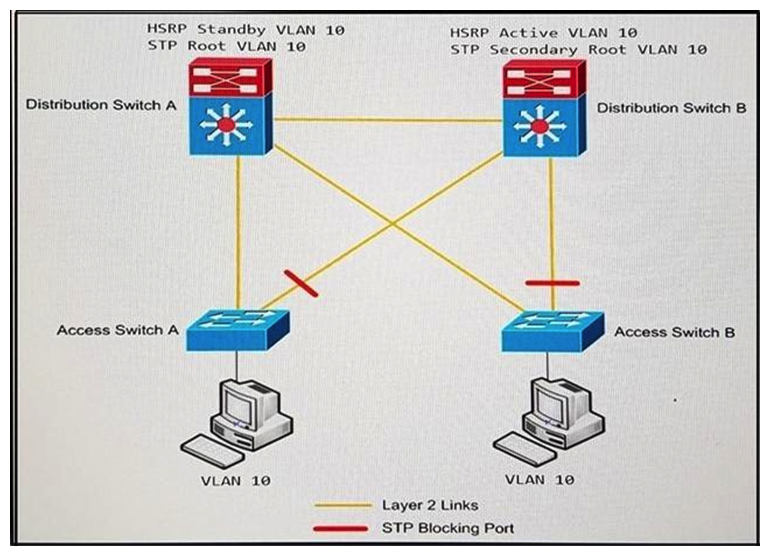 Refer to the exhibit. An engineer must optimize the traffic flow of the network. Which change provides a more efficient design between the access and the distribution layer?
Free
(Multiple Choice)
4.9/5 (72)
(72) Correct Answer:Verified
VerifiedB
An engineer is designing a Layer 3 campus network running EIGRP between the core, aggregation, and access layers. The access layer switches will be connected to the aggregation layer using Layer 3 copper connections. The engineer wants to improve convergence time for access layer switch failures. Which technique must the design include?
Free
(Multiple Choice)
4.9/5 (70)
(70) Correct Answer:Verified
VerifiedA
An engineer is working with NETCONF and Cisco NX-OS based devices. The engineer needs a YANG model that supports a specific feature relevant only to Cisco NX-OS. Which model must the engineer choose?
(Multiple Choice)
4.9/5 (89)
(89) A large chain of stores currently uses MPLS-based T1 lines to connect their stores to their data center. An architect must design a new solution to improve availability and reduce costs while keeping these considerations in mind: The company uses multicast to deliver training to the stores. The company uses dynamic routing protocols and has implemented QoS. To simplify deployments, tunnels should be created dynamically on the hub when additional stores open. Which solution should be included in this design?
(Multiple Choice)
4.8/5 (73)
(73) Instructions The main screen consists of two parts; the Main scenario and the Topology tabs. The main scenario describes TSHOOT.com test bed. The Topology tabs allow you to display the appropriate and select the trouble ticket. To complete the item, you will first need to familiarize yourself with the TSHOOT.com test bed by clicking on the master scenario first and then the topologies tabs. Once you are familiar with the test bed and the topologies, you should start evaluating the trouble ticket. You will be presented with a Trouble Ticket scenario that will describe the fault condition. You will need to determine on which device the fault condition is located, to which technology the fault condition is related, and the solution to each trouble ticket. This will be done by answering three questions. Ticket Selection To begin, click on the Ticket on the Topology tabs. Please note. Some of the questions will require you to use the scroll bar to see all options. Fault Isolation Read the ticket scenario to understand the fault condition. Open the appropriate topology, based upon the ticket scenario. Open the console of the desired device by clicking on that device in the topology, based upon your troubleshooting methodology. Use the supported show, ping and trace commands to begin your fault isolation process. Move to other devices as need by clicking on those devices within the topology. Fault Identification The trouble ticket will include three questions that you will need to answer, 1. Which device contains the fault 2. Which technology the fault condition is related to 3. What is the solution to the issue To advance to the next question within the ticket click on " Next Question ". When you click " DONE ", the trouble ticket will turn RED and will no longer be accessible. You may also use the " Previous Question " button to review questions within that specific ticket. To complete a trouble ticket, answer all three questions and click " ". This will store your response to the questions. Do not click on " " unless you have answered all questions within the ticket. Item Completion Click the NEXT button on the bottom of the screen once a ticket is . This action moves you to the next item. Scenario The company has created the test bed network shown in the layer 2 and layer 3 topology exhibits. This network consists of four routers, two layer 3 switches and two layer 2 switches. In the IPv4 layer 3 topology, R1, R2, R3, and R4 are running OSPF with an OSPF process number 1. DSW1, DSW2 and R4 are running EIGRP with an AS of 10. Redistribution is enabled where necessary. R1 is running a BGP AS with a number of 65001. This AS has an eBGP connection to AS 65002 in the ISP's network. Because the company's address space is in the private range, R1 is also providing NAT translations between the inside (10.1.0.0/16 & 10.2.0.0/16) networks and the outside (209.65.200.0/24) network. ASW1 and ASW2 are layer 2 switches. NTP is enabled on all devices with 209.65.200.226 serving as the master clock source. The client workstations receive their IP address and default gateway via R4's DHCP server. The default gateway address of 10.2.1.254 is the IP address of HSRP group 10 which is running on DSW1 and DSW2. In the IPv6 layer 3 topology R1, R2, and R3 are running OSPFv3 with an OSPF process number 6. DSW1, DSW2 and R4 are running RIPng process name RIP_ZONE. The two IPv6 routing domains, OSPF 6 and RIPng are connected via GRE tunnel running over the underlying IPv4 OSPF domain. Redistribution is enabled where necessary. Recently the implementation group has been using the test bed to do a 'proof-of-concept' on several implementations. This involved changing the configuration on one or more of the devices. You will be presented with a series of trouble tickets related to issues introduced during these configurations. 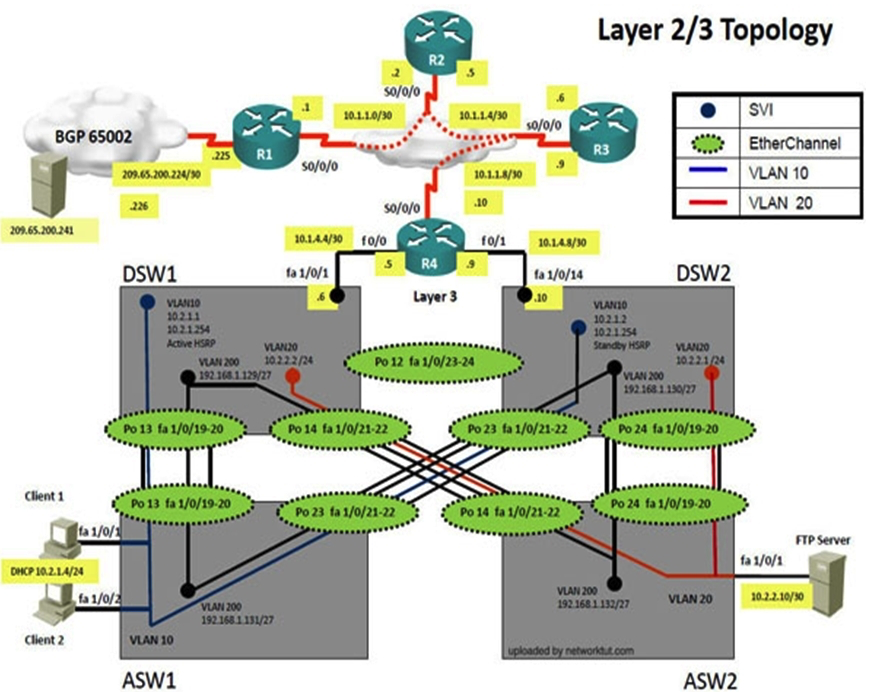 The implementation group has been using the test bed to do a 'proof-of-concept' that requires both Client 1 and Client 2 to access the WEB Server at 209.65.200.241. After several changes to the network addressing, routing schemes, DHCP services, NTP services, and FHRP services, a trouble ticket has been opened indicating that Client 1 cannot ping the 209.65.200.241 address. Use the supported commands to isolate the cause of this fault and answer the following questions. On which device is the fault condition located?
 (Multiple Choice)
4.9/5 (79)
(79) Which nonproprietary mechanism can be used to automate rendezvous point distribution in a large PIM domain?
(Multiple Choice)
4.7/5 (82)
(82) Refer to the exhibit. 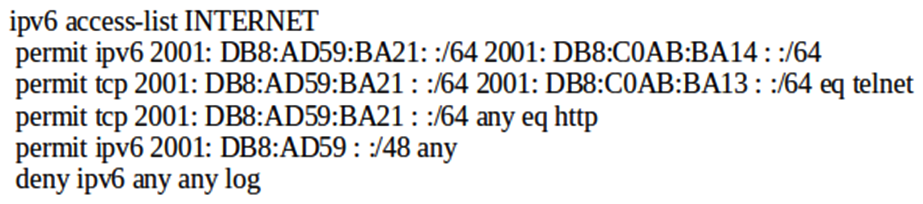 Which statement about the INTERNET ACL is true?
 (Multiple Choice)
4.8/5 (87)
(87) An engineer must design a solution to connect a customer to the Internet. The solution will include a Layer 3 circuit with a CIR of 50 Mbps from the service provider. The hand-off from the provider's switch to the customer's router is 1Gbps. Which solution should the engineer include to prevent potential issues with choppy voice traffic?
(Multiple Choice)
4.8/5 (90)
(90) Which two functions are provided by the Cisco SD-WAN orchestration plane? (Choose two.)
(Multiple Choice)
4.9/5 (80)
(80) What are two valid scaling techniques when an EIGRP network is designed that consists of more than 1000 routers? (Choose two.)
(Multiple Choice)
4.7/5 (77)
(77) An infrastructure team is concerned about the shared memory utilization of a device, and for this reason, they need to monitor the device state. Which solution limits impact on the device and provides the required data?
(Multiple Choice)
4.9/5 (71)
(71) An architect is creating a migration strategy for a large organization in which the choice made by the application between IPv6 and IPv4 is based on the DNS request. Which migration strategy does the architect choose?
(Multiple Choice)
4.8/5 (75)
(75) A branch office has a primary L3VPN MPLS connection back to the main office and an IPSEC VPN tunnel that serves as backup. Which design ensures that data is sent over the backup connection only if the primary MPLS circuit is down?
(Multiple Choice)
4.8/5 (76)
(76) Which two techniques improve the application experience in a Cisco SD-WAN design? (Choose two.)
(Multiple Choice)
4.8/5 (75)
(75) An engineer is designing an EIGRP network for a small branch site where there is only one Layer 3 router. The engineer wants the router to advertise the local LAN network to remote EIGRP neighbors without sending any unnecessary multicast messages on the local LAN. Which action should the engineer take?
(Multiple Choice)
5.0/5 (74)
(74) 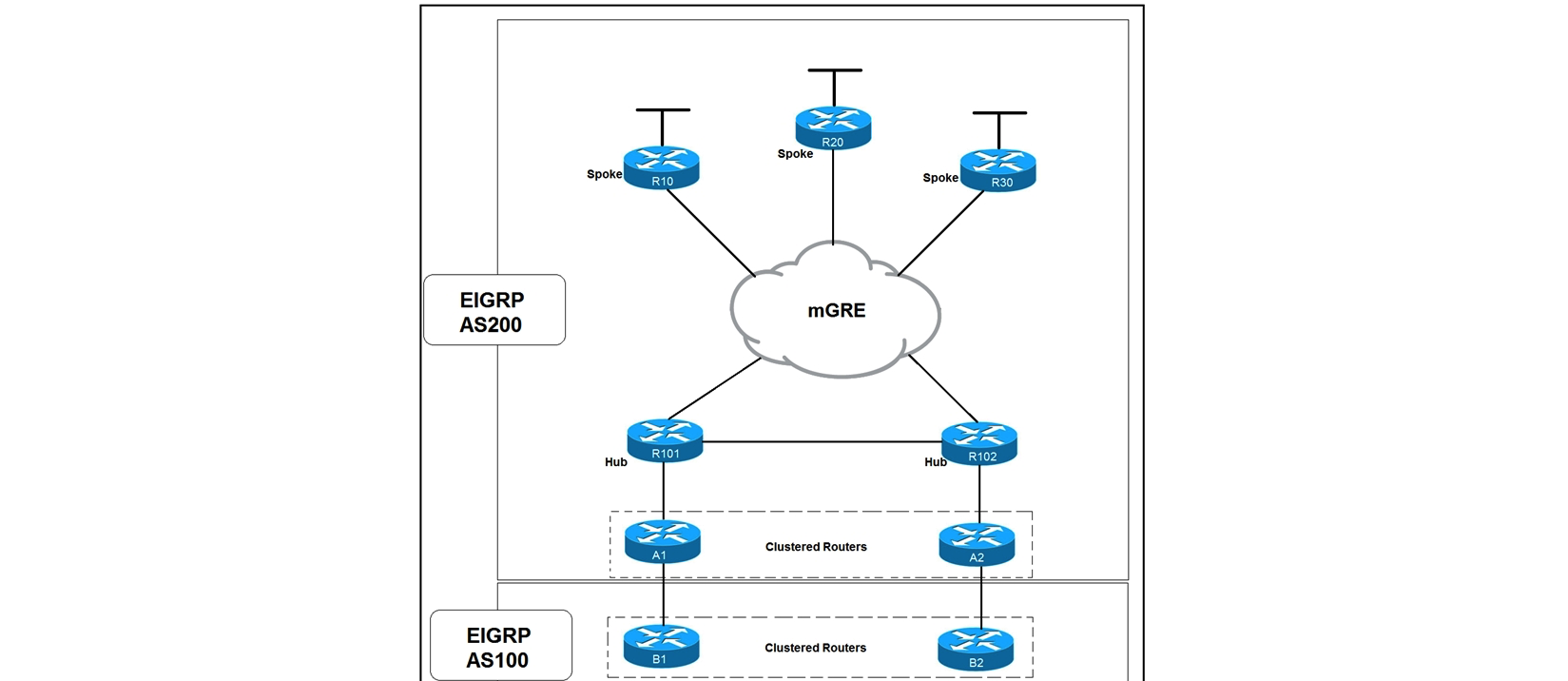 Refer to the exhibit. Which solution decreases the EIGRP convergence time?
 (Multiple Choice)
4.8/5 (78)
(78) What is one function of the vSmart controller in an SD-WAN deployment?
(Multiple Choice)
4.8/5 (63)
(63) The implementations group has been using the test bed to do a 'proof-of-concept' that requires both Client 1 and Client 2 to access the WEB Server at 209.65.200.241. After several changes to the network addressing, routing scheme, DHCP services, NTP services, layer 2 connectivity, FHRP services, and device security, a trouble ticket has been opened indicating that Client 1 cannot ping the 209.65.200.241 address. Use the supported commands to isolated the cause of this fault and answer the following questions. What is the solution to the fault condition?
(Multiple Choice)
5.0/5 (64)
(64) 
Filters
- Essay(0)
- Multiple Choice(0)
- Short Answer(0)
- True False(0)
- Matching(0)