



 Chat with AI
Exam 14: Polishing and Running a Presentation

Exam 1: Getting Started With Windows 866 Questions
Exam 2: Understanding File Management65 Questions
Exam 3: Getting Started With Microsoft Office 201371 Questions
Exam 4: Creating a Document71 Questions
Exam 5: Enhancing a Document68 Questions
Exam 6: Adding Special Elements to a Document66 Questions
Exam 7: Creating and Enhancing a Worksheet66 Questions
Exam 8: Using Complex Formulas, Functions, and Tables66 Questions
Exam 9: Working With Charts66 Questions
Exam 10: Creating a Database66 Questions
Exam 11: Working With Data65 Questions
Exam 12: Creating Database Reports62 Questions
Exam 13: Creating a Presentation62 Questions
Exam 14: Polishing and Running a Presentation66 Questions
Exam 15: Integrating Office Programs59 Questions
Exam 16: Working in the Cloud52 Questions
Exam 17: Understaning Essential Unit Concepts62 Questions
Select questions type


One way to add video to a presentation is by clicking the Insert Video button in a content placeholder.
(True/False)
5.0/5  (83)
(83) You can search for an online audio file by typing a keyword in the ____ dialog box.
(Multiple Choice)
4.7/5 (73)
(73) 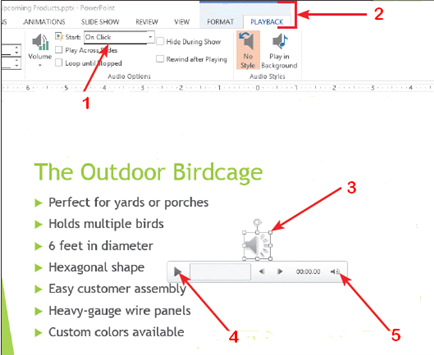 In the accompanying figure, item 5 is the ____ button.
If you have more than one picture or shape on a slide, you can align them to each other by clicking the Align button in the Close group of the PICTURE TOOLS FORMAT tab
(True/False)
4.8/5 (84)
(84) Handouts contain a thumbnail of each slide plus any speaker notes you added in the Notes pane
(True/False)
4.9/5 (78)
(78) 
Filters
- Essay(0)
- Multiple Choice(0)
- Short Answer(0)
- True False(0)
- Matching(0)