



 Chat with AI
Exam 14: Polishing and Running a Presentation

Exam 1: Getting Started With Windows 866 Questions
Exam 2: Understanding File Management65 Questions
Exam 3: Getting Started With Microsoft Office 201371 Questions
Exam 4: Creating a Document71 Questions
Exam 5: Enhancing a Document68 Questions
Exam 6: Adding Special Elements to a Document66 Questions
Exam 7: Creating and Enhancing a Worksheet66 Questions
Exam 8: Using Complex Formulas, Functions, and Tables66 Questions
Exam 9: Working With Charts66 Questions
Exam 10: Creating a Database66 Questions
Exam 11: Working With Data65 Questions
Exam 12: Creating Database Reports62 Questions
Exam 13: Creating a Presentation62 Questions
Exam 14: Polishing and Running a Presentation66 Questions
Exam 15: Integrating Office Programs59 Questions
Exam 16: Working in the Cloud52 Questions
Exam 17: Understaning Essential Unit Concepts62 Questions
Select questions type


To slow down an animation effect for a selected object, click the ____ up arrow in the Timing group.

Free
(Multiple Choice)
4.8/5  (73)
(73) Correct Answer: Verified
A
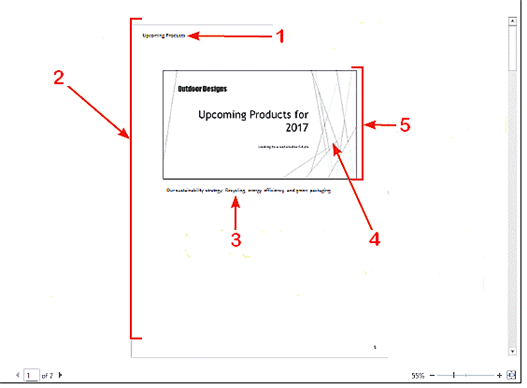 In the accompanying figure, the original presentation graphics indicated by item 4 are green. What setting has most likely been selected for this preview?
Free
(Multiple Choice)
4.9/5 (79)
(79) Correct Answer:Verified
VerifiedD
Your supervisor created a PowerPoint presentation and now she wants you to make the presentation more engaging for her audience. The presentation is about a new product line that your company is developing and the intended audience is a group of company stockholders.
Your supervisor wants a text box on the first slide with information about the product manufacturer. How do you add the text box to the presentation?
Free
(Essay)
4.8/5 (77)
(77) Correct Answer:Verified
VerifiedTo insert a text box on a slide, click the INSERT tab, click the Text box button in the Text group, drag across the slide, then type the information about the manufacturer. A text box becomes a slide object you can move, resize, and format.
To adjust playback volume, use the volume button in the Audio Options group on the ____ tab.
(Multiple Choice)
4.7/5 (80)
(80) On a slide layout, Title and Content or Two Content are examples of a content ____.
(Multiple Choice)
4.8/5 (85)
(85) 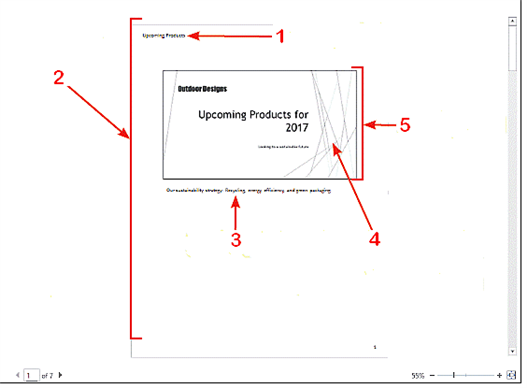 In the accompanying figure, item 2 is known as the ____.
A text box is a slide object you can move, resize, and ____________________.
(Short Answer)
4.7/5 (80)
(80) To insert a text box on a slide, click the Insert tab, and then click the Text box button in the ____ group.
(Multiple Choice)
4.9/5 (78)
(78) To start a slide show with the current slide, rather than from the beginning, press ____.
(Multiple Choice)
5.0/5 (77)
(77) Control handles on each corner and each side let you reduce the size of a picture
(True/False)
4.7/5 (72)
(72) Animation Painter is used to copy animation effects of one object to another object
(True/False)
4.9/5 (73)
(73) Discuss some features that you can use to polish your PowerPoint presentations.
(Essay)
4.8/5 (79)
(79) Your supervisor created a PowerPoint presentation and now she wants you to make the presentation more engaging for her audience. The presentation is about a new product line that your company is developing and the intended audience is a group of company stockholders.
Your supervisor wants to include biographical data for each team member, so that the stockholders can visualize the team building the new product. Their ID photos are available to you, but they are too big. How can you make the pictures better fit in the presentation?
(Essay)
4.7/5 (80)
(80) After a slide appears in a presentation, the sound plays only after you click the ____________________ button under the sound object.
(Short Answer)
4.9/5 (75)
(75) To remove parts of an image from the top, bottom, or sides, click the ____ button in the Size group.
(Multiple Choice)
4.9/5 (79)
(79) To remove a transition for the current slide, click the More button on the Transition to This Slide gallery, and then click ____.
(Multiple Choice)
4.9/5 (79)
(79) To reduce the size of a picture, drag one or both of the ____________________ handles toward the center.
(Short Answer)
4.8/5 (77)
(77) In PowerPoint, a picture might be a photograph, a shape you draw, a piece of clip art, or an illustration created using a graphics app.
(True/False)
4.9/5 (79)
(79) After applying a motion path effect, you can drag the path's ____ points to change it
(Multiple Choice)
4.8/5 (77)
(77) Match each item with a statement below.
Correct Answer:Verified
VerifiedPremises:
Responses:
(Matching)
4.9/5 (77)
(77) 
Filters
- Essay(0)
- Multiple Choice(0)
- Short Answer(0)
- True False(0)
- Matching(0)