



 Chat with AI
Exam 14: Polishing and Running a Presentation

Exam 1: Getting Started With Windows 866 Questions
Exam 2: Understanding File Management65 Questions
Exam 3: Getting Started With Microsoft Office 201371 Questions
Exam 4: Creating a Document71 Questions
Exam 5: Enhancing a Document68 Questions
Exam 6: Adding Special Elements to a Document66 Questions
Exam 7: Creating and Enhancing a Worksheet66 Questions
Exam 8: Using Complex Formulas, Functions, and Tables66 Questions
Exam 9: Working With Charts66 Questions
Exam 10: Creating a Database66 Questions
Exam 11: Working With Data65 Questions
Exam 12: Creating Database Reports62 Questions
Exam 13: Creating a Presentation62 Questions
Exam 14: Polishing and Running a Presentation66 Questions
Exam 15: Integrating Office Programs59 Questions
Exam 16: Working in the Cloud52 Questions
Exam 17: Understaning Essential Unit Concepts62 Questions
Select questions type


You created a presentation for a class and now you want to make the presentation more interesting for your audience. The presentation is about the life and works of a fairly obscure classical composer.
During the presentation, you will not be able to run the presentation manually. How will you manage this situation?
(Essay)
4.9/5  (87)
(87) Typically, you enter Speaker Notes in the Notes area in ____ view.
(Multiple Choice)
4.8/5 (83)
(83) 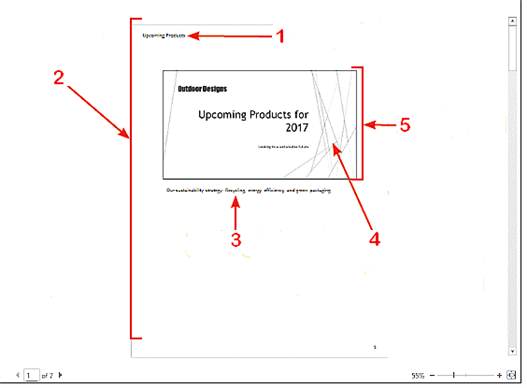 In the accompanying figure, item 5 is the ____.
To insert your own sound or music files in a presentation, you can use files with many of the common ____ extensions, such as .midi, .mp3, .m4a, .mp4, .wav, or .wma.
(Multiple Choice)
4.8/5 (60)
(60) You can use features on the VIDEO TOOLS PLAYBACK tab to adjust how and when the video plays during the slide show.
(True/False)
4.8/5 (70)
(70) After you insert a picture into your presentation, you can crop portions of a picture or remove the picture background by using features on the ____ tab.
(Multiple Choice)
4.8/5 (68)
(68) If you do not have a color printer selected, the slide preview will appear in ____.
(Multiple Choice)
5.0/5 (79)
(79) To trim means to cut off portions of a picture to keep the parts you want and remove the picture background
(True/False)
4.8/5 (83)
(83) ____ animate the way slides advance on-screen during a slide show.
(Multiple Choice)
4.8/5 (91)
(91) 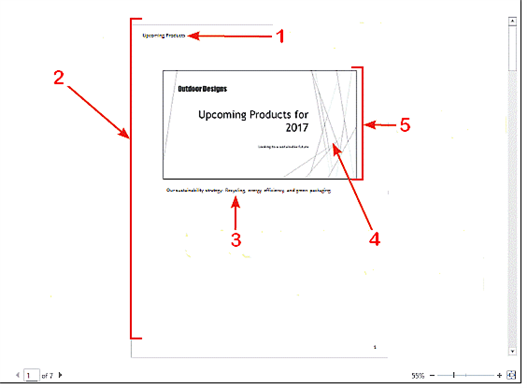 In the accompanying figure, item 1 is the ____ header.
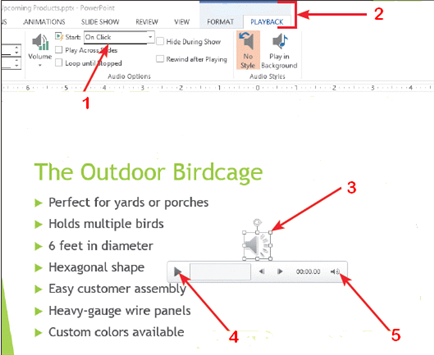 In the accompanying figure, item 4 is the ____ button.
For purposes of a PowerPoint presentation, what are pictures and how are they formatted and sized?
(Essay)
4.7/5 (83)
(83) To start a slide show from the beginning using the keyboard, press [ F1 ]
(True/False)
5.0/5 (86)
(86) You created a presentation for a class and now you want to make the presentation more interesting for your audience. The presentation is about the life and works of a fairly obscure classical composer.
Your professor has collected and digitized a series of performances by this composer. How can you help your audience connect with the works of this unknown composer?
(Essay)
4.8/5 (65)
(65) PowerPoint lets you insert pictures in many file formats, including JPEG, PNG, GIF, TIFF, and BMP.
(True/False)
5.0/5 (86)
(86) The ____ Painter transfers the animation settings from one object to any other object in any open presentation.
(Multiple Choice)
4.8/5 (73)
(73) Once sounds have been added to a presentation, they cannot be moved or modified.
(True/False)
4.8/5 (84)
(84) By clicking the Apply to Next button in the Timing group, the transition you applied to Slide 1 is automatically applied to all slides in a presentation.
(True/False)
4.8/5 (82)
(82) A ____ is the number of seconds a slide remains on the screen before advancing to the next one.
(Multiple Choice)
4.8/5 (75)
(75) 
Filters
- Essay(0)
- Multiple Choice(0)
- Short Answer(0)
- True False(0)
- Matching(0)