



 Chat with AI
Exam 1: Office 2010 and Windows 7 Essential Concepts and Skills

Exam 1: Office 2010 and Windows 7 Essential Concepts and Skills112 Questions
Exam 2: Databases and Database Objects: an Introduction112 Questions
Exam 3: Querying a Database112 Questions
Exam 4: Maintaining a Database112 Questions
Exam 5: Creating Reports and Forms112 Questions
Exam 6: Multitable Forms112 Questions
Exam 7: Advanced Report Techniques112 Questions
Exam 8: Using SQL112 Questions
Exam 9: Advanced Form Techniques112 Questions
Exam 10: Macros, Navigation Forms, Pivot112 Questions
Exam 11: Administering a Database Syste112 Questions
Exam 12: Database Design112 Questions
Select questions type


 If Windows Aero is active on your computer, Windows displays the kind of window shown in the accompanying figure whenever you move your mouse on a button or click a button on the taskbar.
 (True/False)
4.9/5  (70)
(70) To display more of a database or other item in the window of an Office program, some users prefer to maximize the Ribbon.
(True/False)
4.8/5 (77)
(77) Certain commands may need to be accessed differently depending on the resolution chosen.
(True/False)
4.9/5 (77)
(77) Computers with up to 1 GB of RAM display the Windows 7 Aero interface.
(True/False)
4.9/5 (76)
(76) ____ is a powerful desktop-publishing program that assists you in creating professional-quality documents.
(Multiple Choice)
4.9/5 (72)
(72) A ____ is a list of related items, including folders, programs, and commands.
(Multiple Choice)
4.8/5 (72)
(72) In most cases, one end of a ____ represents the lowest of available values, and the opposite represents the highest available value.
(Multiple Choice)
4.8/5 (81)
(81) Windows ____ provides a means to create a blank database without ever starting an Office program.
(Multiple Choice)
4.9/5 (77)
(77) If you are required to log on to the computer, the ____ screen is displayed, which shows the user names of users on the computer.
(Multiple Choice)
4.9/5 (76)
(76) Critical Thinking Questions Case 1-1 Ellie wants to use Office 2010 for her catering business. For example, she plans to use Access to maintain her collection of recipes. To get started, Ellie turns to you for help in understanding the components that appear in the Microsoft Access window. Ellie asks you about the component located at the bottom of the document window. You tell her that it is used to present information about the object and controls for viewing the document. What is the name of this component?
(Multiple Choice)
4.9/5 (80)
(80) When you ____ a scroll bar, a shortcut menu appears with commands related to the scroll bar.
(Multiple Choice)
4.9/5 (76)
(76) On the Customize Quick Access Toolbar menu, _________________________ appear next to commands that already are on the toolbar.
(Short Answer)
4.8/5 (78)
(78) Because the _________________________ can take up space in the window, you may not have as much open space in Access for working as you would with Word or Excel.
(Short Answer)
4.8/5 (74)
(74) A(n) _________________________ is a named location on a storage medium that usually contains related documents.
(Short Answer)
4.7/5 (80)
(80) The arrows on the Command bar allow you to visit different locations on the computer.
(True/False)
4.8/5 (79)
(79) The ____ command waits for Windows 7 to save your work and then turns off the computer fans and hard disk.
(Multiple Choice)
4.8/5 (81)
(81) Microsoft Office 2007 is the newest version of Microsoft Office.
(True/False)
4.8/5 (66)
(66) Modified Multiple Choice ____ files is part of a process known as file management.
(Multiple Choice)
4.8/5 (83)
(83) 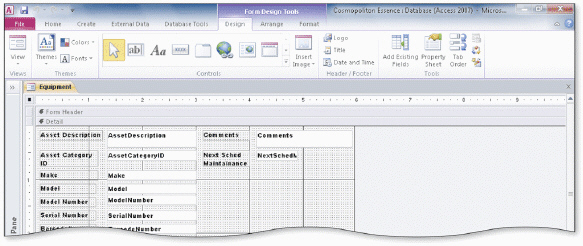 A(n) _________________________, as shown in the accompanying figure, is a set of choices, often graphical, arranged in a grid or in a list.
 (Short Answer)
5.0/5 (82)
(82) 
Filters
- Essay(0)
- Multiple Choice(0)
- Short Answer(0)
- True False(0)
- Matching(0)