



 Chat with AI
Exam 10: Macros, Navigation Forms, Pivot

Exam 1: Office 2010 and Windows 7 Essential Concepts and Skills112 Questions
Exam 2: Databases and Database Objects: an Introduction112 Questions
Exam 3: Querying a Database112 Questions
Exam 4: Maintaining a Database112 Questions
Exam 5: Creating Reports and Forms112 Questions
Exam 6: Multitable Forms112 Questions
Exam 7: Advanced Report Techniques112 Questions
Exam 8: Using SQL112 Questions
Exam 9: Advanced Form Techniques112 Questions
Exam 10: Macros, Navigation Forms, Pivot112 Questions
Exam 11: Administering a Database Syste112 Questions
Exam 12: Database Design112 Questions
Select questions type


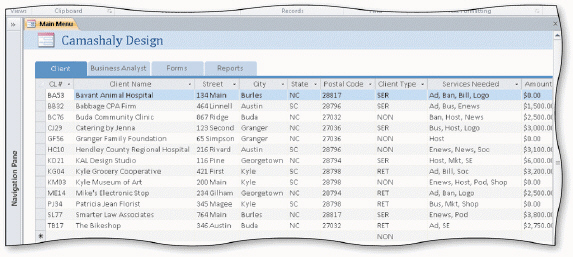 The accompanying figure displays a navigation form for the Camashaly Design database. What type of database objects can be included on the tabs of a navigation form?
Free
(Essay)
4.8/5  (75)
(75) Correct Answer: Verified
You only can include forms and reports on the tabs.
A(n) ____________________ macro is a macro that is attached to an object such as a command button, an option group, or a control on a form.
Free
(Short Answer)
4.9/5 (68)
(68) Correct Answer:Verified
Verifieduser interface
To create a PivotTable from a query, open the query, click the _____ button arrow and then click PivotTable View.
Free
(Multiple Choice)
4.8/5 (73)
(73) Correct Answer:Verified
VerifiedB
Identify the letter of the choice that best matches the phrase or definition.
Premises:
Data from fields in this area will appear as rows in the PivotTable.
Responses:
navigation form
Series
Filter
Correct Answer:Verified
VerifiedPremises:
Responses:
(Matching)
5.0/5 (83)
(83) If the Action Catalog does not appear in the Macro window, click the Show Actions button on the Design tab.
(True/False)
4.9/5 (85)
(85) If you want to execute the next step in a macro, click the _____ button in the Macro Single Step dialog box.
(Multiple Choice)
4.9/5 (87)
(87) If a field list appears when you first create a navigation form, click the ____________________ button on the Design tab to remove the field list.
(Short Answer)
4.8/5 (88)
(88) Identify the letter of the choice that best matches the phrase or definition.
Premises:
Data from fields in this area will be summarized within the chart.
Responses:
pop-up form
Filter
Data
Correct Answer:Verified
VerifiedPremises:
Responses:
(Matching)
4.9/5 (95)
(95) To add a command button to a form, click the ____________________ tool in the Controls group on the Design tab.
(Short Answer)
4.9/5 (80)
(80) To remove fields from drop areas, click the field name and then press the _____ key(s).
(Multiple Choice)
5.0/5 (79)
(79) ____________________ are collections of actions designed to carry out specific tasks.
(Short Answer)
4.9/5 (82)
(82) To make a correction to a macro that contains an error, click the ____________________ button in the Macro Single Step dialog box and then modify the design of the macro.
(Short Answer)
4.9/5 (89)
(89) Critical Thinking Questions Case 9-2 An employee at Camashaly Design has created an initial PivotTable for the Camashaly Design database but is having trouble determining how to perform some of the tasks associated with creating a PivotTable. The employee needs to change a caption for one of the column headings on the PivotTable. How should he accomplish this task?
(Essay)
4.7/5 (87)
(87) A navigation form contains a navigation control and a subform control.
(True/False)
4.9/5 (80)
(80) PivotTables and PivotCharts can be used to analyze past data and predict future patterns and trends, a technique known as data detection .
(True/False)
4.9/5 (81)
(81) A data macro is a special type of macro that is associated with specific table-related events.
(True/False)
4.9/5 (79)
(79) Identify the letter of the choice that best matches the phrase or definition.
Premises:
Data from fields in this area will not appear in the PivotTable but can be used to restrict the data that appears.
Responses:
Category
Series
Column
Correct Answer:Verified
VerifiedPremises:
Responses:
(Matching)
5.0/5 (86)
(86)  The accompanying figure shows the macro for an option group. The SetTempVar action is in the _____ category of the Action Catalog.
 (Multiple Choice)
5.0/5 (81)
(81) To give a chart a cleaner look, remove the drop areas from the PivotChart.
(True/False)
4.9/5 (78)
(78) 
Filters
- Essay(0)
- Multiple Choice(0)
- Short Answer(0)
- True False(0)
- Matching(0)