



 Chat with AI
Exam 10: Macros, Navigation Forms, Pivot

Exam 1: Office 2010 and Windows 7 Essential Concepts and Skills112 Questions
Exam 2: Databases and Database Objects: an Introduction112 Questions
Exam 3: Querying a Database112 Questions
Exam 4: Maintaining a Database112 Questions
Exam 5: Creating Reports and Forms112 Questions
Exam 6: Multitable Forms112 Questions
Exam 7: Advanced Report Techniques112 Questions
Exam 8: Using SQL112 Questions
Exam 9: Advanced Form Techniques112 Questions
Exam 10: Macros, Navigation Forms, Pivot112 Questions
Exam 11: Administering a Database Syste112 Questions
Exam 12: Database Design112 Questions
Select questions type


To display a pop-up form for a control, such as Client Number in a datasheet form, create a user interface (UI) macro that is associated with the _____ event for the control.
(Multiple Choice)
5.0/5  (68)
(68) To run a macro, right-click the macro in the Navigation Pane and then click _____ on the shortcut menu.
(Multiple Choice)
4.8/5 (75)
(75) Identify the letter of the choice that best matches the phrase or definition.
Premises:
Named location in computer memory.
Responses:
Series
Row
pop-up form
Correct Answer: Verified
Premises:
Responses:
(Matching)
4.7/5 (86)
(86)  The accompanying figure shows the macro for an option group. The If element is in the _____ category of the Action Catalog.
 (Multiple Choice)
4.8/5 (90)
(90) Identify the letter of the choice that best matches the phrase or definition.
Premises:
Data from fields in this area will appear as related groups of data.
Responses:
Category
Series
Filter
Correct Answer:Verified
VerifiedPremises:
Responses:
(Matching)
4.8/5 (70)
(70) To instruct Access to perform different actions based on certain conditions, use a macro that contains a WhereCondition statement.
(True/False)
4.8/5 (96)
(96) If a field list appears when you create a navigation form, click the _____ button on the Design tab to remove the field list.
(Multiple Choice)
4.9/5 (69)
(69) An option group is a rectangle containing a collection of option buttons.
(True/False)
4.9/5 (92)
(92) Critical Thinking Questions Case 9-1
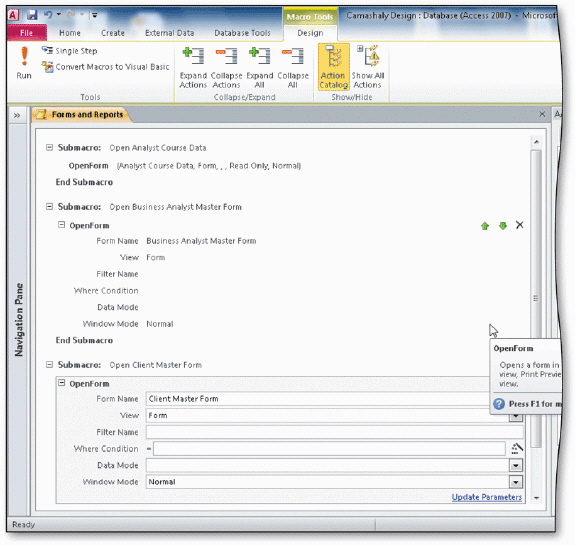 An employee at Camashaly Design needs to modify the macro shown in the accompanying figure. The employee is nervous about the change she just made to the macro and would like to test it. What can she do to be certain the macro will perform as she expects?
 (Essay)
4.8/5 (72)
(72) A user interface (UI) macro is a special type of macro associated with specific table-related events.
(True/False)
4.9/5 (81)
(81)  The accompanying figure displays a PivotChart. To remove the drop areas from the PivotChart, use the _____ button on the Design tab.
 (Multiple Choice)
4.8/5 (78)
(78) To open a query, right-click the query in the Navigation Pane and click _____ on the shortcut menu.
(Multiple Choice)
4.8/5 (81)
(81) Identify the letter of the choice that best matches the phrase or definition.
Premises:
Form that stays on top of other open objects.
Responses:
Series
Row
navigation form
Correct Answer:Verified
VerifiedPremises:
Responses:
(Matching)
4.7/5 (75)
(75) If you want to terminate the process of executing a macro one step at a time, click the _____ button in the Macro Single Step dialog box.
(Multiple Choice)
4.9/5 (79)
(79) If the PivotTable Field List does not appear, click the _____ button on the PivotTable tab to display the field list.
(Multiple Choice)
4.7/5 (81)
(81) To add a title to a PivotChart, click the _____ button in the property sheet for the chart.
(Multiple Choice)
4.8/5 (87)
(87) Modified Multiple Choice The Database Objects category in the Action Catalog includes _____ actions.
(Multiple Choice)
5.0/5 (79)
(79) To save the changes to a PivotTable, click the ____________________ button on the Quick Access toolbar.
(Short Answer)
4.7/5 (78)
(78) PivotTables and PivotCharts are normally associated with _____.
(Multiple Choice)
4.9/5 (81)
(81) 
Filters
- Essay(0)
- Multiple Choice(0)
- Short Answer(0)
- True False(0)
- Matching(0)