



 Chat with AI
Exam 10: Macros, Navigation Forms, Pivot

Exam 1: Office 2010 and Windows 7 Essential Concepts and Skills112 Questions
Exam 2: Databases and Database Objects: an Introduction112 Questions
Exam 3: Querying a Database112 Questions
Exam 4: Maintaining a Database112 Questions
Exam 5: Creating Reports and Forms112 Questions
Exam 6: Multitable Forms112 Questions
Exam 7: Advanced Report Techniques112 Questions
Exam 8: Using SQL112 Questions
Exam 9: Advanced Form Techniques112 Questions
Exam 10: Macros, Navigation Forms, Pivot112 Questions
Exam 11: Administering a Database Syste112 Questions
Exam 12: Database Design112 Questions
Select questions type


A(n) ____ macro is a special type of macro that is associated with specific table-related events.
(Multiple Choice)
4.9/5  (73)
(73) Identify the letter of the choice that best matches the phrase or definition.
Premises:
Replaces the switchboard manager.
Responses:
navigation form
pop-up form
Column
Correct Answer: Verified
Premises:
Responses:
(Matching)
4.9/5 (87)
(87) To remove drop areas from a PivotChart to give the chart a cleaner look, click the ____________________ button on the Design tab.
(Short Answer)
4.8/5 (90)
(90) To proceed through a macro one step at a time, open the macro in Design view, and then click the _____ button on the Design tab.
(Multiple Choice)
4.7/5 (78)
(78) 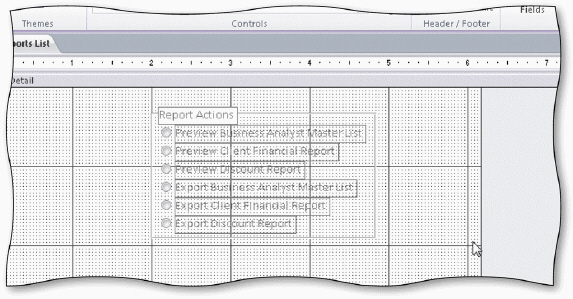 The accompanying figure displays the Report Options group with six option buttons. To instruct Access to perform different actions based on which option button is selected, the macro for the option group will contain a(n) ____________________ statement.
 (Short Answer)
5.0/5 (90)
(90) If a Security Warning appears when you open a database, click the ____ option button.
(Multiple Choice)
4.9/5 (72)
(72) Data from fields in the _____ PivotTable drop area will not appear in the table but can be used to restrict the data that appears.
(Multiple Choice)
4.8/5 (77)
(77) You can create navigation forms with horizontal tabs or vertical tabs.
(True/False)
4.8/5 (77)
(77) Critical Thinking Questions Case 9-2 An employee at Camashaly Design has created an initial PivotTable for the Camashaly Design database but is having trouble determining how to perform some of the tasks associated with creating a PivotTable. The PivotTable Field List currently does not display. The employee needs to add a filter to the PivotTable. How can he display the PivotTable Field List?
(Essay)
4.9/5 (89)
(89) To create a navigation form, click the Create tab and then click the _____ button to display the menu of available navigation forms.
(Multiple Choice)
4.9/5 (67)
(67) Identify the letter of the choice that best matches the phrase or definition.
Premises:
Data from fields in this area will appear as data series.
Responses:
navigation form
Series
Column
Correct Answer:Verified
VerifiedPremises:
Responses:
(Matching)
4.9/5 (63)
(63) Modified Multiple Choice A data macro can be associated with _____ events.
(Multiple Choice)
4.8/5 (88)
(88) Critical Thinking Questions Case 9-1
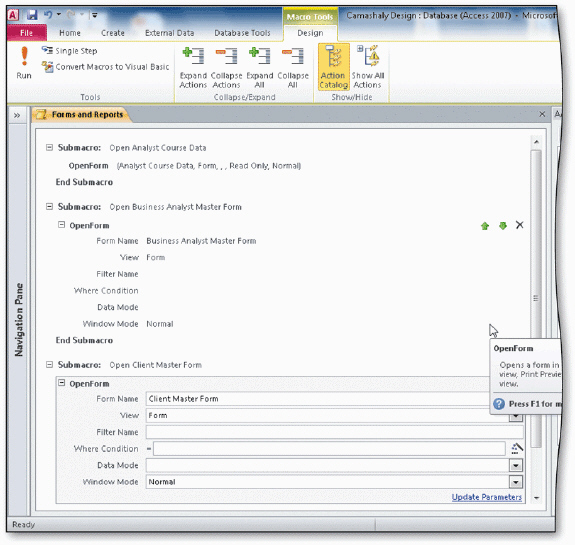 An employee at Camashaly Design needs to modify the macro shown in the accompanying figure. How can the employee collapse the OpenForm action?
 (Essay)
4.8/5 (69)
(69)  The accompanying figure displays a PivotChart. To assign a title to an axis, click the Axis Title box for the axis you want to change, click the Property Sheet button on the Design tab, and then change the _____ property.
 (Multiple Choice)
4.8/5 (63)
(63) To display the PivotTable Field List, click the Add Existing Fields button on the Design tab.
(True/False)
4.8/5 (76)
(76) 
Filters
- Essay(0)
- Multiple Choice(0)
- Short Answer(0)
- True False(0)
- Matching(0)