



 Chat with AI
Exam 10: Macros, Navigation Forms, Pivot

Exam 1: Office 2010 and Windows 7 Essential Concepts and Skills112 Questions
Exam 2: Databases and Database Objects: an Introduction112 Questions
Exam 3: Querying a Database112 Questions
Exam 4: Maintaining a Database112 Questions
Exam 5: Creating Reports and Forms112 Questions
Exam 6: Multitable Forms112 Questions
Exam 7: Advanced Report Techniques112 Questions
Exam 8: Using SQL112 Questions
Exam 9: Advanced Form Techniques112 Questions
Exam 10: Macros, Navigation Forms, Pivot112 Questions
Exam 11: Administering a Database Syste112 Questions
Exam 12: Database Design112 Questions
Select questions type


You can include forms, reports, tables, and queries on the tabs of a navigation form.
(True/False)
4.9/5  (76)
(76) The Submacro element is in the _____ category of the Action Catalog.
(Multiple Choice)
4.8/5 (88)
(88) The OpenForm action is in the _____ category of the Action Catalog.
(Multiple Choice)
4.9/5 (69)
(69) To add a submacro element to a macro, double-click the Submacro element from the Program Flow section on the Action Catalog.
(True/False)
4.7/5 (85)
(85) 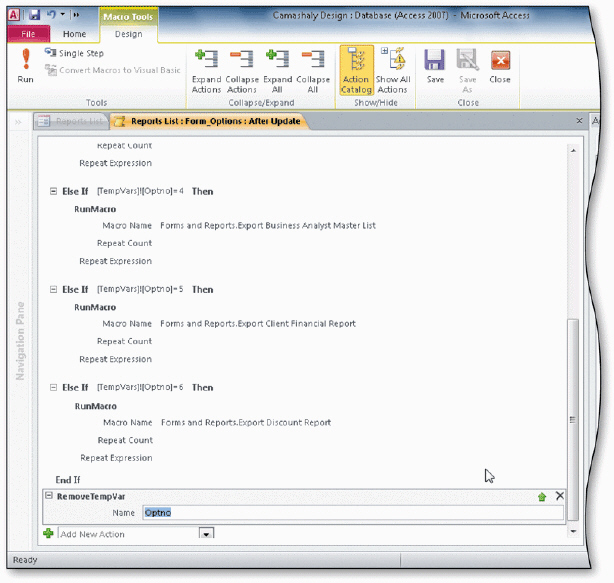 The accompanying figure shows the macro for an option group. The RemoveTempVar action is in the _____ category of the Action Catalog.
 (Multiple Choice)
4.8/5 (75)
(75) You can save a macro as a VBA module using the Save Object As command in the Backstage view.
(True/False)
4.8/5 (80)
(80) To assign a macro to a command button, click ____________________ in the Categories box and then click Run Macro in the Actions box in the Command Wizard dialog box.
(Short Answer)
4.8/5 (76)
(76) To begin creating a macro, click the _____ button on the Create tab.
(Multiple Choice)
4.9/5 (75)
(75) A(n) ____________________ is a form that includes tabs to display forms and reports.
(Short Answer)
4.9/5 (90)
(90) 
Filters
- Essay(0)
- Multiple Choice(0)
- Short Answer(0)
- True False(0)
- Matching(0)