



 Chat with AI
Exam 6: Using Mail Merge

Exam 1: Creating and Editing a Document100 Questions
Exam 2: Navigating and Formatting a Document100 Questions
Exam 3: Creating Tables and a Multipage Report100 Questions
Exam 4: Enhancing Page Layout and Design100 Questions
Exam 5: Working With Templates, Themes, and Styles100 Questions
Exam 6: Using Mail Merge100 Questions
Exam 7: Collaborating With Others and Integrating Data100 Questions
Exam 8: Managing Your Files100 Questions
Select questions type


The _______ menu contains all the merge fields in the data source.
(Multiple Choice)
4.8/5  (92)
(92) You can only insert merge fields into a main document by using the tools on the MAILINGS tab or in the Mail Merge task pane.
(True/False)
4.7/5 (73)
(73) The order of field names in the data source does not affect their placement in the main document.
(True/False)
4.8/5 (87)
(87) To delete a field in the Customize Address List dialog box, click the field to be deleted, click the _______ button, and then click the Yes button.
(Multiple Choice)
4.9/5 (84)
(84) Duncan thinks that the easiest way for him to get comfortable with mail merges is to create a data source from scratch with which he can experiment.
-Which of the following can't Duncan use to generate a data source?
(Multiple Choice)
4.9/5 (86)
(86) To remove an individual record from a merge, deselect the corresponding check box in the ____________________ dialog box.
(Short Answer)
4.7/5 (79)
(79) You can create a new field by clicking the New Entry button, or by pressing the Tab key after you have finished entering information into the last field for a record. _________________________
(True/False)
4.7/5 (74)
(74) To open the Convert Text to Table dialog box, click the _______ tab, click the Table button in the Tables group, and then click Convert Text to Table.
(Multiple Choice)
4.8/5 (91)
(91) You can use the _______ buttons to rearrange field names in the Customize Address List dialog box.
(Multiple Choice)
4.8/5 (94)
(94) MATCHING
Identify the letter of the choice that best matches the phrase or definition.
-Another term for an angle bracket
(Multiple Choice)
4.9/5 (71)
(71) You can create a new record by clicking the _______ button or by pressing the Tab key after you have finished entering data into the last field for a record.
(Multiple Choice)
4.7/5 (79)
(79) Press the Tab key to move the insertion point to the new tab _______.
(Multiple Choice)
4.8/5 (72)
(72) When you create a new data source from within the Mail Merge task pane, Word provides a number of ____________________ fields, such as First Name, Last Name, and Company.
(Short Answer)
4.9/5 (85)
(85) Which of the following is a default field provided by Word in a new data source that you create?
(Multiple Choice)
5.0/5 (65)
(65) You can use the options in the _______ group on the MAILINGS tab to insert merge fields in the main document.
(Multiple Choice)
4.9/5 (72)
(72) A(n) space leader is a dotted line that extends from the last letter of text on the left margin to the beginning of text aligned at a tab stop. _________________________
(True/False)
5.0/5 (80)
(80) You can use the tools in the _______ tab to perform the same tasks described by the Mail Merge task pane.
(Multiple Choice)
4.9/5 (67)
(67) The first time you click a column heading in the Mail Merge Recipients dialog box, the records are sorted in _______ order.
(Multiple Choice)
4.8/5 (82)
(82) 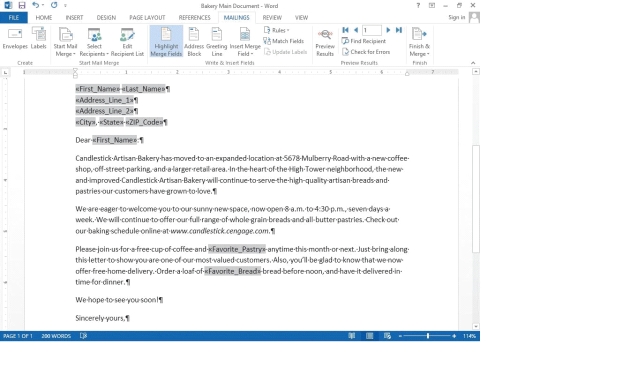 -The items around "First_Name" in the accompanying figure are pairs of _______.
 (Multiple Choice)
4.9/5 (92)
(92) In the Mail Merge Recipients dialog box, to remove an individual _______ from a merge, you can deselect its check box in the leftmost column.
(Multiple Choice)
4.9/5 (85)
(85) 
Filters
- Essay(0)
- Multiple Choice(0)
- Short Answer(0)
- True False(0)
- Matching(0)