



 Chat with AI
Exam 6: Using Mail Merge

Exam 1: Creating and Editing a Document100 Questions
Exam 2: Navigating and Formatting a Document100 Questions
Exam 3: Creating Tables and a Multipage Report100 Questions
Exam 4: Enhancing Page Layout and Design100 Questions
Exam 5: Working With Templates, Themes, and Styles100 Questions
Exam 6: Using Mail Merge100 Questions
Exam 7: Collaborating With Others and Integrating Data100 Questions
Exam 8: Managing Your Files100 Questions
Select questions type


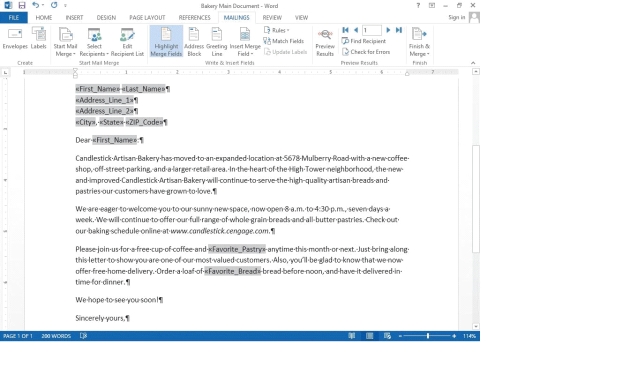 -A name or address like the kind in the accompanying figure is an example of the _______ information that is inserted into a main document.
Free
(Multiple Choice)
4.9/5  (76)
(76) Correct Answer: Verified
B
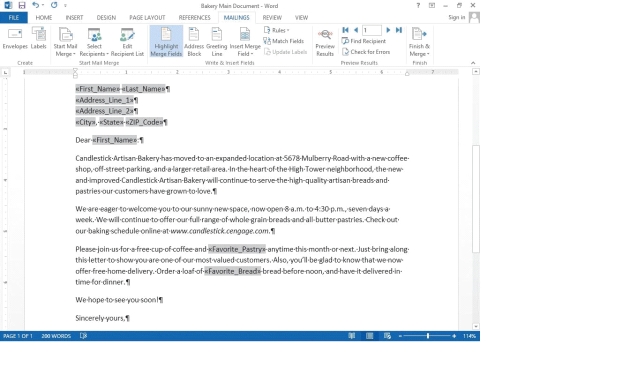 -During a merge, the merge fields shown in the document in the accompanying figure instruct Word to retrieve information from the ____________________ source.
Free
(Short Answer)
4.8/5 (82)
(82) Correct Answer:Verified
Verifieddata
-Word's _______ task pane is a special feature that walks you through the steps involved in producing documents like the kind shown in the accompanying figure.
-Word's _______ task pane is a special feature that walks you through the steps involved in producing documents like the kind shown in the accompanying figure.Free
(Multiple Choice)
4.8/5 (88)
(88) Correct Answer:Verified
VerifiedC
When you preview a merged document, you can check one last time for any missing spaces between the merge fields and the surrounding text. _________________________
(True/False)
4.9/5 (73)
(73) If you include spaces in your field names, Word will replace the spaces with _______.
(Multiple Choice)
4.8/5 (80)
(80) The default save location is a subfolder of the ____________________ folder.
(Short Answer)
4.9/5 (71)
(71) When you have used the dialog box to convert text to a table, if the result is not what you expect, _______ the conversion and then review the text to make sure it is set up consistently.
(Multiple Choice)
5.0/5 (77)
(77) In the Preview Results group, click the _______ button to display each merged document.
(Multiple Choice)
4.9/5 (79)
(79) A(n) ____________________ is a dotted line that extends from the last letter of text on the left margin to the beginning of text aligned at a tab stop.
(Short Answer)
4.9/5 (75)
(75) In the Convert to Text dialog box, each paragraph mark in the data source starts a new column.
(True/False)
4.8/5 (76)
(76) When you are finished entering data, you close the New Address List dialog box, and the _______ dialog box opens.
(Multiple Choice)
4.9/5 (83)
(83) MATCHING
Identify the letter of the choice that best matches the phrase or definition.
-A file with information organized into fields and records
(Multiple Choice)
4.8/5 (82)
(82) As you create a data source, note that if you include slashes in your field names, Word will replace them with underscores. _________________________
(True/False)
4.7/5 (71)
(71) The _______ row contains the name of each field in the data source.
(Multiple Choice)
4.8/5 (78)
(78) Add spaces only in the data source, not in the text of the main document.
(True/False)
4.9/5 (80)
(80) The ____________________ row contains the names of the fields in the data source.
(Short Answer)
4.9/5 (78)
(78) MATCHING
Identify the letter of the choice that best matches the phrase or definition.
-Contains placeholders called merge fields
(Multiple Choice)
5.0/5 (73)
(73) To maintain the proper spacing in the main document, you will adjust character spacing after you insert all the fields.
(True/False)
4.9/5 (96)
(96) Provide the steps for editing a data source from within the Mail Merge Recipients dialog box in Word.
(Essay)
4.9/5 (94)
(94) 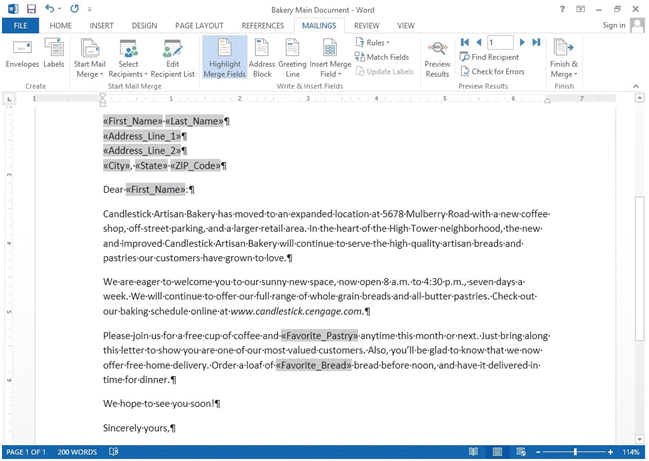 -One merge key in a main document like the kind shown in the accompanying figure might retrieve a name from a data source, for example, while another might retrieve an address.
 (True/False)
5.0/5 (82)
(82) 
Filters
- Essay(0)
- Multiple Choice(0)
- Short Answer(0)
- True False(0)
- Matching(0)