



 Chat with AI
Exam 6: Animating With Illustrator and Photoshop Files in Flash Professional

Exam 1: Creating a Character Using Adobe Illustrator50 Questions
Exam 2: Creating a Comic Book Using Adobe Illustrator50 Questions
Exam 3: Creating Animations Using Adobe Photoshop50 Questions
Exam 4: Enhancing Your Character Using Illustrator and Photoshop50 Questions
Exam 5: Creating Basic Animations in Flash Professional50 Questions
Exam 6: Animating With Illustrator and Photoshop Files in Flash Professional50 Questions
Select questions type


You can select the layers you want to import from Photoshop to Flash based on whether the layer was _______________ in Photoshop.
(Short Answer)
4.9/5  (71)
(71) Kate works as an illustrator for a publishing company. She provides illustrations for children's books and also creates animations for the company's website. Kate will use her Illustrator files to create a cut-out style animation, also called a _______________ animation, for use on the company website.
(Multiple Choice)
5.0/5 (77)
(77) When importing an Illustrator file, all of the following are options on the Convert layers to menu except :
(Multiple Choice)
4.8/5 (77)
(77) ______________ compression compresses the image to the PNG or GIF file format and does not discard any data from the image.
(Short Answer)
4.9/5 (75)
(75) The Puppet Warp feature in Photoshop works best if you first remove the _______________ from the image you want to adjust
(Multiple Choice)
4.9/5 (78)
(78) In the Import to Stage dialog box, you should create _______________ of the Illustrator components you want to animate in Flash.
(Short Answer)
4.9/5 (93)
(93) Illustrator paths can be imported as a bitmap or as a(n) _______________ .
(Short Answer)
4.8/5 (82)
(82) The Convert layers to Single Flash Layers option flattens all of the Illustrator layers into a single Flash layer.
(True/False)
4.9/5 (66)
(66) 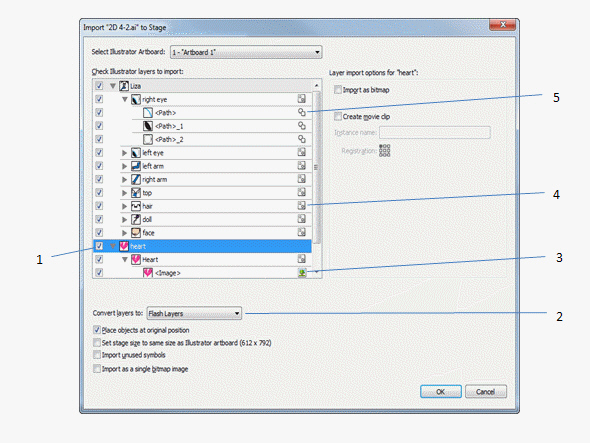 In the figure above, item 2 is used to _______________ .

Filters
- Essay(0)
- Multiple Choice(0)
- Short Answer(0)
- True False(0)
- Matching(0)