



 Chat with AI
Exam 6: Animating With Illustrator and Photoshop Files in Flash Professional

Exam 1: Creating a Character Using Adobe Illustrator50 Questions
Exam 2: Creating a Comic Book Using Adobe Illustrator50 Questions
Exam 3: Creating Animations Using Adobe Photoshop50 Questions
Exam 4: Enhancing Your Character Using Illustrator and Photoshop50 Questions
Exam 5: Creating Basic Animations in Flash Professional50 Questions
Exam 6: Animating With Illustrator and Photoshop Files in Flash Professional50 Questions
Select questions type


When naming a movie clip be sure to following these naming conventions: do not use spaces or special characters, except the _______________, and begin the name with a lowercase letter.

Free
(Short Answer)
4.7/5  (81)
(81) Correct Answer: Verified
underscore
Which option on the Puppet Warp options bar do you select if you want to warp the image at the location of the pin as you drag the pin?
Free
(Multiple Choice)
4.9/5 (93)
(93) Correct Answer:Verified
VerifiedB
A keyframe is created each time you adjust, or pose, the armature.
Free
(True/False)
4.8/5 (84)
(84) Correct Answer:Verified
VerifiedTrue
When working with inverse kinematics, you pin a bone to the Stage so the bone cannot move..
(True/False)
5.0/5 (81)
(81) 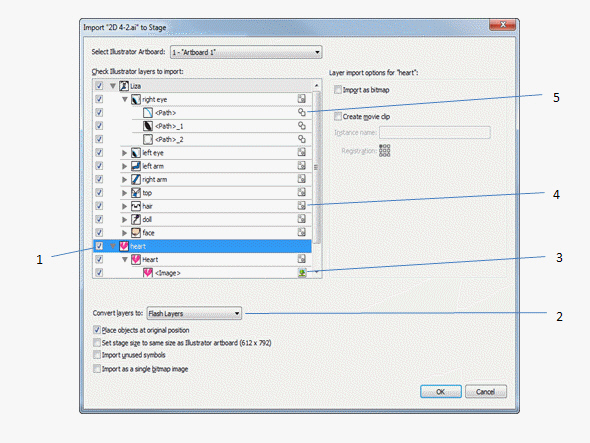 In the figure above, item 1 is pointing to _______________ .
 (Multiple Choice)
4.9/5 (73)
(73) When you select an armature with the Bind tool, control points are highlighted in yellow and the selected bone is highlighted in red.
(True/False)
4.7/5 (73)
(73) The content-aware command is found on the Puppet Warp options bar.
(True/False)
4.9/5 (88)
(88) _______________ uses bones to adjust or animate parts of a shape, eliminating the need to draw separate versions of an object to represent different movements.
(Short Answer)
4.9/5 (75)
(75) Importing an object identified as a group in the Import to Stage dialog box as a(n) _______________ will remove the option to import the elements of the group as editable paths.
(Short Answer)
4.8/5 (81)
(81) When applying tweens, all shapes or symbols you want to animate should be on the same layer.
(True/False)
4.9/5 (84)
(84) 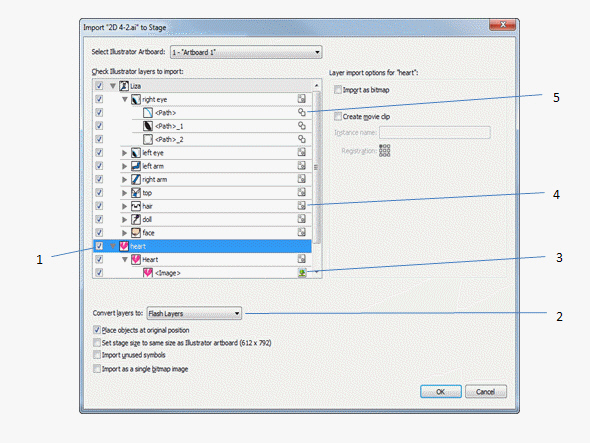 In the figure above, item 4 is pointing to a ________________ .
 (Multiple Choice)
4.7/5 (82)
(82) You can create your artwork and animations in Illustrator and Photoshop and then import them for use into Flash.
(True/False)
4.9/5 (95)
(95) The default setting for importing an Illustrator object is as a _______________ .
(Multiple Choice)
5.0/5 (95)
(95) You access the AI File Importer using the Flash Preferences dialog box.
(True/False)
4.8/5 (72)
(72) For images such as photographs that have complex color and tonal variations, you use the lossy compression.
(True/False)
4.7/5 (80)
(80) When you use lossy compression in the PSD File Importer Preferences dialog box, the image is compressed using the _______________ file format.
(Multiple Choice)
4.9/5 (80)
(80) When using the content-aware fill command, the best results can be achieved by creating a selection that is slightly larger than the object you are removing.
(True/False)
4.9/5 (73)
(73) Changes you make in the Property inspector for an armature layer affect the entire armature on the layer and not specific bones in the armature.
(True/False)
4.7/5 (85)
(85) If you can copy and paste between Illustrator and Flash using the AI File Importer preferences, you can override any preferences once the file is pasted.
(True/False)
4.7/5 (96)
(96) Rigid is the default setting for Mode on the Puppet Warp options bar.
(True/False)
4.9/5 (71)
(71) 
Filters
- Essay(0)
- Multiple Choice(0)
- Short Answer(0)
- True False(0)
- Matching(0)