



 Chat with AI
Exam 6: Animating With Illustrator and Photoshop Files in Flash Professional

Exam 1: Creating a Character Using Adobe Illustrator50 Questions
Exam 2: Creating a Comic Book Using Adobe Illustrator50 Questions
Exam 3: Creating Animations Using Adobe Photoshop50 Questions
Exam 4: Enhancing Your Character Using Illustrator and Photoshop50 Questions
Exam 5: Creating Basic Animations in Flash Professional50 Questions
Exam 6: Animating With Illustrator and Photoshop Files in Flash Professional50 Questions
Select questions type


When working with the Puppet Warp feature in Photoshop, you need to either cancel your puppet warp or _______________ to your puppet warp before you are able to continue working in Photoshop.
(Short Answer)
4.9/5  (79)
(79) Which Density setting increases the accuracy that can be created with pins and requires more processing time?
(Multiple Choice)
4.9/5 (77)
(77) The Style menu in the Armature properties in the Property inspector includes all of the following except :
(Multiple Choice)
4.8/5 (91)
(91) If you want to show only adjustment pins to make it easier to see your transformations when working with Puppet Warp, you should deselect the Show Mesh check box.
(True/False)
4.9/5 (73)
(73) Kate works as an illustrator for a publishing company. She provides illustrations for children's books and also creates animations for the company's website. Kate will use the AI File Importer settings, which she can access in the _______________, to identify how her Illustrator files will be imported into the Flash project she is working on for the company website.
(Multiple Choice)
4.8/5 (60)
(60) To copy a pose, select the frame where you want the pose duplicated, right-click the pose you want to copy, click Copy Pose, then click Paste Pose.
(True/False)
5.0/5 (77)
(77) If you click and drag layers between Photoshop and Flash, the default import settings, which you cannot change, will be applied.
(True/False)
4.8/5 (67)
(67) In the Import to Stage dialog box, a bitmap icon identifies an object that as been ________________ in Illustrator.
(Short Answer)
4.9/5 (83)
(83) When you use the Bone tool to click one object, and then, when you see the plus sign, drag to a second object, the _______________ layer is created automatically.
(Short Answer)
4.9/5 (64)
(64) 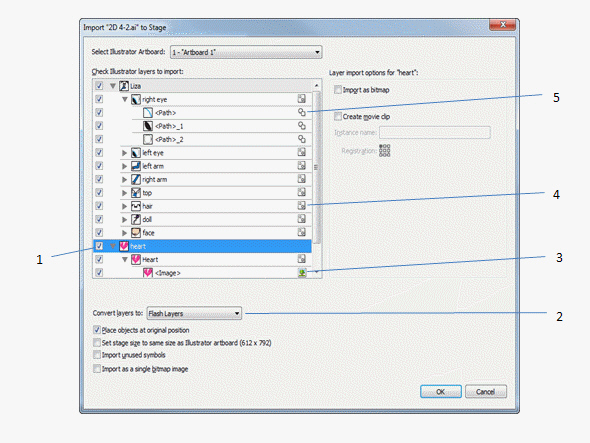 In the figure above, item 5 is pointing to a _______________ .
 (Multiple Choice)
4.8/5 (99)
(99) When you use the Import to Stage option, you can choose to resize the Stage to the same size as the Photoshop document you are importing.
(True/False)
4.8/5 (61)
(61) When working with inverse kinematics, you can use the Pen tool to connect bones.
(True/False)
4.9/5 (83)
(83) 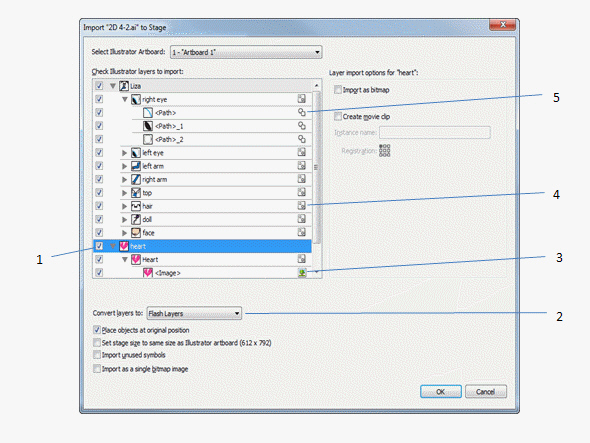 In the figure above, item 3 is pointing to a _______________ .
 (Multiple Choice)
4.9/5 (81)
(81) Kate works as an illustrator for a publishing company. She provides illustrations for children's books and also creates animations for the company's website. When Kate uses the Import to Library option to import a Photoshop file into the Flash project she is creating for the company website, which of the following will not happen?
(Multiple Choice)
4.9/5 (80)
(80) In order to have the greatest flexibility when working with Illustrator files in Flash, it is important to follow all of the following steps in Illustrator except :
(Multiple Choice)
4.8/5 (73)
(73) Kate works as an illustrator for a publishing company. She provides illustrations for children's books and also creates animations for the company's website. Kate will use the Photoshop _______________ feature to remove an area of a selection and replace it with similar nearby pixels.
(Multiple Choice)
4.8/5 (68)
(68) Kate works as an illustrator for a publishing company. She provides illustrations for children's books and also creates animations for the company's website. When Kate is working with inverse kinematics in the Flash project for the company website and she wants to move the joints of bones by making them shorter or rotating them, she must use the _______________ tool.
(Multiple Choice)
4.7/5 (91)
(91) If you have symbols in the Illustrator symbol library that are not on the Illustrator artboard, you can select the Import unused symbols option to import these symbols to the Flash pasteboard.
(True/False)
4.7/5 (86)
(86) When working with inverse kinematics, you use the _______________ tool when you want to edit connections between bones or shape the control points.
(Multiple Choice)
5.0/5 (86)
(86) You can import an Illustrator file using the Import to Library option or the _______________ option.
(Multiple Choice)
4.7/5 (81)
(81) 
Filters
- Essay(0)
- Multiple Choice(0)
- Short Answer(0)
- True False(0)
- Matching(0)