



 Chat with AI
Exam 28: Word Lesson 3: Helpful Word Features

Exam 1: Access Lesson 1: Microsoft Access Basics46 Questions
Exam 2: Access Lesson 2: Creating a Database46 Questions
Exam 3: Access Lesson 3: Creating Queries46 Questions
Exam 4: Access Lesson 4: Creating and Modifying Forms46 Questions
Exam 5: Access Lesson 5: Creating and Modifying Reports46 Questions
Exam 6: Access Lesson 6: Integrating Access46 Questions
Exam 7: Excel Lesson 1: Microsoft Excel Basics46 Questions
Exam 8: Excel Lesson 2: Changing the Appearance of a Worksheet46 Questions
Exam 9: Excel Lesson 3: Organizing the Worksheet46 Questions
Exam 10: Excel Lesson 4: Entering Worksheet Formulas46 Questions
Exam 11: Excel Lesson 5: Using Functions46 Questions
Exam 12: Excel Lesson 6: Enhancing a Worksheet46 Questions
Exam 13: Excel Lesson 7: Working With Multiple Worksheets and Workbooks46 Questions
Exam 14: Excel Lesson 8: Working With Charts46 Questions
Exam 15: Microsoft Office 2010 Basics and the Internet92 Questions
Exam 16: Outlook Lesson 1: Outlook Basics and E-Mail46 Questions
Exam 17: Outlook Lesson 2: Calendar46 Questions
Exam 18: Outlook Lesson 3: Working With Other Outlook Tools46 Questions
Exam 19: Powerpoint Lesson 1: Microsoft Powerpoint Basics46 Questions
Exam 20: Powerpoint Lesson 2: Creating Enhancing Powerpoint Presentations46 Questions
Exam 21: Powerpoint Lesson 3: Working With Visual Elements46 Questions
Exam 22: Powerpoint Lesson 4: Expanding on Powerpoint Basics46 Questions
Exam 23: Publisher Lesson 1: Microsoft Publisher Basics46 Questions
Exam 24: Publisher Lesson 2: Enhancing Publisher Documents46 Questions
Exam 25: Introduction Lesson 1: Microsoft Windows 7 Basics46 Questions
Exam 26: Word Lesson 1: Microsoft Word Basics46 Questions
Exam 27: Word Lesson 2: Basic Editing46 Questions
Exam 28: Word Lesson 3: Helpful Word Features46 Questions
Exam 29: Word Lesson 4: Formatting Text46 Questions
Exam 30: Word Lesson 5: Formatting Paragraphs and Documents46 Questions
Exam 31: Word Lesson 6: Working With Graphics46 Questions
Exam 32: Word Lesson 7: Working With Documents46 Questions
Exam 33: Word Lesson 8: Increasing Efficiency Using Word46 Questions
Select questions type


You can use the Spelling and Context dialog box to check a document's spelling and grammar after you finish typing.
(True/False)
4.7/5  (70)
(70) If a word appears twice in a row, the ____ will be underlined with a red, wavy underline.
(Multiple Choice)
4.8/5 (60)
(60) To change the paragraph from a numbered list to normal text, you can click the Text button in the Styles group on the Format tab.
(True/False)
4.9/5 (74)
(74) When working with the Spelling and Grammar dialog box, before you make a decision on the first grammar change, the ____ command stops the grammar check.
(Multiple Choice)
4.7/5 (72)
(72) ____________________ are building blocks you create from frequently used text, such as a name, address, or slogan, and then save so that you can access them easily.
(Short Answer)
4.9/5 (73)
(73) To correct an error that has been identified with a wavy underline, ____ the flagged word or phrase to open a shortcut menu with a list of suggestions to replace the possible error.
(Multiple Choice)
4.8/5 (84)
(84) If you want to display the current date whenever you open the document, you would click the Update automatically check box to select it.
(True/False)
4.9/5 (94)
(94) FIGURE WD 3-1 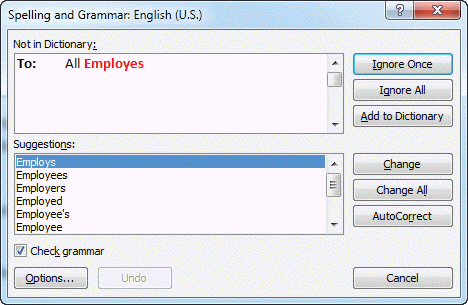 In Figure WD 3-1 above, the Spelling and Grammar dialog box gave you the suggested spelling of Employs. As a next step, you would ____.
 (Multiple Choice)
4.9/5 (74)
(74) Automatic spelling and grammar checking can be turned on and off or adjusted in the Popular section of the Word Options dialog box.
(True/False)
4.9/5 (85)
(85) AutoComplete is a feature in Word that automatically completes the spelling of days of the week and months of the year that have less than three letters in their names.
(True/False)
4.9/5 (90)
(90) To check only spelling in the document, click the ____ in the Spelling and Grammar dialog box to deselect it.
(Multiple Choice)
4.9/5 (81)
(81) If you select a plural noun or a verb in a form other than its base form (the infinitive form), a list of ____ appears in the list in the task pane.
(Multiple Choice)
4.8/5 (75)
(75) Grammar blocks are document parts that you can create, store, and reuse.
(True/False)
4.8/5 (77)
(77) The Spelling and Grammar dialog box option for spelling errors called ____ leaves all instances of the word untouched in the document and jumps to the next flagged error.
(Multiple Choice)
4.7/5 (71)
(71) Case WD 3-2 Gabriel's boss has asked him for some additional statistics on the paper he wrote to introduce a new product. He is exploring the options and commands for correcting spelling and grammar to learn the features. To determine the reading level of the document, which option would Gabriel choose?
(Multiple Choice)
4.8/5 (83)
(83) A yellow , wavy underline indicates words that Word cannot find in its built-in dictionary.
(True/False)
4.7/5 (82)
(82) ____________________ flags words that might be misspelled by underlining them with a red or blue wavy line immediately after you type them.
(Short Answer)
4.9/5 (78)
(78) Word identifies possible misusage by examining the context in which the word is used. This feature is called ____________________ spell checking.
(Short Answer)
4.9/5 (79)
(79) The automatic spell checker sometimes incorrectly identifies words as being misspelled, such as proper names.
(True/False)
4.8/5 (73)
(73) 
Filters
- Essay(0)
- Multiple Choice(0)
- Short Answer(0)
- True False(0)
- Matching(0)