



 Chat with AI
Exam 8: Excel Lesson 2: Changing the Appearance of a Worksheet

Exam 1: Access Lesson 1: Microsoft Access Basics46 Questions
Exam 2: Access Lesson 2: Creating a Database46 Questions
Exam 3: Access Lesson 3: Creating Queries46 Questions
Exam 4: Access Lesson 4: Creating and Modifying Forms46 Questions
Exam 5: Access Lesson 5: Creating and Modifying Reports46 Questions
Exam 6: Access Lesson 6: Integrating Access46 Questions
Exam 7: Excel Lesson 1: Microsoft Excel Basics46 Questions
Exam 8: Excel Lesson 2: Changing the Appearance of a Worksheet46 Questions
Exam 9: Excel Lesson 3: Organizing the Worksheet46 Questions
Exam 10: Excel Lesson 4: Entering Worksheet Formulas46 Questions
Exam 11: Excel Lesson 5: Using Functions46 Questions
Exam 12: Excel Lesson 6: Enhancing a Worksheet46 Questions
Exam 13: Excel Lesson 7: Working With Multiple Worksheets and Workbooks46 Questions
Exam 14: Excel Lesson 8: Working With Charts46 Questions
Exam 15: Microsoft Office 2010 Basics and the Internet92 Questions
Exam 16: Outlook Lesson 1: Outlook Basics and E-Mail46 Questions
Exam 17: Outlook Lesson 2: Calendar46 Questions
Exam 18: Outlook Lesson 3: Working With Other Outlook Tools46 Questions
Exam 19: Powerpoint Lesson 1: Microsoft Powerpoint Basics46 Questions
Exam 20: Powerpoint Lesson 2: Creating Enhancing Powerpoint Presentations46 Questions
Exam 21: Powerpoint Lesson 3: Working With Visual Elements46 Questions
Exam 22: Powerpoint Lesson 4: Expanding on Powerpoint Basics46 Questions
Exam 23: Publisher Lesson 1: Microsoft Publisher Basics46 Questions
Exam 24: Publisher Lesson 2: Enhancing Publisher Documents46 Questions
Exam 25: Introduction Lesson 1: Microsoft Windows 7 Basics46 Questions
Exam 26: Word Lesson 1: Microsoft Word Basics46 Questions
Exam 27: Word Lesson 2: Basic Editing46 Questions
Exam 28: Word Lesson 3: Helpful Word Features46 Questions
Exam 29: Word Lesson 4: Formatting Text46 Questions
Exam 30: Word Lesson 5: Formatting Paragraphs and Documents46 Questions
Exam 31: Word Lesson 6: Working With Graphics46 Questions
Exam 32: Word Lesson 7: Working With Documents46 Questions
Exam 33: Word Lesson 8: Increasing Efficiency Using Word46 Questions
Select questions type


FIGURE EX 2-1 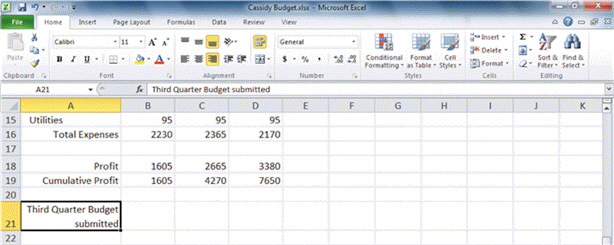 In Figure EX 2-1 above, you can see that when you wrap text, the ____increases automatically to display additional lines until all the text is visible.
Free
(Multiple Choice)
4.7/5  (71)
(71) Correct Answer: Verified
B
The default number format is General, which displays numbers the way you type them.
Free
(True/False)
4.8/5 (95)
(95) Correct Answer:Verified
VerifiedTrue
Format Painter enables you to copy formatting from one worksheet cell to another without copying the cell's contents.
Free
(True/False)
4.7/5 (76)
(76) Correct Answer:Verified
VerifiedTrue
To change the alignment of a cell, select the cell, and then click an alignment button in the Alignment group on the ____________________ tab of the Ribbon.
(Short Answer)
4.7/5 (77)
(77) To change text orientation, select the cells whose contents you want to rotate. Click the ____ button in the Alignment group on the Home tab of the Ribbon.
(Multiple Choice)
4.9/5 (78)
(78) To remove a style from the selected cell, simply click Good in the Good, Bad and Neutral section of the Cell Styles gallery.
(True/False)
4.7/5 (79)
(79) You can add emphasis to a cell by placing a(n) ____________________ (or line) around its edges.
(Short Answer)
4.9/5 (72)
(72) As you format cells, ____ shows the results of the different formatting options you can choose.
(Multiple Choice)
4.7/5 (96)
(96) To change fonts and sizes, you must first select the cells you want to change. Then, on the Home tab of the Ribbon, in the ____ group, click the arrow next to the Font box to display a gallery of available fonts.
(Multiple Choice)
4.8/5 (72)
(72) Case EX 2-2 Josh wants to apply a cell style to certain cells in his worksheet. Josh previews some of the styles and clicks one to apply it to the cell. He now wants to remove it. To remove a style from the selected cell, he should simply click ____ in the Good, Bad and Neutral section of the Cell Styles gallery.
(Multiple Choice)
4.8/5 (80)
(80) A ____ is a preset collection of design elements, including fonts, colors, and other effects.
(Multiple Choice)
4.7/5 (74)
(74) At times, you might need to remove, or clear, all the formatting applied to a cell or range of cells.
(True/False)
4.7/5 (79)
(79) To resize a column, place the pointer on the right edge of the column heading until the pointer changes to a double-headed arrow. Click and drag to the right until the column expands to the width you want.
(True/False)
4.9/5 (92)
(92) Standard accounting format uses a single border below a column of numbers and a double border below the total .
(True/False)
4.9/5 (83)
(83) Numbers that do not fit in the cell are shown as a series of question marks (??????).
(True/False)
4.8/5 (85)
(85) ____ determines the best width for a column or the best height for a row, based on its contents.
(Multiple Choice)
4.9/5 (82)
(82) If you want to specify a precise column width, use the Column Width ____.
(Multiple Choice)
4.8/5 (93)
(93) 
Filters
- Essay(0)
- Multiple Choice(0)
- Short Answer(0)
- True False(0)
- Matching(0)