



 Chat with AI
Exam 15: Microsoft Office 2010 Basics and the Internet

Exam 1: Access Lesson 1: Microsoft Access Basics46 Questions
Exam 2: Access Lesson 2: Creating a Database46 Questions
Exam 3: Access Lesson 3: Creating Queries46 Questions
Exam 4: Access Lesson 4: Creating and Modifying Forms46 Questions
Exam 5: Access Lesson 5: Creating and Modifying Reports46 Questions
Exam 6: Access Lesson 6: Integrating Access46 Questions
Exam 7: Excel Lesson 1: Microsoft Excel Basics46 Questions
Exam 8: Excel Lesson 2: Changing the Appearance of a Worksheet46 Questions
Exam 9: Excel Lesson 3: Organizing the Worksheet46 Questions
Exam 10: Excel Lesson 4: Entering Worksheet Formulas46 Questions
Exam 11: Excel Lesson 5: Using Functions46 Questions
Exam 12: Excel Lesson 6: Enhancing a Worksheet46 Questions
Exam 13: Excel Lesson 7: Working With Multiple Worksheets and Workbooks46 Questions
Exam 14: Excel Lesson 8: Working With Charts46 Questions
Exam 15: Microsoft Office 2010 Basics and the Internet92 Questions
Exam 16: Outlook Lesson 1: Outlook Basics and E-Mail46 Questions
Exam 17: Outlook Lesson 2: Calendar46 Questions
Exam 18: Outlook Lesson 3: Working With Other Outlook Tools46 Questions
Exam 19: Powerpoint Lesson 1: Microsoft Powerpoint Basics46 Questions
Exam 20: Powerpoint Lesson 2: Creating Enhancing Powerpoint Presentations46 Questions
Exam 21: Powerpoint Lesson 3: Working With Visual Elements46 Questions
Exam 22: Powerpoint Lesson 4: Expanding on Powerpoint Basics46 Questions
Exam 23: Publisher Lesson 1: Microsoft Publisher Basics46 Questions
Exam 24: Publisher Lesson 2: Enhancing Publisher Documents46 Questions
Exam 25: Introduction Lesson 1: Microsoft Windows 7 Basics46 Questions
Exam 26: Word Lesson 1: Microsoft Word Basics46 Questions
Exam 27: Word Lesson 2: Basic Editing46 Questions
Exam 28: Word Lesson 3: Helpful Word Features46 Questions
Exam 29: Word Lesson 4: Formatting Text46 Questions
Exam 30: Word Lesson 5: Formatting Paragraphs and Documents46 Questions
Exam 31: Word Lesson 6: Working With Graphics46 Questions
Exam 32: Word Lesson 7: Working With Documents46 Questions
Exam 33: Word Lesson 8: Increasing Efficiency Using Word46 Questions
Select questions type


Microsoft Office 2010 (u Office) es una colección de programas de hardware.
(True/False)
4.8/5  (69)
(69) Case OFF 1-2 Wes has been using the Save command and the Save As command interchangeably with mixed results. He is now taking the time to learn about the Save options and how each one works. Wes wants to save a file that he has worked on many times, over several months, but he wants to change the file's name. In this case, he would use the ____ command.
(Multiple Choice)
4.8/5 (84)
(84) The ____________________ is a vast network of computers that are located all over the world and linked to one another.
(Short Answer)
4.9/5 (91)
(91) ScreenTip tabs appear on the Ribbon only when you select certain items in a file, and they contain commands related to that item.
(True/False)
4.9/5 (64)
(64) The Quick Access Toolbar is "command central" for the Office programs.
(True/False)
4.9/5 (74)
(74) FIGURA OFF 1-1 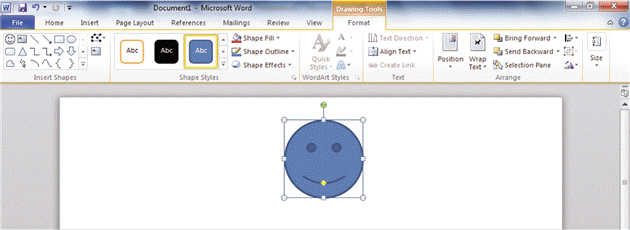 La figura OFF 1-1 muestra una forma seleccionada en Word. La pesta a de herramientas de dibujo que est seleccionada es una pesta a (de) ____.
 (Multiple Choice)
4.8/5 (76)
(76) To view Web pages, you need special software called a Web browser .
(True/False)
4.8/5 (83)
(83) Case OFF 1-1 Julia will be using the programs within Office 2010 to write, analyze, and present some research she is doing for her Doctorate degree. She is working on becoming comfortable with the items in the program window. Julia also learns that the main area that displays the file that you are working on is called the ____ area.
(Multiple Choice)
4.8/5 (79)
(79) Each program has a different file extension, which is a series of letters Office adds to the end of a file name that identifies in which program that file was created.
(True/False)
4.9/5 (78)
(78) Para moverse entre archivo abiertos, solo haga clic en el ____ de la barra de tareas, para el archivo que quiera ver.
(Multiple Choice)
5.0/5 (91)
(91) Se puede reducir la Cinta a una línea que muestra los nombres de las pestañas haciendo doble clic en cualquier pestaña o haciendo clic en el botón ____ de la Cinta.
(Multiple Choice)
4.8/5 (82)
(82) 
Filters
- Essay(0)
- Multiple Choice(0)
- Short Answer(0)
- True False(0)
- Matching(0)