



 Chat with AI
Exam 10: Excel Lesson 4: Entering Worksheet Formulas

Exam 1: Access Lesson 1: Microsoft Access Basics46 Questions
Exam 2: Access Lesson 2: Creating a Database46 Questions
Exam 3: Access Lesson 3: Creating Queries46 Questions
Exam 4: Access Lesson 4: Creating and Modifying Forms46 Questions
Exam 5: Access Lesson 5: Creating and Modifying Reports46 Questions
Exam 6: Access Lesson 6: Integrating Access46 Questions
Exam 7: Excel Lesson 1: Microsoft Excel Basics46 Questions
Exam 8: Excel Lesson 2: Changing the Appearance of a Worksheet46 Questions
Exam 9: Excel Lesson 3: Organizing the Worksheet46 Questions
Exam 10: Excel Lesson 4: Entering Worksheet Formulas46 Questions
Exam 11: Excel Lesson 5: Using Functions46 Questions
Exam 12: Excel Lesson 6: Enhancing a Worksheet46 Questions
Exam 13: Excel Lesson 7: Working With Multiple Worksheets and Workbooks46 Questions
Exam 14: Excel Lesson 8: Working With Charts46 Questions
Exam 15: Microsoft Office 2010 Basics and the Internet92 Questions
Exam 16: Outlook Lesson 1: Outlook Basics and E-Mail46 Questions
Exam 17: Outlook Lesson 2: Calendar46 Questions
Exam 18: Outlook Lesson 3: Working With Other Outlook Tools46 Questions
Exam 19: Powerpoint Lesson 1: Microsoft Powerpoint Basics46 Questions
Exam 20: Powerpoint Lesson 2: Creating Enhancing Powerpoint Presentations46 Questions
Exam 21: Powerpoint Lesson 3: Working With Visual Elements46 Questions
Exam 22: Powerpoint Lesson 4: Expanding on Powerpoint Basics46 Questions
Exam 23: Publisher Lesson 1: Microsoft Publisher Basics46 Questions
Exam 24: Publisher Lesson 2: Enhancing Publisher Documents46 Questions
Exam 25: Introduction Lesson 1: Microsoft Windows 7 Basics46 Questions
Exam 26: Word Lesson 1: Microsoft Word Basics46 Questions
Exam 27: Word Lesson 2: Basic Editing46 Questions
Exam 28: Word Lesson 3: Helpful Word Features46 Questions
Exam 29: Word Lesson 4: Formatting Text46 Questions
Exam 30: Word Lesson 5: Formatting Paragraphs and Documents46 Questions
Exam 31: Word Lesson 6: Working With Graphics46 Questions
Exam 32: Word Lesson 7: Working With Documents46 Questions
Exam 33: Word Lesson 8: Increasing Efficiency Using Word46 Questions
Select questions type


You can include cell references in a formula more quickly by using the point-and-click method to click each cell, rather than typing cell references.
(True/False)
4.8/5  (68)
(68) When the formula =$A$3+$A$4 in cell A5 is copied to cell B7, the formula is ____.
(Multiple Choice)
4.9/5 (71)
(71) Case EX 4-2 Ben is copying some formulas and wants to make sure he has the cell references correct. Ben also wants to copy a formula from the bottom of the spreadsheet and put it at the top of the spreadsheet in a summary section. He wants the formula to stay exactly the same and result in the same figure. What type of cell reference should Ben use?
(Multiple Choice)
4.7/5 (87)
(87) FIGURE EX 4-1 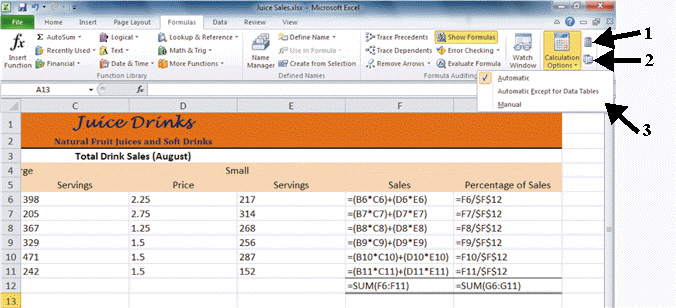 In Figure EX 4-1 above, number 3 is pointing to the ____ menu.
 (Multiple Choice)
4.8/5 (72)
(72) COUNT CELLS determine how many entries are included in the range.
(True/False)
4.7/5 (76)
(76) Although Excel checks that the formula has the correct structure, it does not check that the formula contains the correct values or cell references.
(True/False)
4.8/5 (93)
(93) 
Filters
- Essay(0)
- Multiple Choice(0)
- Short Answer(0)
- True False(0)
- Matching(0)