



 Chat with AI
Exam 9: Excel Lesson 3: Organizing the Worksheet

Exam 1: Access Lesson 1: Microsoft Access Basics46 Questions
Exam 2: Access Lesson 2: Creating a Database46 Questions
Exam 3: Access Lesson 3: Creating Queries46 Questions
Exam 4: Access Lesson 4: Creating and Modifying Forms46 Questions
Exam 5: Access Lesson 5: Creating and Modifying Reports46 Questions
Exam 6: Access Lesson 6: Integrating Access46 Questions
Exam 7: Excel Lesson 1: Microsoft Excel Basics46 Questions
Exam 8: Excel Lesson 2: Changing the Appearance of a Worksheet46 Questions
Exam 9: Excel Lesson 3: Organizing the Worksheet46 Questions
Exam 10: Excel Lesson 4: Entering Worksheet Formulas46 Questions
Exam 11: Excel Lesson 5: Using Functions46 Questions
Exam 12: Excel Lesson 6: Enhancing a Worksheet46 Questions
Exam 13: Excel Lesson 7: Working With Multiple Worksheets and Workbooks46 Questions
Exam 14: Excel Lesson 8: Working With Charts46 Questions
Exam 15: Microsoft Office 2010 Basics and the Internet92 Questions
Exam 16: Outlook Lesson 1: Outlook Basics and E-Mail46 Questions
Exam 17: Outlook Lesson 2: Calendar46 Questions
Exam 18: Outlook Lesson 3: Working With Other Outlook Tools46 Questions
Exam 19: Powerpoint Lesson 1: Microsoft Powerpoint Basics46 Questions
Exam 20: Powerpoint Lesson 2: Creating Enhancing Powerpoint Presentations46 Questions
Exam 21: Powerpoint Lesson 3: Working With Visual Elements46 Questions
Exam 22: Powerpoint Lesson 4: Expanding on Powerpoint Basics46 Questions
Exam 23: Publisher Lesson 1: Microsoft Publisher Basics46 Questions
Exam 24: Publisher Lesson 2: Enhancing Publisher Documents46 Questions
Exam 25: Introduction Lesson 1: Microsoft Windows 7 Basics46 Questions
Exam 26: Word Lesson 1: Microsoft Word Basics46 Questions
Exam 27: Word Lesson 2: Basic Editing46 Questions
Exam 28: Word Lesson 3: Helpful Word Features46 Questions
Exam 29: Word Lesson 4: Formatting Text46 Questions
Exam 30: Word Lesson 5: Formatting Paragraphs and Documents46 Questions
Exam 31: Word Lesson 6: Working With Graphics46 Questions
Exam 32: Word Lesson 7: Working With Documents46 Questions
Exam 33: Word Lesson 8: Increasing Efficiency Using Word46 Questions
Select questions type


To check the spelling in a worksheet, click the Review tab on the Ribbon, and then, in the ____ group, click the Spelling button.
(Multiple Choice)
4.8/5  (84)
(84) If Excel incorrectly flags a word that you use frequently as a misspelling, you can add the word to a custom dictionary that resides on your computer by clicking the ____ button.
(Multiple Choice)
4.9/5 (83)
(83) ____ enables you to resize a worksheet to print on a specific number of pages.
(Multiple Choice)
4.7/5 (70)
(70) To move cell contents, select the cell or range whose contents you want to move. Then, click the Cut button in the ____ group on the Home tab of the Ribbon.
(Multiple Choice)
4.9/5 (81)
(81) Worksheets printed in ____ orientation are wider than they are long.
(Multiple Choice)
4.9/5 (69)
(69) On the Home tab of the Ribbon, the ____ group includes buttons for inserting and deleting rows, columns, and cells.
(Multiple Choice)
4.8/5 (75)
(75) A ____ is text that prints in the bottom margin of each page.
(Multiple Choice)
4.9/5 (71)
(71) To change the margins of a worksheet, click the Page Layout tab on the Ribbon, and then, in the ____ group, click the Margins button.
(Multiple Choice)
4.7/5 (70)
(70) By default, ____________________, row numbers, and column letters appear in the worksheet-but not on the printed page-to help you enter and format data.
(Short Answer)
4.7/5 (67)
(67) The ____________________ group on the Page Layout tab contains three options for resizing a worksheet.
(Short Answer)
4.8/5 (79)
(79) Worksheets printed in landscape orientation are longer than they are wide.
(True/False)
5.0/5 (83)
(83) Case EX 3-1 Vanessa is learning how to split a worksheet window. To resize the panes, what should Vanessa do?
(Multiple Choice)
4.8/5 (81)
(81) Case EX 3-1 Vanessa is learning how to split a worksheet window. What should Vanessa do to start the process of splitting a window horizontally?
(Multiple Choice)
4.9/5 (69)
(69) To help track down and correct spelling errors in a worksheet, you can use the Find command.
(True/False)
4.8/5 (78)
(78) ____________________ divides the worksheet window into two or four panes that you can scroll independently.
(Short Answer)
4.8/5 (84)
(84) FIGURE EX 3-1 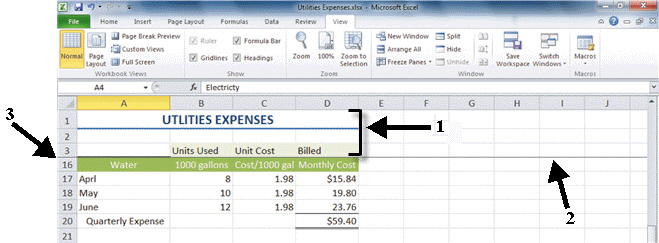 The line marked with the number 2 in Figure EX 3-1 above, indicates the ____.
 (Multiple Choice)
4.8/5 (86)
(86) 
Filters
- Essay(0)
- Multiple Choice(0)
- Short Answer(0)
- True False(0)
- Matching(0)