



 Chat with AI
Exam 3: Getting Started With Microsoft Office 2013

Exam 1: Getting Started With Windows 866 Questions
Exam 2: Understanding File Management65 Questions
Exam 3: Getting Started With Microsoft Office 201371 Questions
Exam 4: Creating a Document71 Questions
Exam 5: Enhancing a Document68 Questions
Exam 6: Adding Special Elements to a Document66 Questions
Exam 7: Creating and Enhancing a Worksheet66 Questions
Exam 8: Using Complex Formulas, Functions, and Tables66 Questions
Exam 9: Working With Charts66 Questions
Exam 10: Creating a Database66 Questions
Exam 11: Working With Data65 Questions
Exam 12: Creating Database Reports62 Questions
Exam 13: Creating a Presentation62 Questions
Exam 14: Polishing and Running a Presentation66 Questions
Exam 15: Integrating Office Programs59 Questions
Exam 16: Working in the Cloud52 Questions
Exam 17: Understaning Essential Unit Concepts62 Questions
Select questions type


Microsoft Word is a ____ program you can use to create text documents, such as letters, memos, newsletters, and reports.
(Multiple Choice)
4.9/5  (85)
(85) A(n) user interface is the collection of buttons and tools you use to interact with a software program
(True/False)
4.8/5 (71)
(71) The toolbar is the band directly below the title bar that contains commands in the form of buttons, icons, lists, galleries, and text boxes
(True/False)
4.8/5 (91)
(91) In order to keep a document permanently so that you can access it later, where do you need to store it?
(Multiple Choice)
4.9/5 (70)
(70) The buttons on the _____ toolbar are available anytime except when the FILE tab is active.
(Multiple Choice)
4.9/5 (87)
(87) Click the Close button at the far right of the title bar to close the document and the app.
(True/False)
4.9/5 (87)
(87) When you click Blank document in the Start screen, the Start screen closes and a new blank document appears on screen in the Word app window.
(True/False)
4.9/5 (87)
(87) Critical Thinking Questions
Case 1-1
Your company recently upgraded to Microsoft Office 2013. Your supervisor has asked you to explain some of the new features in Microsoft Word. You start out with a blank Word document window.
What is the name of the flashing vertical bar that appears in the blank part of the window?
(Multiple Choice)
4.8/5 (83)
(83) Press ____ to place the insertion point at the end of the document.
(Multiple Choice)
4.9/5 (63)
(63)  In the accompanying figure, item 3 points to the ____.
Zooming affects the content in a file, not just the view of the file.
(True/False)
4.8/5 (68)
(68) 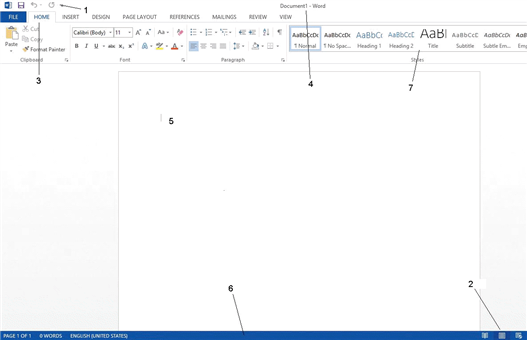 In the accompanying figure, item 5 appears next to the ____.
 (Multiple Choice)
4.9/5 (96)
(96) When using a touch screen device, which basic gesture means that you move two fingers apart?
(Multiple Choice)
4.9/5 (87)
(87)  In the accompanying figure, item 4 points to the ____.
When using a touch screen device, the _______ basic gesture means that you move your finger from left to right.
(Short Answer)
4.9/5 (76)
(76) When you save a file, the app automatically assigns it a file ____.
(Multiple Choice)
4.7/5 (78)
(78) Critical Thinking Questions
Case 1-1
Your company recently upgraded to Microsoft Office 2013. Your supervisor has asked you to explain some of the new features in Microsoft Word. You start out with a blank Word document window.
Your supervisor notices that common action items, like saving a file, can be accessed very quickly. What tool at the top of the screen makes this possible?
(Multiple Choice)
4.8/5 (82)
(82) When you want to work on a document on which you have worked recently, you can quickly open it by clicking the file name in the Recent section of the app's start screen.
(True/False)
4.9/5 (84)
(84) 
Filters
- Essay(0)
- Multiple Choice(0)
- Short Answer(0)
- True False(0)
- Matching(0)