



 Chat with AI
Exam 17: Powerpoint 2: Modifying a Presentation

Exam 1: Access 1: Getting Started With Access75 Questions
Exam 2: Access 2: Building and Using Queries74 Questions
Exam 3: Access 3: Using Forms75 Questions
Exam 4: Access 4: Using Reports75 Questions
Exam 5: Essential: Understanding Essential Computer Concepts75 Questions
Exam 6: Excel 1: Getting Started With Excel 201675 Questions
Exam 7: Excel 2: Working With Formulas and Functions75 Questions
Exam 8: Excel 3: Formatting a Worksheet75 Questions
Exam 9: Excel 4: Working With Charts75 Questions
Exam 10: Integration 1: Integrating Word and Excel75 Questions
Exam 11: Integration 2: Integrating Word Excel and Access75 Questions
Exam 12: Integration 3: Integrating Word Excel Access and Powerpoint75 Questions
Exam 13: Office: Getting Started With Office 201675 Questions
Exam 14: Outlook 1: Getting Started With Email75 Questions
Exam 15: Outlook 2: Managing Information Using Outlook75 Questions
Exam 16: Powerpoint 1: Creating a Presentation in Powerpoint 201675 Questions
Exam 17: Powerpoint 2: Modifying a Presentation75 Questions
Exam 18: Powerpoint 3: Inserting Objects Into a Presentation75 Questions
Exam 19: Powerpoint 4: Finishing a Presentation75 Questions
Exam 20: Windows 1: Getting Started With Windows 1075 Questions
Exam 21: Windows 2: Understanding File Management75 Questions
Exam 22: Word 1: Creating Documents With Word 201675 Questions
Exam 23: Word 2: Editing Documents75 Questions
Exam 24: Word 3: Formatting Text and Paragraphs75 Questions
Exam 25: Word 4: Formatting Documents75 Questions
Select questions type


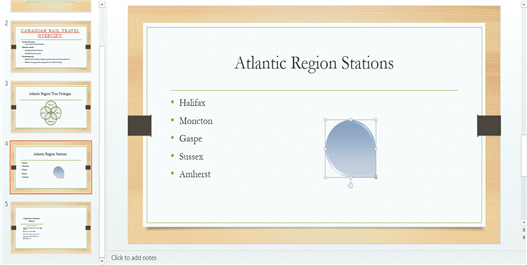 In the accompanying figure, the small vertical line that is sticking down from the rectangular graphic is the ____.
 (Multiple Choice)
4.7/5  (79)
(79) In the PowerPoint rulers, the current location of the cursor is identified by a small ____ in the ruler.
(Multiple Choice)
4.8/5 (78)
(78) A ____ graphic is a professional-quality diagram that visually illustrates text.
(Multiple Choice)
4.9/5 (75)
(75) In PowerPoint, it is possible to combine several shapes together to make a more complex figure.
(True/False)
4.9/5 (75)
(75) The ____ toolbar is convenient to use for formatting text when the HOME tab is closed.
(Multiple Choice)
4.8/5 (94)
(94) Match each term below with the statement that best defines it.
Premises:
Makes it easy to move objects
Responses:
Group command
Bring to Front command
Mini toolbar
Correct Answer: Verified
Premises:
Responses:
(Matching)
4.9/5 (72)
(72) 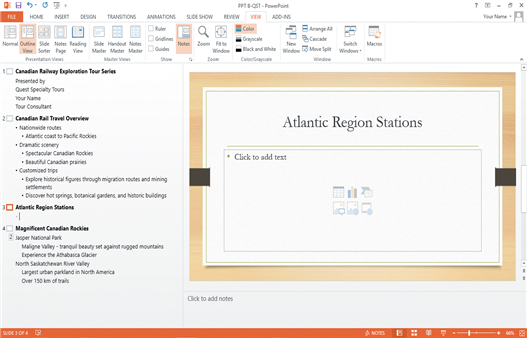 In the accompanying figure, slide 4 is selected in the slide pane.
 (True/False)
4.8/5 (80)
(80) The placement of footer text objects on a slide is dependent upon the presentation ____________________.
(Short Answer)
4.7/5 (90)
(90) 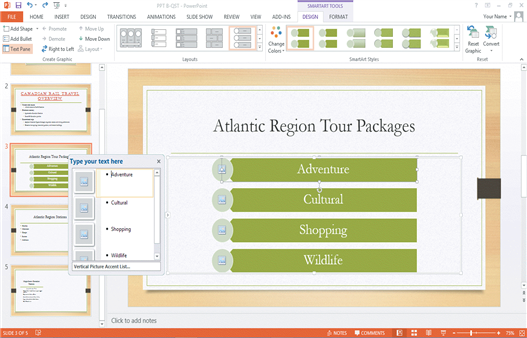 As seen in the accompanying figure, when you insert a SmartArt graphic, a new SMARTART TOOLS DISPLAY tab opens on the Ribbon. _________________________
 (True/False)
4.8/5 (62)
(62) Match each term below with the statement that best defines it.
Premises:
Displays the computer's measurement system
Responses:
Mini toolbar
ruler
Align command
Correct Answer:Verified
VerifiedPremises:
Responses:
(Matching)
4.9/5 (79)
(79) You can press and hold ____ to turn off the snap-to-grid feature while dragging objects on a slide.
(Multiple Choice)
4.7/5 (55)
(55) 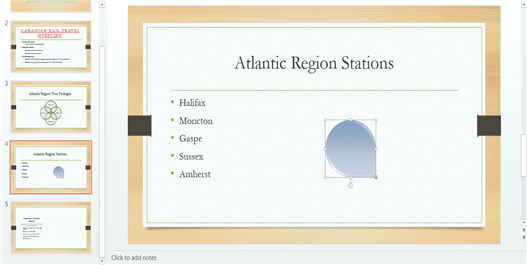 In the accompanying figure, the yellow circle in the lower-right corner of the rectangular graphic is a(n) ____.
 (Multiple Choice)
4.9/5 (71)
(71) Some objects have an adjustment handle that can be moved to change the ____ of the object.
(Multiple Choice)
4.8/5 (87)
(87) 
Filters
- Essay(0)
- Multiple Choice(0)
- Short Answer(0)
- True False(0)
- Matching(0)