



 Chat with AI
Exam 17: Powerpoint 2: Modifying a Presentation

Exam 1: Access 1: Getting Started With Access75 Questions
Exam 2: Access 2: Building and Using Queries74 Questions
Exam 3: Access 3: Using Forms75 Questions
Exam 4: Access 4: Using Reports75 Questions
Exam 5: Essential: Understanding Essential Computer Concepts75 Questions
Exam 6: Excel 1: Getting Started With Excel 201675 Questions
Exam 7: Excel 2: Working With Formulas and Functions75 Questions
Exam 8: Excel 3: Formatting a Worksheet75 Questions
Exam 9: Excel 4: Working With Charts75 Questions
Exam 10: Integration 1: Integrating Word and Excel75 Questions
Exam 11: Integration 2: Integrating Word Excel and Access75 Questions
Exam 12: Integration 3: Integrating Word Excel Access and Powerpoint75 Questions
Exam 13: Office: Getting Started With Office 201675 Questions
Exam 14: Outlook 1: Getting Started With Email75 Questions
Exam 15: Outlook 2: Managing Information Using Outlook75 Questions
Exam 16: Powerpoint 1: Creating a Presentation in Powerpoint 201675 Questions
Exam 17: Powerpoint 2: Modifying a Presentation75 Questions
Exam 18: Powerpoint 3: Inserting Objects Into a Presentation75 Questions
Exam 19: Powerpoint 4: Finishing a Presentation75 Questions
Exam 20: Windows 1: Getting Started With Windows 1075 Questions
Exam 21: Windows 2: Understanding File Management75 Questions
Exam 22: Word 1: Creating Documents With Word 201675 Questions
Exam 23: Word 2: Editing Documents75 Questions
Exam 24: Word 3: Formatting Text and Paragraphs75 Questions
Exam 25: Word 4: Formatting Documents75 Questions
Select questions type


A shape color's red, green, and blue (RGB) values are also known as its ____.
(Multiple Choice)
4.8/5  (84)
(84) A(n) ____________________ allows you to manually rotate a shape.
(Short Answer)
5.0/5 (95)
(95) The Font Color gallery includes Theme Colors and the ____ Colors.
(Multiple Choice)
4.8/5 (79)
(79) 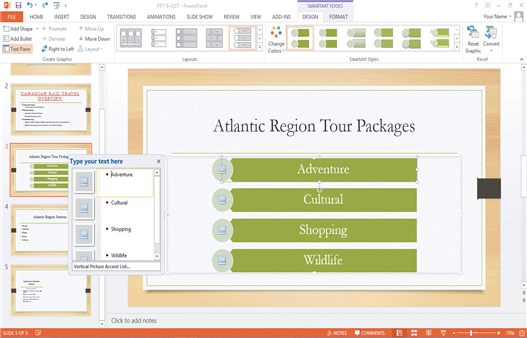 The accompanying figure shows text converted into a(n) Clip Art graphic. _________________________
 (True/False)
4.9/5 (71)
(71) Instead of changing individual attributes, you can apply a Quick Style to a ____.
(Multiple Choice)
4.9/5 (70)
(70) The PowerPoint guides appear as dotted lines on a slide and usually intersect at the ____ of a slide.
(Multiple Choice)
4.9/5 (84)
(84) As you move the pointer over font names in the font list, the text on the slide displays a ____ of the different font choices.
(Multiple Choice)
4.9/5 (75)
(75) Case-Based Critical Thinking Questions Case 1 Hannah has been hired as a graphics consultant for a company that is struggling with PowerPoint 2016. They are looking for ways to improve their graphics but maintain a professional appearance to their presentations. Hannah would also like to add a special effect to the arrows to improve their appearance, so she clicks the ____.
(Multiple Choice)
4.9/5 (83)
(83) Some SmartArt graphic layouts are limited by the number of ____________________ they can accommodate.
(Short Answer)
4.8/5 (85)
(85) A SmartArt Theme is a preset combination of simple and 3-D formatting options that follows the presentation theme. _________________________
(True/False)
4.8/5 (87)
(87) To add a new guide to the slide, press ____________________, and then drag an existing guide.
(Short Answer)
4.8/5 (78)
(78) You can radically change how a SmartArt graphic looks by applying a SmartArt ____.
(Multiple Choice)
4.8/5 (90)
(90) Every object on a slide, whether it is a text object, a shape, a chart, a picture, or any other object, is ____________________ on the slide in the order it was created.
(Short Answer)
4.9/5 (73)
(73) Match each term below with the statement that best defines it.
Premises:
Moves items in a stack
Responses:
Bring to Front command
Group command
Align command
Correct Answer: Verified
Premises:
Responses:
(Matching)
4.8/5 (69)
(69) 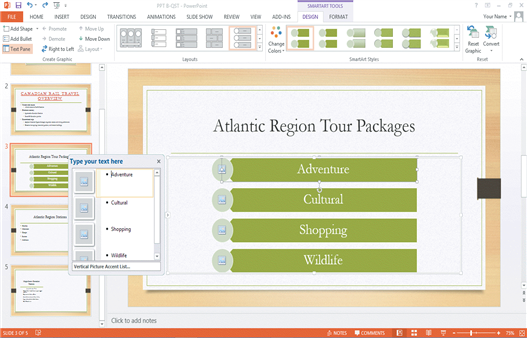 As seen in the accompanying figure, a SmartArt graphic consists of two parts: the SmartArt graphic itself and a(n) Text pane._________________________
 (True/False)
5.0/5 (88)
(88) There are nine basic categories of SmartArt graphics that illustrate text differently.
(True/False)
4.8/5 (78)
(78) The Convert to SmartArt Graphic button is in the ____ group.
(Multiple Choice)
4.9/5 (81)
(81) 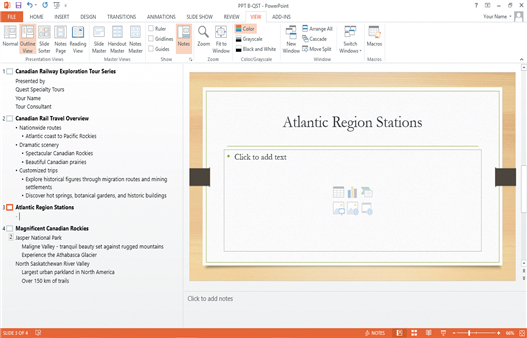 In the accompanying figure, it is possible to convert the last bullet in slide 4 to become the 5th slide.
 (True/False)
4.8/5 (79)
(79) To evenly space objects horizontally or vertically relative to each other or to the slide is to ____________________ them.
(Short Answer)
4.9/5 (79)
(79) 
Filters
- Essay(0)
- Multiple Choice(0)
- Short Answer(0)
- True False(0)
- Matching(0)