



 Chat with AI
Exam 17: Powerpoint 2: Modifying a Presentation

Exam 1: Access 1: Getting Started With Access75 Questions
Exam 2: Access 2: Building and Using Queries74 Questions
Exam 3: Access 3: Using Forms75 Questions
Exam 4: Access 4: Using Reports75 Questions
Exam 5: Essential: Understanding Essential Computer Concepts75 Questions
Exam 6: Excel 1: Getting Started With Excel 201675 Questions
Exam 7: Excel 2: Working With Formulas and Functions75 Questions
Exam 8: Excel 3: Formatting a Worksheet75 Questions
Exam 9: Excel 4: Working With Charts75 Questions
Exam 10: Integration 1: Integrating Word and Excel75 Questions
Exam 11: Integration 2: Integrating Word Excel and Access75 Questions
Exam 12: Integration 3: Integrating Word Excel Access and Powerpoint75 Questions
Exam 13: Office: Getting Started With Office 201675 Questions
Exam 14: Outlook 1: Getting Started With Email75 Questions
Exam 15: Outlook 2: Managing Information Using Outlook75 Questions
Exam 16: Powerpoint 1: Creating a Presentation in Powerpoint 201675 Questions
Exam 17: Powerpoint 2: Modifying a Presentation75 Questions
Exam 18: Powerpoint 3: Inserting Objects Into a Presentation75 Questions
Exam 19: Powerpoint 4: Finishing a Presentation75 Questions
Exam 20: Windows 1: Getting Started With Windows 1075 Questions
Exam 21: Windows 2: Understanding File Management75 Questions
Exam 22: Word 1: Creating Documents With Word 201675 Questions
Exam 23: Word 2: Editing Documents75 Questions
Exam 24: Word 3: Formatting Text and Paragraphs75 Questions
Exam 25: Word 4: Formatting Documents75 Questions
Select questions type


The ____________________ handle is a small yellow diamond used for changing the most prominent feature of an object.
(Short Answer)
4.7/5  (83)
(83) When you are working in Outline view, a new slide is created when you press [Shift][Tab].
(True/False)
4.9/5 (78)
(78) Case-Based Critical Thinking Questions Case 1 Hannah has been hired as a graphics consultant for a company that is struggling with PowerPoint 2016. They are looking for ways to improve their graphics but maintain a professional appearance to their presentations. Hannah looks at the first slide, which shows three bulleted words: Phase 1, Phase 2, and Phase 3. She decides that she can keep this same information but make it more interesting by ____.
(Multiple Choice)
4.8/5 (63)
(63) If you choose to distribute objects relative to each other, PowerPoint will evenly divide the empty space among all the selected objects.
(True/False)
4.9/5 (85)
(85) Match each term below with the statement that best defines it.
Premises:
Snaps objects to a grid of evenly spaced vertical and horizontal lines
Responses:
ruler
Group command
Mini toolbar
Correct Answer: Verified
Premises:
Responses:
(Matching)
4.9/5 (83)
(83) 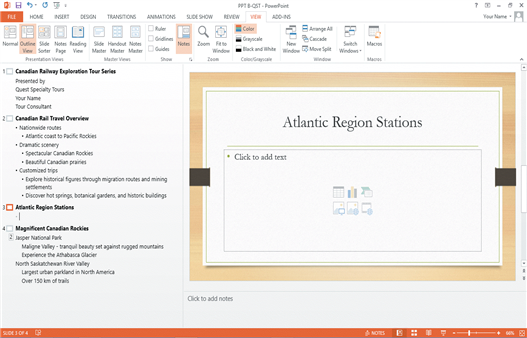 In the accompanying figure, slide 1 has 3 second-level bullets.
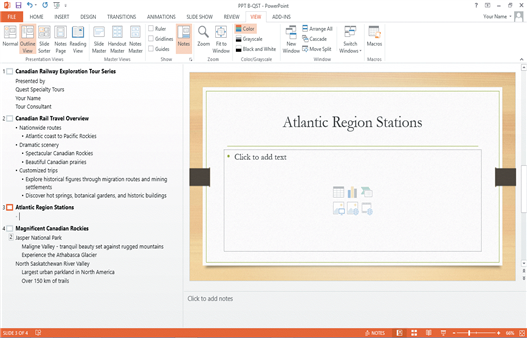 In the accompanying figure, slide 3 has only 1 content placeholder.
 (True/False)
4.9/5 (86)
(86) To create superscript text in PowerPoint, select the text, number, or symbol, and then press ____ at the same time.
(Multiple Choice)
4.8/5 (68)
(68) 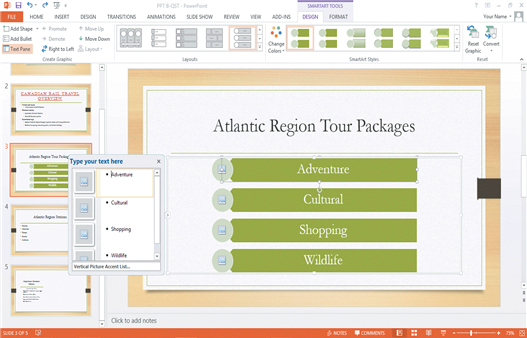 In the accompanying figure, the box that says "Type your text here" is called a(n) text pane . _________________________
 (True/False)
4.9/5 (73)
(73) Pressing [Shift] as you drag to create a shape maintains the shape's ____ as you change its size.
(Multiple Choice)
4.8/5 (83)
(83) It is impossible open a PowerPoint 97-2007 presentation in PowerPoint 2016.
(True/False)
4.9/5 (78)
(78) A SmartArt graphic consists of two parts: the SmartArt graphic itself and a(n) ____ pane.
(Multiple Choice)
4.8/5 (91)
(91) Design styles are organized into sections; the top group offers suggestions for the best match for the document, and the bottom group shows you all of the possible 3-D styles that are available. _________________________
(True/False)
4.7/5 (88)
(88) Case-Based Critical Thinking Questions Case 1 Hannah has been hired as a graphics consultant for a company that is struggling with PowerPoint 2016. They are looking for ways to improve their graphics but maintain a professional appearance to their presentations. Hannah displays the two guides on the slide and creates an additional guide by ____.
(Multiple Choice)
4.9/5 (69)
(69) Case-Based Critical Thinking Questions Case 1 Hannah has been hired as a graphics consultant for a company that is struggling with PowerPoint 2016. They are looking for ways to improve their graphics but maintain a professional appearance to their presentations. To secure the arrows' positions and to move them easily, Hannah ____ them.
(Multiple Choice)
4.9/5 (77)
(77) If you press [ Tab ] as you drag to create a shape, the shape maintains even proportions. _________________________
(True/False)
4.7/5 (81)
(81) A Quick Format is a set of formatting options, including line style, fill color, and effects. _________________________
(True/False)
4.7/5 (87)
(87) There are three types of footer text: Date and time, ____________________, and Footer.
(Short Answer)
4.9/5 (77)
(77) Merging shapes, which combines multiple shapes together, provides you the potential to create a variety of unique geometric shapes that are not available in the Shapes gallery.
(True/False)
4.8/5 (91)
(91) To select an unselected text object, press [____], click the text object, and then release [____].
(Multiple Choice)
5.0/5 (69)
(69) 
Filters
- Essay(0)
- Multiple Choice(0)
- Short Answer(0)
- True False(0)
- Matching(0)