



 Chat with AI
Exam 21: Enhancing a Presentation

Exam 1: Introduction to Computers and the Internet74 Questions
Exam 2: Computer Hardware78 Questions
Exam 3: Computer Software75 Questions
Exam 4: Computer Networks75 Questions
Exam 5: The Internet and Email75 Questions
Exam 6: Security and Privacy74 Questions
Exam 7: Exploring Windows 10 and Managing Files82 Questions
Exam 8: Using Edge Mail and People74 Questions
Exam 9: Introducing Microsoft Office 201674 Questions
Exam 10: Creating a Document74 Questions
Exam 11: Formatting a Long Document74 Questions
Exam 12: Enhancing a Document74 Questions
Exam 13: Creating a Workbook74 Questions
Exam 14: Working With Formulas and Functions77 Questions
Exam 15: Creating an Advanced Workbook74 Questions
Exam 16: Inserting and Formatting Charts74 Questions
Exam 17: Creating a Database74 Questions
Exam 18: Maintaining and Querying a Database74 Questions
Exam 19: Creating Forms and Reports74 Questions
Exam 20: Creating Apresentation76 Questions
Exam 21: Enhancing a Presentation74 Questions
Exam 22: Integrating Word, Excel, Access and Powerpoint74 Questions
Select questions type


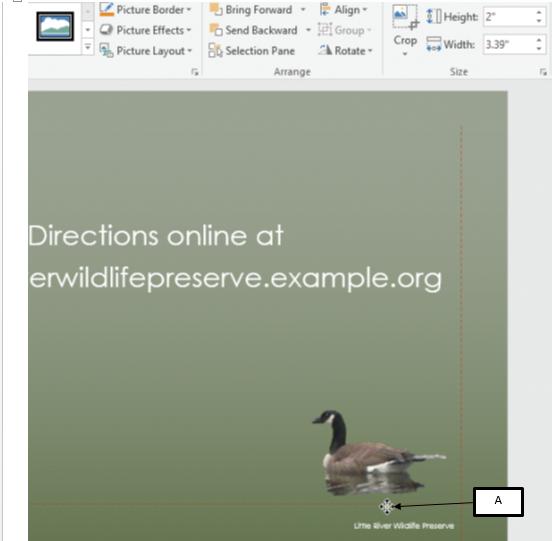
In the accompanying figure of Microsoft PowerPoint 2016, Box A points to a _____ that is used to reposition an image in a slide.
(Multiple Choice)
4.9/5  (69)
(69) When you save a presentation that contains photos, PowerPoint automatically compresses the photos to a resolution of 300 pixels per inch (ppi).
(True/False)
4.8/5 (67)
(67) Case 21-2:
Han, an environmental lawyer, travels around the United States to create awareness and propagate the environmental law. She presents such information in various institutes on PowerPoint slides.
Han is asked to address a group of university students on the importance of being aware of environmental laws. After creating the presentation, Han wishes to modify it such that, in the slide show, each shape in the SmartArt appears as random bars that combine together to form the complete shape with contents. In this scenario, Han should click the _____ tab.
(Multiple Choice)
4.8/5 (94)
(94) Case 21-1
Roger has been recently appointed as a team lead in an IT firm. He often needs to make PowerPoint presentations to discuss the team's progress, project related details, etc. Microsoft PowerPoint is used to present data in a crisp manner. Hence, the software allows a user to add images and other graphics to enhance the visual appeal.
Roger needs to create a PowerPoint presentation on the process flow followed in his team to complete each task. In this scenario, Roger needs to use the _____ tool to present the process flow using graphics.
(Multiple Choice)
4.8/5 (78)
(78) Susan, a Human Resource manager at FirstPro Techologies, creates a PowerPoint presentation to show the attrition rate in the company. In one of the slides, she wants to reduce the size of the text placeholder to accommodate an image. In this scenario, Susan should _____ to reduce the size of the placeholders.
(Multiple Choice)
4.9/5 (81)
(81) Once you finish modifying the slide master, it is not recommended to view your slides in the normal view.
(True/False)
4.8/5 (84)
(84) To align a selected text to the right on a Microsoft PowerPoint slide, click the _________ tab on the ribbon, and then in the Paragraph group, click the Align Right button .
A)Home
B)Review
C)Insert
D)Design
(Short Answer)
4.9/5 (73)
(73) You cannot create a Matrix showing information in a grid using SmartArt.
(True/False)
4.9/5 (70)
(70) In Microsoft PowerPoint, you can use options on the _________ button menu to soften details in a photo or adjust the brightness and contrast to change the difference between dark and light areas in the photo.
A)Reset Picture
B)Corrections
C)Artistic Effects
D)Color
(Short Answer)
4.8/5 (75)
(75) In addition to the slide masters, a Microsoft PowerPoint 2016 presentation has a _________ that contains the elements that appear on all printed brochure.
A)black page
B)notes page
C)notes master
D)handouts master
(Short Answer)
4.7/5 (87)
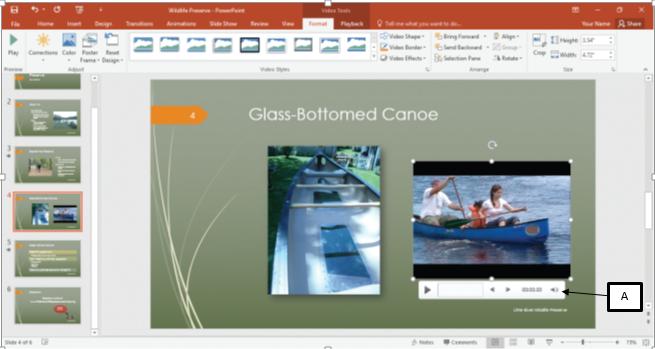
(87) In the accompanying image of Microsoft PowerPoint 2016, Box A points to the _____.
(Multiple Choice)
4.8/5 (89)
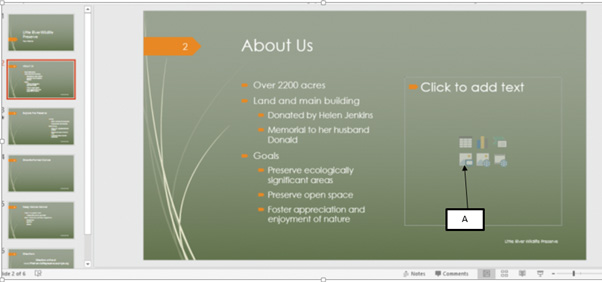
(89) In the accompanying image of Microsoft PowerPoint 2016, Box A points to the _____ button.
(Multiple Choice)
4.9/5 (67)
(67) Case 21-1
Roger has been recently appointed as a team lead in an IT firm. He often needs to make PowerPoint presentations to discuss the team's progress, project related details, etc. Microsoft PowerPoint is used to present data in a crisp manner. Hence, the software allows a user to add images and other graphics to enhance the visual appeal.
Roger creates a presentation to represent the growth structure followed in the company that is linked to a central role. He wishes to represent the growth structure in grids. Which of the following type of SmartArt diagrams should Roger use?
(Multiple Choice)
5.0/5 (93)
(93) Sally, a professor, needs to speak to her students about corporate etiquette. She prepares a PowerPoint presentation to be able to convey her message using graphics. In one of the slides, Sally adds a video. She notices that the preview frame of the video is too large to accommodate other content on the slide. In this scenario, Sally should _____ to make the preview frame smaller.
(Multiple Choice)
4.8/5 (77)
(77) In Microsoft PowerPoint, you can change sequence effects for single objects like a picture or a shape.
(True/False)
4.9/5 (76)
(76) Explain how media files used in a PowerPoint presentation can be compressed.
(Essay)
4.7/5 (85)
(85) The Shapes button is located in the _____ group on the Insert tab.
(Multiple Choice)
4.9/5 (75)
(75) Lidya, an entrepreneur, creates a motivational PowerPoint presentation on leadership. She animates the heading on one of the slides. Lidya then animates an image on the same slide such that it is set to start With Previous. In this scenario, the animation sequence number of the image _____.
(Multiple Choice)
4.9/5 (83)
(83) Fiona, a technical manager, creates a PowerPoint presentation on the recent advancements in technology. She uses images to explain these technologies. While reviewing the slides, she realizes that the images used are dark and therefore intends to lighten the images. In this scenario, which of the following features should Fiona use to lighten the images?
(Multiple Choice)
4.9/5 (87)
(87) 
Filters
- Essay(0)
- Multiple Choice(0)
- Short Answer(0)
- True False(0)
- Matching(0)