



 Chat with AI
Exam 21: Enhancing a Presentation

Exam 1: Introduction to Computers and the Internet74 Questions
Exam 2: Computer Hardware78 Questions
Exam 3: Computer Software75 Questions
Exam 4: Computer Networks75 Questions
Exam 5: The Internet and Email75 Questions
Exam 6: Security and Privacy74 Questions
Exam 7: Exploring Windows 10 and Managing Files82 Questions
Exam 8: Using Edge Mail and People74 Questions
Exam 9: Introducing Microsoft Office 201674 Questions
Exam 10: Creating a Document74 Questions
Exam 11: Formatting a Long Document74 Questions
Exam 12: Enhancing a Document74 Questions
Exam 13: Creating a Workbook74 Questions
Exam 14: Working With Formulas and Functions77 Questions
Exam 15: Creating an Advanced Workbook74 Questions
Exam 16: Inserting and Formatting Charts74 Questions
Exam 17: Creating a Database74 Questions
Exam 18: Maintaining and Querying a Database74 Questions
Exam 19: Creating Forms and Reports74 Questions
Exam 20: Creating Apresentation76 Questions
Exam 21: Enhancing a Presentation74 Questions
Exam 22: Integrating Word, Excel, Access and Powerpoint74 Questions
Select questions type


Which of the following statements is true of adding text to a shape?

Free
(Multiple Choice)
4.8/5  (91)
(91) Correct Answer: Verified
A
Vivian, a doctor, creates a PowerPoint presentation on cardiac diseases. In one of the slides, he adds a video that plays for a minute. Vivian intends to shorten the length of the video. In this scenario, Vivian should _____.
Free
(Multiple Choice)
4.9/5 (82)
(82) Correct Answer:Verified
VerifiedD
Which of the following is an example of a graphic?
Free
(Multiple Choice)
5.0/5 (81)
(81) Correct Answer:Verified
VerifiedC
Identify a true statement about deleting a graphic in a theme on a PowerPoint slide.
(Multiple Choice)
4.8/5 (81)
(81) Case 21-1
Roger has been recently appointed as a team lead in an IT firm. He often needs to make PowerPoint presentations to discuss the team's progress, project related details, etc. Microsoft PowerPoint is used to present data in a crisp manner. Hence, the software allows a user to add images and other graphics to enhance the visual appeal.
Roger creates a PowerPoint presentation to show the productivity of his team in last week. He uses the SmartArt tool to make the presentation. While reviewing his presentation, Roger decides to change the color of the SmartArt shapes by choosing from a predefined combination of colors set for the SmartArt. In this scenario, Roger should click the _____ tab to change the color of the SmartArt shapes.
(Multiple Choice)
4.7/5 (85)
(85) Explain how a video can be inserted and formatted in a Microsoft PowerPoint slide.
(Essay)
4.7/5 (86)
(86) Identify a true statement about placeholders in Microsoft PowerPoint.
(Multiple Choice)
4.9/5 (68)
(68) In the accompanying image of Microsoft PowerPoint 2016, Box A points to the _____ placeholder.
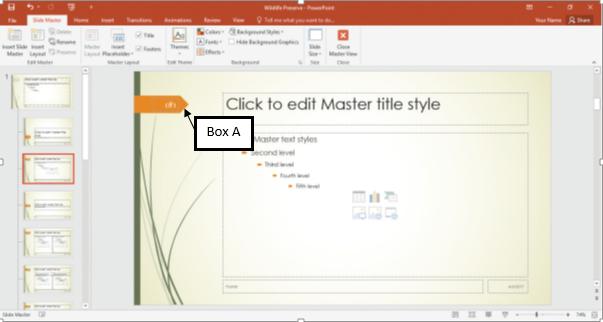
(Multiple Choice)
4.8/5 (82)
(82) A graphic is any textual content added to a PowerPoint slide. the Animations tab.
(True/False)
4.9/5 (72)
(72) In the accompanying image of Microsoft PowerPoint 2016, Box A points to the _____ placeholder.
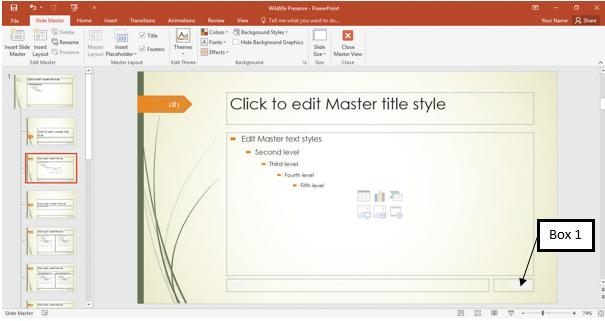
(Multiple Choice)
4.9/5 (77)
(77) In Microsoft PowerPoint, the _________ tab should be clicked to add shapes to a slide.
A)Insert
B)File
C)Design
D)Animations
(Short Answer)
4.8/5 (73)
(73) How do you save a PowerPoint presentation as a package presentation for CD and as a PDF?
(Essay)
4.9/5 (74)
(74) Identify a true statement about drawing a shape on a Microsoft PowerPoint slide.
(Multiple Choice)
4.8/5 (82)
(82) In Microsoft PowerPoint, you can animate any object on a slide, including photos, shapes, and SmartArt diagrams.
(True/False)
4.9/5 (72)
(72) Patricia, a researcher, is in the process of creating a PowerPoint presentation for her thesis. She includes a lot of pictures in the presentation. This made the presentation a large file making it difficult to share the file through email, etc. She decides to compress the images to reduce the size of her presentation. In this scenario, Patricia should click the _____ tab to compress the images.
(Multiple Choice)
4.9/5 (75)
(75) 
Filters
- Essay(0)
- Multiple Choice(0)
- Short Answer(0)
- True False(0)
- Matching(0)