



 Chat with AI
Exam 21: Enhancing a Presentation

Exam 1: Introduction to Computers and the Internet74 Questions
Exam 2: Computer Hardware78 Questions
Exam 3: Computer Software75 Questions
Exam 4: Computer Networks75 Questions
Exam 5: The Internet and Email75 Questions
Exam 6: Security and Privacy74 Questions
Exam 7: Exploring Windows 10 and Managing Files82 Questions
Exam 8: Using Edge Mail and People74 Questions
Exam 9: Introducing Microsoft Office 201674 Questions
Exam 10: Creating a Document74 Questions
Exam 11: Formatting a Long Document74 Questions
Exam 12: Enhancing a Document74 Questions
Exam 13: Creating a Workbook74 Questions
Exam 14: Working With Formulas and Functions77 Questions
Exam 15: Creating an Advanced Workbook74 Questions
Exam 16: Inserting and Formatting Charts74 Questions
Exam 17: Creating a Database74 Questions
Exam 18: Maintaining and Querying a Database74 Questions
Exam 19: Creating Forms and Reports74 Questions
Exam 20: Creating Apresentation76 Questions
Exam 21: Enhancing a Presentation74 Questions
Exam 22: Integrating Word, Excel, Access and Powerpoint74 Questions
Select questions type


In the accompanying image of Microsoft PowerPoint 2016, Box A points to the _____.
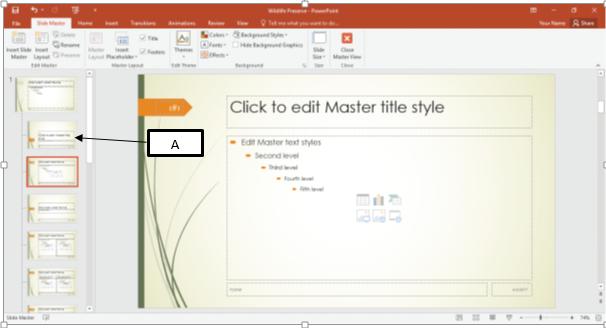
(Multiple Choice)
4.7/5  (77)
(77) Saving a PowerPoint presentation as a PowerPoint Show file causes the presentation to open only in Slide Show view.
(True/False)
4.7/5 (73)
(73) Case 21-2:
Han, an environmental lawyer, travels around the United States to create awareness and propagate the environmental law. She presents such information in various institutes on PowerPoint slides.
Han creates a PowerPoint presentation on the basic environmental laws. She uses animations to enhance her presentation. While practicing the presentation, she realizes that she needs to reorder the sequence of appearance of the objects in a slide. In this scenario, Han should use the _____ group in the Animations tab.
(Multiple Choice)
4.8/5 (92)
(92) Cheng, an economist, makes a PowerPoint presentation on the reasons for price inflation in the past year. She includes a video in her presentation and wishes to change the poster frame of the video. In this scenario, Cheng should click the _____ tab to change the poster frame of the video
(Multiple Choice)
4.9/5 (81)
(81) The _________ is the primary slide master, and text, graphics, and formatting on this slide master appear on all slides in a presentation.
A)layout master
B)theme Slide Master
C)handouts master
D)content Slide Master
(Short Answer)
4.7/5 (87)
(87) In Microsoft PowerPoint, _________ with predesigned layouts, are used to create diagrams easily and quickly.
A)online pictures
B)screen shots
C)photo albums
D. SmartArt diagrams
(Short Answer)
4.7/5 (89)
(89) Frank, a management consultant, creates a Microsoft PowerPoint presentation about different management styles. After making the PowerPoint slides, he wants to upload the presentation to a Web site in the form of a video. In this scenario, Frank should use the _____ function in the navigation tab in Backstage view to convert the presentation to a video format.
(Multiple Choice)
4.8/5 (65)
(65) A _________ is an illustration that visually depicts information or ideas and shows how they are connected.
A)diagram
B)conclusion
C)title
D)label
(Short Answer)
4.8/5 (84)
(84) Before distributing a presentation, you should consider inspecting it for hidden or private information by clicking the _________ button.
A)Inspect Presentation
B)Protect Presentation
C)Check for Issues
D)Publish SLides
(Short Answer)
4.9/5 (83)
(83) Case 21-2:
Han, an environmental lawyer, travels around the United States to create awareness and propagate the environmental law. She presents such information in various institutes on PowerPoint slides.
Han creates her first slide in her presentation - Content. This slide typically lists the headings and subheadings in the form of bullets and subpoints. Which of the following statements is true by default if Han animates the Content list? __ group in the Animations tab.
(Multiple Choice)
4.9/5 (67)
(67) O ptions on the Color button menu are used to adjust the color saturation.
(True/False)
4.8/5 (82)
(82) Anto, a doctoralstudent, is asked to present his thesis in PowerPoint. In his presentation, he uses images to support his work. While reviewing the presentation, he feels that few images look blurred and he needs to sharpen the images. In this scenario, Anto should click the _____ button on the Picture Tools Format tab.
(Multiple Choice)
4.9/5 (80)
(80) In Microsoft PowerPoint, you can change the order of animations by clicking the Move Earlier or Move Later button in the _________ group.
A)Advanced Animation
B)Timing
C)Preview
D)Animation
(Short Answer)
4.7/5 (98)
(98) Which of the following should be done if a graphic jumps from one location to another as you drag it and if you cannot position it exactly where you want it to be?
(Multiple Choice)
4.9/5 (80)
(80) Sheng, a manager in a company, wants to present the achievements of his team on PowerPoint. In the presentation, he intends to add the title "Achievements of the Year" to every slide at once. In this scenario, Sheng should make changes in the _____ view .
(Multiple Choice)
4.9/5 (85)
(85) In the accompanying figure of Microsoft PowerPoint 2016, Box A points to a _____ that can be deleted in Slide Master view.
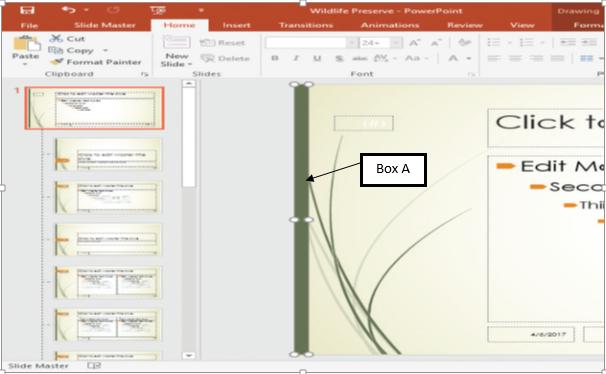
(Multiple Choice)
4.9/5 (63)
(63) When you save a presentation as a PDF file, each slide becomes a page in the PDF file by default.
(True/False)
5.0/5 (71)
(71) In Microsoft PowerPoint, the Crop button to crop a video is present in the _________ tab.
A)Video Tools Format
B)Video Tools Playback
C)Animations
D)Transitions
(Short Answer)
4.7/5 (69)
(69) 
Filters
- Essay(0)
- Multiple Choice(0)
- Short Answer(0)
- True False(0)
- Matching(0)