



 Chat with AI
Exam 10: Managing Long Documents

Exam 1: Creating and Editing a Document91 Questions
Exam 2: Navigating and Formatting a Document91 Questions
Exam 3: Creating Tables and a Multipage Report91 Questions
Exam 4: Enhancing Page Layout and Design91 Questions
Exam 5: Working With Templates, Themes, and Styles91 Questions
Exam 6: Using Mail Merge91 Questions
Exam 7: Collaborating With Others and Integrating Data91 Questions
Exam 8: Customizing Word and Automating Your Work91 Questions
Exam 9: Creating Online Forms Using Advanced Table Techniques91 Questions
Exam 10: Managing Long Documents91 Questions
Exam 11: Managing Your Files91 Questions
Select questions type


To create a subdocument, click the _______ button in the Master Document group.
(Multiple Choice)
4.9/5  (83)
(83) A(n) _______ is a list of captions for all the pictures, charts, graphs, slides or other illustrations in a document, along with the page number for each.
(Multiple Choice)
4.9/5 (94)
(94) You can create a chart using Excel from within a Word document by clicking the Chart button in the _______ group on the INSERT tab.
(Multiple Choice)
4.8/5 (77)
(77) When you mark a document as _______, all editing features are turned off and the document file becomes a read-only file.
(Multiple Choice)
4.7/5 (86)
(86) Scrolling two documents at once allows you to quickly assess the overall structure of two documents.
(True/False)
4.9/5 (75)
(75) 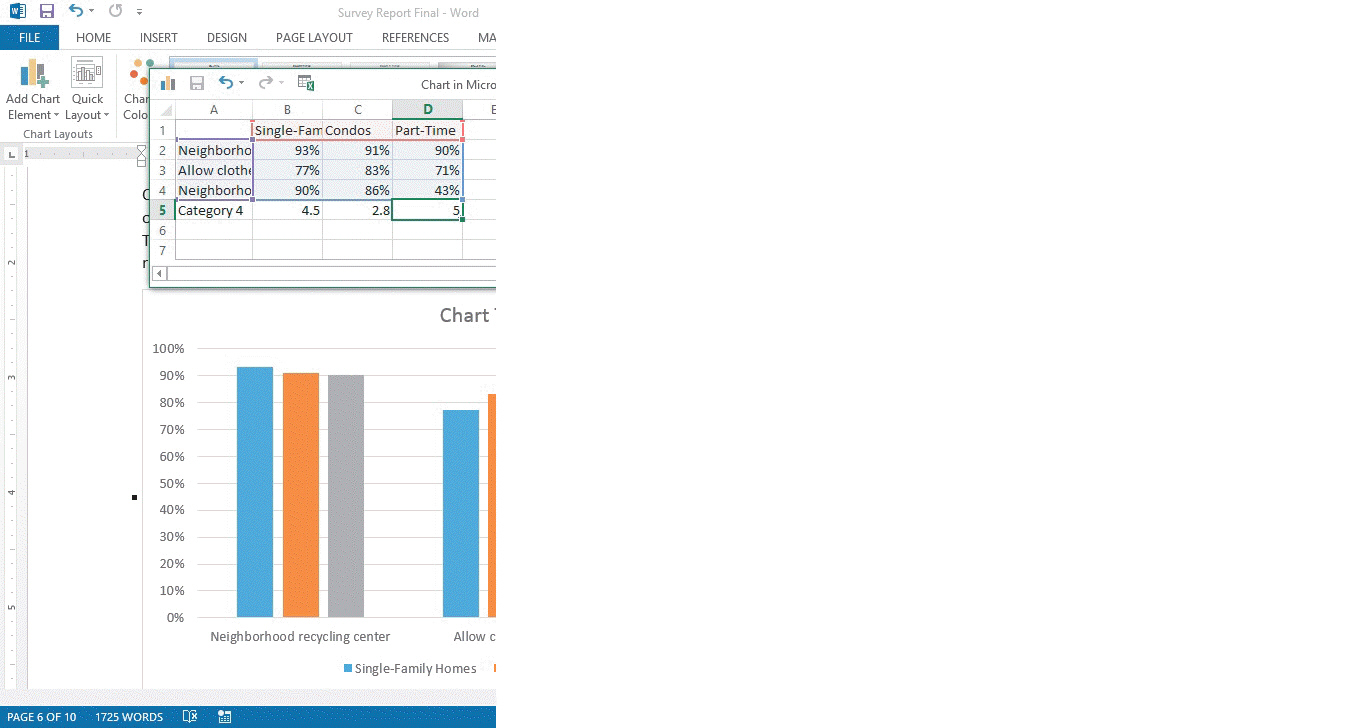 In a column chart like the one shown in the accompanying figure, one column or bar from each series grouped together is a(n) ____________________.
 (Short Answer)
4.7/5 (73)
(73) If a subdocument becomes too long and unwieldy, you can split it by dividing it into two document files.
(True/False)
4.9/5 (81)
(81) Word automatically inserts a _______ section break before a newly inserted subdocument.
(Multiple Choice)
4.8/5 (76)
(76) Case-Based Critical Thinking Questions Case 10-1 Tom and Sylvia have seven children. They record each child's birthday party details in Word, including the party theme, guest list, games, goody-bag contents, and list of addresses for writing thank you notes. Over the years, Tom and Sylvia have created many birthday documents and would like a way to incorporate them into one document so that they can share their party ideas with friends and relatives. Tom is getting the hang of the master document concept. He is ready to insert the first subdocument but he cannot find the Insert button that Sylvia is referring to. Which of the following is most likely to be the case?
(Multiple Choice)
4.9/5 (86)
(86) Identify the letter of the choice that best matches the phrase or definition.
Correct Answer: Verified
Premises:
Responses:
(Matching)
4.9/5 (88)
(88) 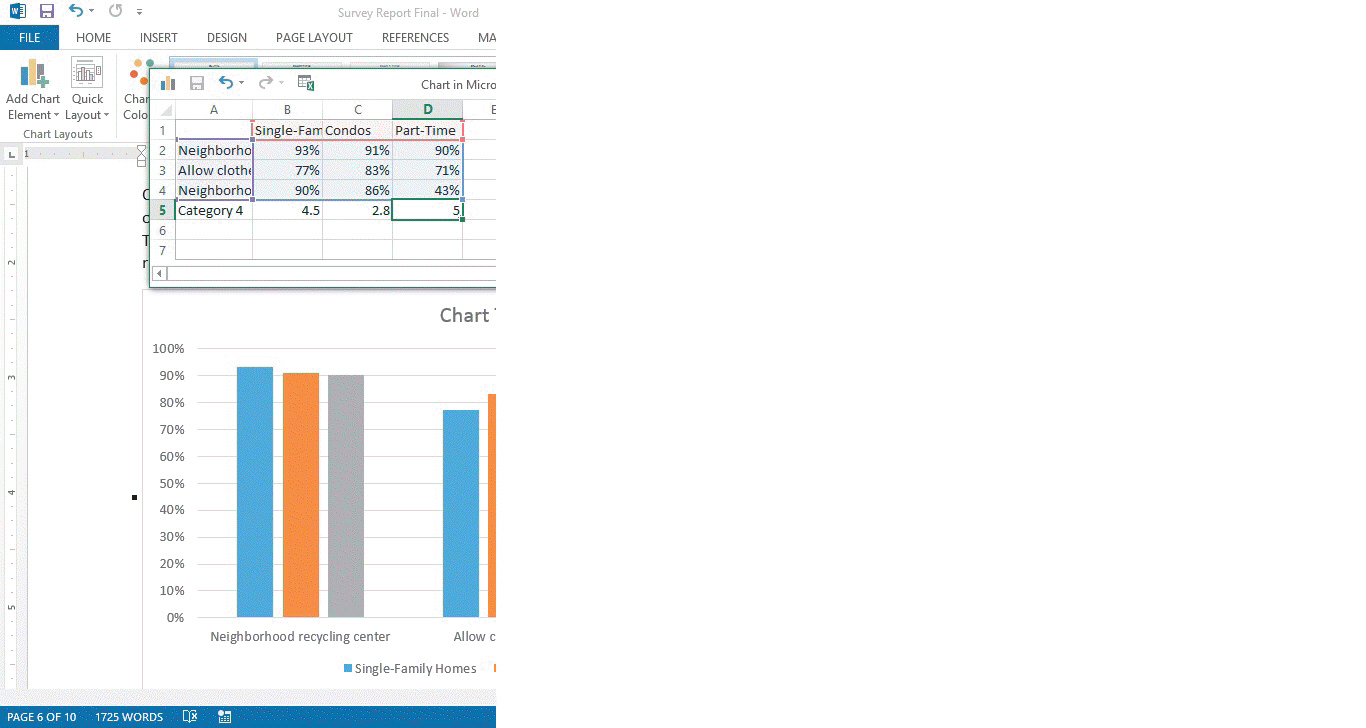 As shown in the accompanying figure, ____________________ in a datasheet are referenced by their column letter and row number.
 (Short Answer)
4.9/5 (66)
(66) A(n) ____________________ is a notation within a document that points the reader to another figure, table, or section.
(Short Answer)
5.0/5 (73)
(73) The blank space on the inside of each page, where the pages are bound together, is called the gutter.
(True/False)
4.9/5 (82)
(82) A group of colleagues who have access to the same network server and work together on a common project is called a _______.
(Multiple Choice)
5.0/5 (73)
(73) To incorporate text from a subdocument into the master document, click the _______ button.
(Multiple Choice)
4.8/5 (90)
(90) You can display and work with as many as ten levels of headings in Outline view.
(True/False)
4.7/5 (76)
(76) To keep the two parts of the phrase "35 mm" together, you can insert a _______ space between the "35" and the "mm."
(Multiple Choice)
4.9/5 (81)
(81) If you rearrange, delete, or add material in a subdocument, you must update all the page and section numbers to reflect your changes.
(True/False)
4.9/5 (68)
(68) Rather than manually entering a heading in each footer, it's easier to have Word insert the proper text automatically using a _______ reference.
(Multiple Choice)
4.8/5 (95)
(95) 
Filters
- Essay(0)
- Multiple Choice(0)
- Short Answer(0)
- True False(0)
- Matching(0)