



 Chat with AI
Exam 17: Word: Creating a Business Letter With a Letterhead and Table

Exam 1: Introduction to Technology45 Questions
Exam 2: Office 365 Essentials59 Questions
Exam 3: Office 2013 and Windows 8 Essential Concepts and Skills109 Questions
Exam 4: Access: Databases and Database Objects: an Introduction105 Questions
Exam 5: Access: Querying a Database105 Questions
Exam 6: Access: Maintaining a Database105 Questions
Exam 7: Excel: Creating a Worksheet and a Chart105 Questions
Exam 8: Excel: Formulas, Functions, and Formatting103 Questions
Exam 9: Excel: Working With Large Worksheets, Charting, and What-If Analysis105 Questions
Exam 10: Outlook: Managing Email Messages With Outlook109 Questions
Exam 11: Outlook: Managing Calendars With Outlook109 Questions
Exam 12: Powerpoint: Creating and Editing a Presentation With Pictures108 Questions
Exam 13: Powerpoint: Enhancing a Presentation With Pictures, Shapes, and Wordart109 Questions
Exam 14: Powerpoint: Reusing a Presentation and Adding Media and Animation107 Questions
Exam 15: Word: Creating, Formatting, and Editing a Word Document With a Picture112 Questions
Exam 16: Word: Creating a Research Paper With References and Sources107 Questions
Exam 17: Word: Creating a Business Letter With a Letterhead and Table112 Questions
Select questions type


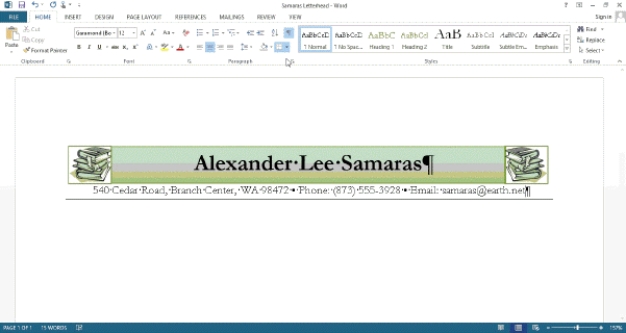 -In Word,as shown in the accompanying figure,a solid line,called a(n)____________________,can be drawn at any edge of a paragraph.
 (Essay)
5.0/5  (80)
(80) Each row of a table has an end-of-row mark,which can be used to add columns to the right of a table.
(True/False)
4.8/5 (81)
(81) In a business letter,type the ____ at least four blank lines below the complimentary close,allowing room for the author to sign his or her name.
(Multiple Choice)
4.8/5 (71)
(71) In a business letter,the inside address usually contains the addressee's ____.
(Multiple Choice)
4.9/5 (85)
(85) To convert a hyperlink to regular text,right-click the hyperlink and then click ____ on the shortcut menu.
(Multiple Choice)
4.8/5 (84)
(84) An entire table can be resized by dragging the ____________________,which is a small square that displays when pointing to a corner of a table.
(Essay)
5.0/5 (75)
(75) MATCHING
Identify the letter of the choice that best matches the phrase or definition.
a.letterhead
f.clip art
b.complimentary close
g.building block
c.drawing object
h.dimension
d.salutation
i.cell
e.Clip Organizer
j.inside address
-A predefined graphic.
(Essay)
4.8/5 (73)
(73) Case 3-1
Your friend Julian is applying for his first job and is looking to produce a cover letter that is letter-perfect in its presentation,not to mention its content.Knowing that you are a recently successful job seeker,he comes to you for advice on the preparation of the letter.
-Julian wants to get the letter off to a good start.He has designed a personal letterhead with his name at the very top.What is the first thing he should put immediately below the letterhead,and how far below the letterhead should it appear?
(Multiple Choice)
4.7/5 (73)
(73) To display the Rotate gallery,with the graphic selected,tap or click the Rotate Objects button in the ____ group on the Picture Tools Format tab.
(Multiple Choice)
4.9/5 (71)
(71) To move a custom tab stop,drag the tab marker to the desired location on the ruler.
(True/False)
4.9/5 (78)
(78)
-In Word,the term,____________________,refers to returning the formatting to the Normal style.
-In Word,the term,____________________,refers to returning the formatting to the Normal style. (Essay)
4.9/5 (93)
(93) When you first create a table it is left-aligned;that is,flush with the left margin.
(True/False)
4.7/5 (81)
(81) With the In Front of Text wrapping option,a floating object appears behind the text.
(True/False)
4.8/5 (92)
(92) To move from the first cell in the table in the accompanying figure to the next cell,press the ____ key(s).
(Multiple Choice)
4.9/5 (81)
(81) As an alternative to using the Color button on the PICTURE TOOLS FORMAT tab to display the Color gallery,you can right-click the graphic,click ____ on the shortcut menu,click the Picture button,expand the PICTURE COLOR section,and select the desired options.
(Multiple Choice)
4.9/5 (76)
(76) An inline object is an object that can be positioned at a specific location in a document or in a layer over or behind text in a document.
(True/False)
5.0/5 (92)
(92) When a custom tab stop is set,the tab marker on the ruler reflects the alignment of the characters at the location of the tab stop.
(True/False)
4.9/5 (73)
(73) You can use your own creative skills to design and compose business documents.
(True/False)
4.8/5 (78)
(78) To advance rightward from one cell to the next in a table,press the ____ key.
(Multiple Choice)
4.9/5 (70)
(70) 
Filters
- Essay(0)
- Multiple Choice(0)
- Short Answer(0)
- True False(0)
- Matching(0)