



 Chat with AI
Exam 17: Word: Creating a Business Letter With a Letterhead and Table

Exam 1: Introduction to Technology45 Questions
Exam 2: Office 365 Essentials59 Questions
Exam 3: Office 2013 and Windows 8 Essential Concepts and Skills109 Questions
Exam 4: Access: Databases and Database Objects: an Introduction105 Questions
Exam 5: Access: Querying a Database105 Questions
Exam 6: Access: Maintaining a Database105 Questions
Exam 7: Excel: Creating a Worksheet and a Chart105 Questions
Exam 8: Excel: Formulas, Functions, and Formatting103 Questions
Exam 9: Excel: Working With Large Worksheets, Charting, and What-If Analysis105 Questions
Exam 10: Outlook: Managing Email Messages With Outlook109 Questions
Exam 11: Outlook: Managing Calendars With Outlook109 Questions
Exam 12: Powerpoint: Creating and Editing a Presentation With Pictures108 Questions
Exam 13: Powerpoint: Enhancing a Presentation With Pictures, Shapes, and Wordart109 Questions
Exam 14: Powerpoint: Reusing a Presentation and Adding Media and Animation107 Questions
Exam 15: Word: Creating, Formatting, and Editing a Word Document With a Picture112 Questions
Exam 16: Word: Creating a Research Paper With References and Sources107 Questions
Exam 17: Word: Creating a Business Letter With a Letterhead and Table112 Questions
Select questions type


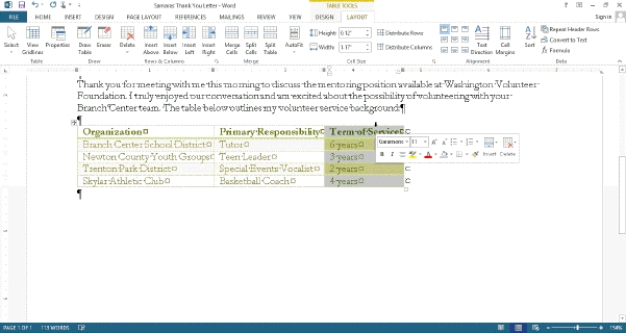 -If you want to select the first and third rows in the table in the accompanying figure,you select the first row,and then hold down the ____ key while selecting the third row.
 (Multiple Choice)
4.8/5  (88)
(88) To print a mailing label,tap or click the Labels button in the Create group on the MAILINGS tab,type the delivery address in the Delivery address box,and then tap or click the Print button in the Envelopes and Labels dialog box.
(True/False)
4.9/5 (79)
(79) Word provides a(n)____ button,which increases the font size of selected text each time you tap or click the button.
(Multiple Choice)
4.9/5 (82)
(82) Business documents can include all of the following EXCEPT ____.
(Multiple Choice)
4.9/5 (73)
(73) To delete the contents of a cell,select the cell contents and then press the DELETE or BACKSPACE key.
(True/False)
4.9/5 (85)
(85) When ____ is pressed after entering an email address or web address,Word automatically formats the address as a hyperlink,that is,in a different color and underlined.
(Multiple Choice)
4.9/5 (85)
(85) In the ____ letter style,the date,complimentary close,and signature block are positioned approximately one-half inch to the right of center or at the right margin.
(Multiple Choice)
4.9/5 (77)
(77) When you press the ____ key without entering any text after the automatic bullet character,Word turns off the automatic bullets feature.
(Multiple Choice)
4.7/5 (80)
(80) Each cell in a Word table has a(n)____________________,which is a formatting mark that assists with selecting and formatting cells.
(Essay)
4.8/5 (71)
(71) Case 3-2
Your friend is new to using tables,and he is having a lot of difficulty manipulating them.You offer to help him with some tips for selecting items in the table,for starters.
-If you tap or click at the left edge of a cell,what are you selecting?
(Multiple Choice)
4.9/5 (73)
(73) You can drag a(n)____________________,which is the border to the right of a column,until the column is the desired width.
(Essay)
5.0/5 (87)
(87) MATCHING
Identify the letter of the choice that best matches the phrase or definition.
a.letterhead
f.clip art
b.complimentary close
g.building block
c.drawing object
h.dimension
d.salutation
i.cell
e.Clip Organizer
j.inside address
-The total number of rows and columns required in a table.
(Essay)
4.9/5 (76)
(76) If the same text or graphic is used frequently,you can store the text or graphic as a(n)____________________ and then insert the stored entry in the open document,as well as in future documents.
(Essay)
5.0/5 (95)
(95) To remove a border from a paragraph,position the insertion point in the paragraph,tap or click the Border button arrow on the HOME tab,and then tap or click the No Border button in the Borders gallery.
(True/False)
4.8/5 (70)
(70) In a business letter,within the message,paragraphs are double-spaced with single-spacing between paragraphs.
(True/False)
4.7/5 (77)
(77) MATCHING
Identify the letter of the choice that best matches the phrase or definition.
a.letterhead
f.clip art
b.complimentary close
g.building block
c.drawing object
h.dimension
d.salutation
i.cell
e.Clip Organizer
j.inside address
-Section of a letter that identifies an organization or individual.
(Essay)
4.8/5 (77)
(77) Typing an ordinal followed by a space or a hyphen makes part of the ordinal into a(n)subscript._________________________
(Essay)
4.9/5 (83)
(83) If you tap or click the Increase Font Size button too many times and make the font size too big,you can tap or click the ____ button until the desired font size is displayed.
(Multiple Choice)
4.7/5 (84)
(84) All of the following are guidelines about the appearance of letterhead elements EXCEPT ____.
(Multiple Choice)
4.8/5 (75)
(75) 
Filters
- Essay(0)
- Multiple Choice(0)
- Short Answer(0)
- True False(0)
- Matching(0)