



 Chat with AI
Exam 5: Access: Querying a Database

Exam 1: Introduction to Technology45 Questions
Exam 2: Office 365 Essentials59 Questions
Exam 3: Office 2013 and Windows 8 Essential Concepts and Skills109 Questions
Exam 4: Access: Databases and Database Objects: an Introduction105 Questions
Exam 5: Access: Querying a Database105 Questions
Exam 6: Access: Maintaining a Database105 Questions
Exam 7: Excel: Creating a Worksheet and a Chart105 Questions
Exam 8: Excel: Formulas, Functions, and Formatting103 Questions
Exam 9: Excel: Working With Large Worksheets, Charting, and What-If Analysis105 Questions
Exam 10: Outlook: Managing Email Messages With Outlook109 Questions
Exam 11: Outlook: Managing Calendars With Outlook109 Questions
Exam 12: Powerpoint: Creating and Editing a Presentation With Pictures108 Questions
Exam 13: Powerpoint: Enhancing a Presentation With Pictures, Shapes, and Wordart109 Questions
Exam 14: Powerpoint: Reusing a Presentation and Adding Media and Animation107 Questions
Exam 15: Word: Creating, Formatting, and Editing a Word Document With a Picture112 Questions
Exam 16: Word: Creating a Research Paper With References and Sources107 Questions
Exam 17: Word: Creating a Business Letter With a Letterhead and Table112 Questions
Select questions type


To calculate statistics for only those records that satisfy certain criteria,select ____ as the entry in the Total row for the field,and then enter the criterion in the Criteria row.

Free
(Multiple Choice)
4.9/5  (76)
(76) Correct Answer: Verified
B
To find all customers whose returns are greater than $0.00 and whose book rep is book rep number 42,enter each criterion on the same row.
Free
(True/False)
4.7/5 (77)
(77) Correct Answer:Verified
VerifiedTrue
To show the Navigation Pane if it is hidden,click the ____ Button.
Free
(Multiple Choice)
4.7/5 (75)
(75) Correct Answer:Verified
VerifiedB
To change the design of a query that is not currently open,press and hold or right-click the query in the Navigation Pane and then tap or click ____________________ on the shortcut menu.
(Essay)
4.8/5 (85)
(85) MATCHING
Identify the letter of the choice that best matches the phrase or definition.
a.*
f.NOT
b.?
g.BETWEEN
c./
h.OR criterion
d.Total
i.IN
e.AND criterion
j.FIRST
-Use to select values in a given range.
(Essay)
4.9/5 (88)
(88) When you sort data in a query,the records in the underlying table are actually rearranged.
(True/False)
5.0/5 (74)
(74) To find all customers whose names begin with S,enter S? in the Criteria row of the design grid.
(True/False)
4.8/5 (84)
(84) A question that is asked of Access or any other database management system is called a(n)____________________.
(Essay)
4.8/5 (84)
(84) In fixed-width files,each record is on a separate line and the fields are separated by a special character.
(True/False)
4.8/5 (77)
(77) To find all customers whose names begin with Sr,enter ____________________ as the criterion for the Customer Name field.
(Essay)
4.8/5 (66)
(66) The asterisk (*)wildcard represents any collection of characters.
(True/False)
5.0/5 (80)
(80) MATCHING
Identify the letter of the choice that best matches the phrase or definition.
a.*
f.NOT
b.?
g.BETWEEN
c./
h.OR criterion
d.Total
i.IN
e.AND criterion
j.FIRST
-Represents any individual character.
(Essay)
4.9/5 (75)
(75) To view the results of a query,open it by pressing and holding or right-clicking the query in the Navigation Pane and tapping or clicking ____ on the shortcut menu.
(Multiple Choice)
4.8/5 (82)
(82) To re-use saved export steps,tap or click the Saved Exports button on the ____ tab on the ribbon.
(Multiple Choice)
4.9/5 (76)
(76) 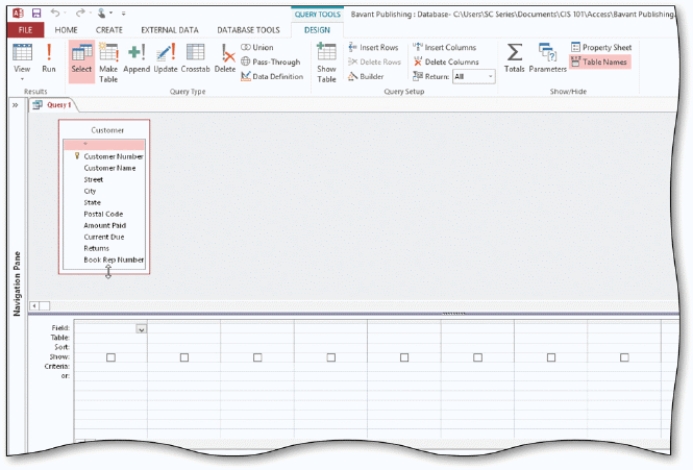 -In the accompanying figure,the Customer table was added to the query by selecting the table and tapping or clicking the Add button in the ____ dialog box.
 (Multiple Choice)
4.9/5 (77)
(77) To combine criteria with ____________________,place the criteria on the same row.
(Essay)
4.9/5 (83)
(83) The ____________________ function finds the smallest value in a group of records.
(Essay)
4.9/5 (87)
(87) The ____ operator allows you to search for a range of values in one field.
(Multiple Choice)
4.9/5 (97)
(97) To find all individuals whose name is Robin or Robyn,enter ____ in the Criteria row of the appropriate column.
(Multiple Choice)
4.9/5 (88)
(88) 
Filters
- Essay(0)
- Multiple Choice(0)
- Short Answer(0)
- True False(0)
- Matching(0)