



 Chat with AI
Exam 18: Navigating and Formatting a Document

Exam 1: Creating a Database100 Questions
Exam 2: Building a Database and Defining Table Relationships98 Questions
Exam 3: Maintaining and Querying a Database100 Questions
Exam 4: Creating Forms and Reports100 Questions
Exam 5: Essential Computer Concepts100 Questions
Exam 6: Getting Started With Excel100 Questions
Exam 7: Formatting Workbook Text and Data100 Questions
Exam 8: Calculating Data With Formulas and Functions100 Questions
Exam 9: Analyzing and Charting Financial Data100 Questions
Exam 10: Exploring the Basics of Windows 8100 Questions
Exam 11: Integrating Word, Excel, Access, and Powerpoint100 Questions
Exam 12: Internet Basics and Information Literacy100 Questions
Exam 13: Introduction to Cloud Computing50 Questions
Exam 14: Managing Your Files100 Questions
Exam 15: Creating a Presentation100 Questions
Exam 16: Adding Media and Special Effects100 Questions
Exam 17: Creating and Editing a Document100 Questions
Exam 18: Navigating and Formatting a Document100 Questions
Exam 19: Creating Tables and a Multipage Report100 Questions
Exam 20: Enhancing Page Layout and Design100 Questions
Select questions type


MATCHING
-An instruction that tells Word to insert a page number on each page
(Multiple Choice)
4.9/5  (90)
(90) MATCHING
-A group of related paragraphs that have a particular order
(Multiple Choice)
4.9/5 (83)
(83) Charlotte has just taken a job at a local publishing house. She has a lot of tasks to accomplish today, but her first task is to write letters to several of the authors and send out contracts. Charlotte wants to make a good impression on her boss, so she wants to make sure all her correspondence with the authors is professional and looks formal.
-In her letter, Charlotte asks each author to return a copy of their signed agreement. She needs to emphasize parts of her letter, but she wants to make sure everyone reads this particular sentence. She should apply ____.
(Multiple Choice)
4.9/5 (87)
(87) Discuss all of the tools available in the Comments group on the REVIEW tab for working with comments.
(Essay)
4.7/5 (75)
(75) The square below the Hanging Indent marker in the accompanying figure is the ____.
(Multiple Choice)
4.7/5 (89)
(89) 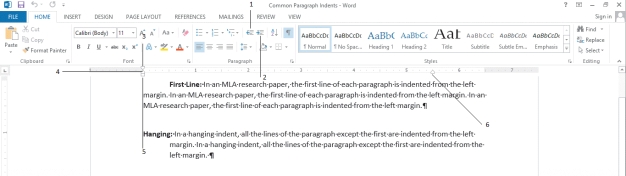 -The Hanging Indent marker is show by item ____ in the accompanying figure.
 (Multiple Choice)
4.8/5 (83)
(83) The Office ____ is a temporary storage area on your computer that holds objects such as text or graphics until you need them.
(Multiple Choice)
4.8/5 (69)
(69) Charlotte has just taken a job at a local publishing house. She has a lot of tasks to accomplish today, but her first task is to write letters to several of the authors and send out contracts. Charlotte wants to make a good impression on her boss, so she wants to make sure all her correspondence with the authors is professional and looks formal.
-Charlotte reviews her document and decides that the she needs to format an entire paragraph including changing the paragraph and line spacing. She should apply ____.
(Multiple Choice)
5.0/5 (71)
(71) To paste only the text with the formatting of the surrounding text in its new location, you can click the Keep Source Formatting button. _________________________
(True/False)
4.9/5 (82)
(82) To ____ means to insert a copy of whatever is on the Clipboard into the document.
(Multiple Choice)
4.9/5 (77)
(77) A(n) ____________________ button allows you to click once to format the selected text, and click again to remove the formatting from the selected text.
(Short Answer)
4.8/5 (69)
(69) With a ____ indent, all lines except the first line of the paragraph are indented from the left margin.
(Multiple Choice)
4.9/5 (86)
(86) 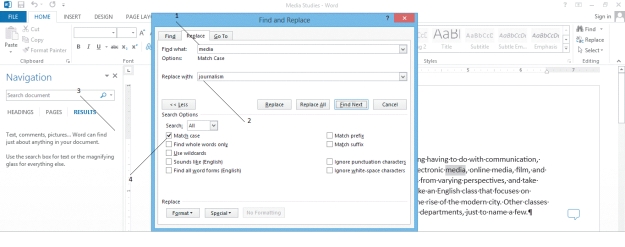 -If you wanted to enter search text, you would position the insertion point at the arrow marked by item ____ in the accompanying figure.
 (Multiple Choice)
4.8/5 (101)
(101) Discuss the importance of acknowledging sources in written communication. Include a definition of plagiarism in your response.
(Essay)
4.9/5 (74)
(74) To use cut and paste, click the Cut button from the ____ group on the HOME tab.
(Multiple Choice)
4.7/5 (93)
(93) To update a bibliography field that is not contained in a ____, right-click the bibliography, and then click Update Field on the Shortcut menu.
(Multiple Choice)
4.7/5 (78)
(78) Click the ____ in the Clipboard group to open the Clipboard task pane.
(Multiple Choice)
4.8/5 (82)
(82)
-In the accompanying figure, using item ____ ensures that only "media" and not, for example, "MEDIA" will be replaced.
-In the accompanying figure, using item ____ ensures that only "media" and not, for example, "MEDIA" will be replaced. (Multiple Choice)
4.9/5 (81)
(81) 
Filters
- Essay(0)
- Multiple Choice(0)
- Short Answer(0)
- True False(0)
- Matching(0)