



 Chat with AI
Exam 15: Creating a Presentation

Exam 1: Creating a Database100 Questions
Exam 2: Building a Database and Defining Table Relationships98 Questions
Exam 3: Maintaining and Querying a Database100 Questions
Exam 4: Creating Forms and Reports100 Questions
Exam 5: Essential Computer Concepts100 Questions
Exam 6: Getting Started With Excel100 Questions
Exam 7: Formatting Workbook Text and Data100 Questions
Exam 8: Calculating Data With Formulas and Functions100 Questions
Exam 9: Analyzing and Charting Financial Data100 Questions
Exam 10: Exploring the Basics of Windows 8100 Questions
Exam 11: Integrating Word, Excel, Access, and Powerpoint100 Questions
Exam 12: Internet Basics and Information Literacy100 Questions
Exam 13: Introduction to Cloud Computing50 Questions
Exam 14: Managing Your Files100 Questions
Exam 15: Creating a Presentation100 Questions
Exam 16: Adding Media and Special Effects100 Questions
Exam 17: Creating and Editing a Document100 Questions
Exam 18: Navigating and Formatting a Document100 Questions
Exam 19: Creating Tables and a Multipage Report100 Questions
Exam 20: Enhancing Page Layout and Design100 Questions
Select questions type


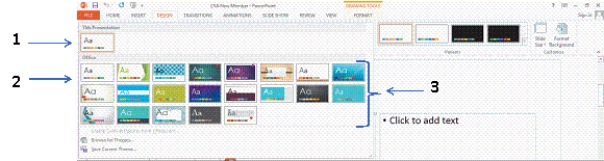 -In the accompanying figure, the arrow labeled 1 is pointing to ____.
 (Multiple Choice)
4.7/5  (69)
(69) Using PowerPoint 2013, Ethan develops a short five-slide presentation for his marketing project.
-After opening PowerPoint, Ethan sees buttons to execute commands in the ____ area.
(Multiple Choice)
4.8/5 (74)
(74) In ____________________ view, each slide fills the screen, one after another.
(Short Answer)
4.9/5 (79)
(79) If you don't want objects you are moving to snap to the grid, press and hold the ____________________ key while you are dragging.
(Short Answer)
4.8/5 (85)
(85) In PowerPoint terms, ____ a photo means cutting out the parts you don't want to include.
(Multiple Choice)
4.8/5 (86)
(86) If your computer is connected to a projector, and you start a slide show in Slide Show view, ____________________ view starts on the computer and Slide Show view appears on the projection screen.
(Short Answer)
4.9/5 (81)
(81) A ____ is a coordinated set of colors, fonts, backgrounds, and effects.
(Multiple Choice)
4.8/5 (98)
(98) You can undo up to the most recent 40 actions by clicking the Undo button.
(True/False)
4.8/5 (85)
(85)
-In the accompanying figure, the arrow labeled 3 is pointing to ____.
-In the accompanying figure, the arrow labeled 3 is pointing to ____. (Multiple Choice)
5.0/5 (77)
(77) Using PowerPoint 2013, Ethan develops a short five-slide presentation for his marketing project.
-Ethan has not saved his PowerPoint file yet, and it appears with a temporary filename "____" followed by a number.
(Multiple Choice)
4.9/5 (73)
(73) If you have closed a saved presentation, open it in Backstage view by using the ____ command.
(Multiple Choice)
4.9/5 (74)
(74) To copy selected text or objects, you use the Copy button in the ____________________ group on the HOME tab.
(Short Answer)
4.9/5 (80)
(80) When you select an existing list and then click the Convert to SmartArt Graphic button in the Paragraph group on the ____________________ tab, a gallery of SmartArt layouts appears.
(Short Answer)
4.7/5 (82)
(82) When you save a presentation that contains photos, PowerPoint automatically compresses the photos to a resolution of ____ pixels per inch (ppi).
(Multiple Choice)
4.9/5 (85)
(85) MATCHING
-____ photos reduces the size of the presentation file
(Multiple Choice)
4.9/5 (72)
(72) When the ____________________ is locked, if you resize the photo by dragging a corner sizing handle, the other dimension will change by the same percentage.
(Short Answer)
4.9/5 (86)
(86) 
Filters
- Essay(0)
- Multiple Choice(0)
- Short Answer(0)
- True False(0)
- Matching(0)