



 Chat with AI
Exam 15: Creating a Presentation

Exam 1: Creating a Database100 Questions
Exam 2: Building a Database and Defining Table Relationships98 Questions
Exam 3: Maintaining and Querying a Database100 Questions
Exam 4: Creating Forms and Reports100 Questions
Exam 5: Essential Computer Concepts100 Questions
Exam 6: Getting Started With Excel100 Questions
Exam 7: Formatting Workbook Text and Data100 Questions
Exam 8: Calculating Data With Formulas and Functions100 Questions
Exam 9: Analyzing and Charting Financial Data100 Questions
Exam 10: Exploring the Basics of Windows 8100 Questions
Exam 11: Integrating Word, Excel, Access, and Powerpoint100 Questions
Exam 12: Internet Basics and Information Literacy100 Questions
Exam 13: Introduction to Cloud Computing50 Questions
Exam 14: Managing Your Files100 Questions
Exam 15: Creating a Presentation100 Questions
Exam 16: Adding Media and Special Effects100 Questions
Exam 17: Creating and Editing a Document100 Questions
Exam 18: Navigating and Formatting a Document100 Questions
Exam 19: Creating Tables and a Multipage Report100 Questions
Exam 20: Enhancing Page Layout and Design100 Questions
Select questions type


In Touch Mode the ribbon increases in height, making it easier to use your finger to tap the button you need.
(True/False)
4.8/5  (69)
(69) Unnumbered lists are useful in slides when you want to present information on multiple lines without actually itemizing the information. _________________________
(True/False)
4.8/5 (82)
(82) MATCHING
-To remove text formatting, click Clear All Formatting in the ____ group
(Multiple Choice)
4.8/5 (81)
(81) Most people find it helpful to use presentation media-visual and audio aids to support key points and engage the audience's attention. _________________________
(True/False)
4.8/5 (68)
(68) To apply format to text, both the text and the text box must be selected.
(True/False)
4.9/5 (87)
(87) 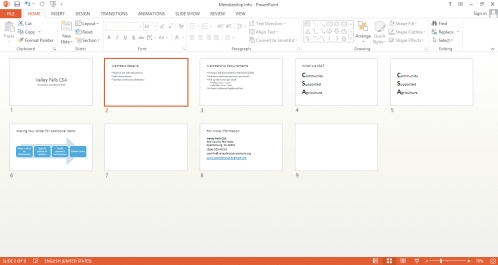 -The view shown in the accompanying figure is ____ view.
Kamilla is creating a presentation about her family for a homework assignment. Her friend Ivan, a PowerPoint 2013 expert, is helping her.
-When Kamilla clicks in the Title placeholder a contextual tab, the ____ tab, appears on the ribbon.
(Multiple Choice)
4.9/5 (69)
(69) 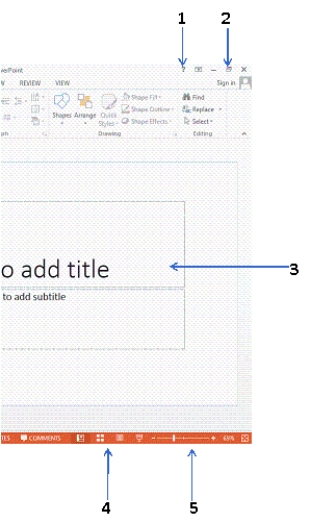 -The arrow marked 4 in the accompanying figure is pointing to the ____ buttons.
 (Multiple Choice)
4.9/5 (95)
(95) In Slide Show view, the left pane shows the current slide. _________________________
(True/False)
4.7/5 (85)
(85) To edit a presentation without changing the original, create a copy of it. To do this, use the ____ command.
(Multiple Choice)
4.9/5 (79)
(79) MATCHING
-To check spelling, click the Spelling button in the ____ group of the REVIEW tab
(Multiple Choice)
4.8/5 (94)
(94) You can use the Picture button in the Images group on the ____ tab to add photos to slides.
(Multiple Choice)
4.7/5 (78)
(78) ____ handles are the small squares that appear in the corners and in the middle of the sides of the border of a selected object.
(Multiple Choice)
4.8/5 (66)
(66) The More button appears on all galleries that contain additional items or commands that don't fit in the group on the ribbon. _________________________
(True/False)
4.7/5 (74)
(74)
-The Help button is shown by arrow ____ in the accompanying figure.
-The Help button is shown by arrow ____ in the accompanying figure. (Multiple Choice)
4.7/5 (87)
(87) The layout of a slide is the arrangement of placeholders on the slide.
(True/False)
4.7/5 (81)
(81) The ____ ratio is the ratio of an object's height to its width.
(Multiple Choice)
4.8/5 (69)
(69) The aspect ratio is the ratio of the object's height to its width. _________________________
(True/False)
4.9/5 (82)
(82) Answering a few key questions will help you create a presentation using appropriate presentation media that successfully delivers its message or motivates the audience to take an action. Seven planning questions were listed in the text. Please list four of these questions.
(Essay)
4.8/5 (81)
(81) 
Filters
- Essay(0)
- Multiple Choice(0)
- Short Answer(0)
- True False(0)
- Matching(0)