



 Chat with AI
Exam 8: Use Advanced Features

Exam 1: Get Started With Microsoft Publisher70 Questions
Exam 2: Create a Publication70 Questions
Exam 3: Work With Text70 Questions
Exam 4: Work With Graphic Objects70 Questions
Exam 5: Enhance a Publication70 Questions
Exam 6: Improve a Design70 Questions
Exam 7: Work With Multiple Pages70 Questions
Exam 8: Use Advanced Features70 Questions
Exam 9: Work Efficiently70 Questions
Select questions type


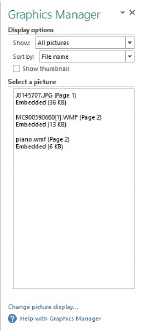 The accompanying figure shows the preview of a(n) ____.

The Wrap Text button is in the Arrange group on the Picture Tools Format tab.
(True/False)
4.9/5  (78)
(78) Which of the following can be a data source file in a mail merge?
(Multiple Choice)
5.0/5 (83)
(83) The Publisher format is accessible with the ____ Wizard. This Wizard verifies linked graphics, embeds TrueType fonts, and will pack all the files your printing service might need.
(Multiple Choice)
5.0/5 (86)
(86) What is text wrapping? Describe some common text wrap techniques and features.
(Essay)
4.9/5 (70)
(70) 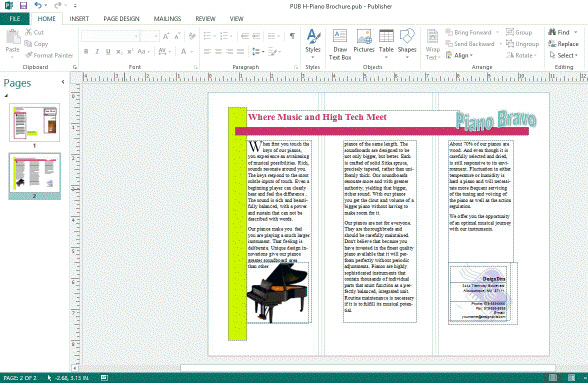 The accompanying figure shows Loose text wrapping applied to the text near the piano image.
 (True/False)
4.8/5 (86)
(86) You can open the Mail Merge task pane by clicking the ____ tab on the Ribbon.
(Multiple Choice)
4.8/5 (85)
(85) To delete a wrap point, press and hold [Ctrl] and click the wrap point you want removed.
(True/False)
4.8/5 (79)
(79) 
Filters
- Essay(0)
- Multiple Choice(0)
- Short Answer(0)
- True False(0)
- Matching(0)