



 Chat with AI
Exam 3: Designing a Newsletter

Exam 1: Creating a Flyer98 Questions
Exam 2: Publishing a Trifold Brochure98 Questions
Exam 3: Designing a Newsletter98 Questions
Exam 4: Office 2010 and Windows 7 - Essential Concepts and Skills98 Questions
Select questions type


List the steps to choose a newsletter template and make design choices.

Free
(Essay)
4.9/5  (76)
(76) Correct Answer: Verified
1. In the New template gallery, click Newsletters in the Most Popular area to display the newsletter templates.
2. Scroll as necessary and then click the Bars template to select it.
3. In the Customize area, click the Color scheme box arrow and then click the Peach color scheme.
4. Click the Font scheme box arrow and then click the Civic font scheme.
5. Click the Create button in the lower-right corner of the window to create the publication based on the template settings.
When you use automatic hyphenation , Publisher automatically inserts hyphens where they are needed.
Free
(True/False)
4.9/5 (88)
(88) Correct Answer:Verified
VerifiedTrue
A duplicate of a graphic uses the Clipboard to store the image.
Free
(True/False)
4.8/5 (88)
(88) Correct Answer:Verified
VerifiedFalse
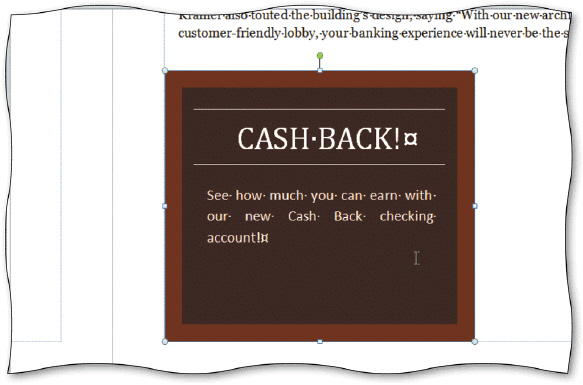 In the accompany figure, ____ the border of the sidebar to move the sidebar to the lower-left corner of the page.
 (Multiple Choice)
4.7/5 (67)
(67) 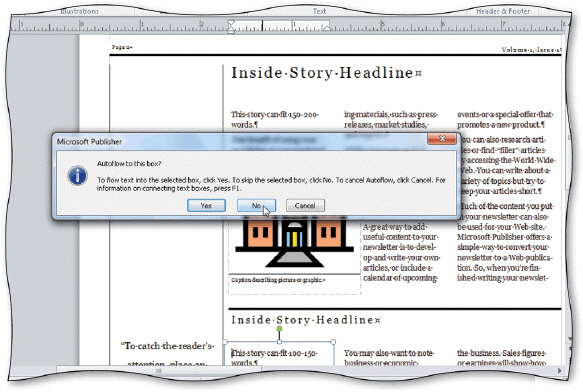 If a story contains more text than will fit in the default text box, you have the option of allowing Publisher to ____________________ the text to another available text box, as shown in the accompanying figure.
 (Short Answer)
4.8/5 (70)
(70) It is easy to customize the _____ the way that you want it. This allows you to add new buttons to a custom group.
(Multiple Choice)
4.8/5 (90)
(90) People often make reading decisions based on the ____________________ of the story.
(Short Answer)
4.9/5 (76)
(76) Graphics in a landscape orientation are taller than they are wide.
(True/False)
4.7/5 (87)
(87) If you resize a graphic, be sure to hold down the ____ key while dragging a handle to maintain the graphic's proportionality.
(Multiple Choice)
4.8/5 (89)
(89) In printing and publishing, the left-hand page of a two-page spread is called ____.
(Multiple Choice)
4.9/5 (80)
(80) While you are working on a story in Word, you cannot edit the corresponding text box in Publisher.
(True/False)
4.9/5 (88)
(88) Publisher____________________ include a group of promotional templates and objects used to market a product or service.
(Short Answer)
4.8/5 (82)
(82) A ____ notice indicates a story that flows from one page to the next page, such as from page 1 to page 2.
(Multiple Choice)
4.8/5 (89)
(89) You can click Page Options in the Publisher Tasks task pane to specify the number of columns in a newsletter.
(True/False)
4.8/5 (91)
(91) A newsletter ____ is usually a narrow, short list that is used to refer readers to specific pages.
(Multiple Choice)
4.9/5 (83)
(83) If you were designing a newsletter with only two pages, it would be best to delete pages 2 and ____.
(Multiple Choice)
4.7/5 (81)
(81) Two specific ____________________ properties can be set at the time you save a publication or template.
(Short Answer)
4.9/5 (90)
(90) The more ____ you have, the more white space is created on the page.
(Multiple Choice)
4.7/5 (86)
(86) Briefly discuss the process of creating the first draft of a newsletter publication.
(Essay)
5.0/5 (84)
(84) The ____ command removes any previous cropping or resizing.
(Multiple Choice)
4.9/5 (88)
(88) 
Filters
- Essay(0)
- Multiple Choice(0)
- Short Answer(0)
- True False(0)
- Matching(0)