



 Chat with AI
Exam 5: Creating Forms and Reports

Exam 1: Managing Your Files100 Questions
Exam 2: Creating a Database100 Questions
Exam 3: Building a Database and Defining Table Relationships100 Questions
Exam 4: Maintaining and Querying a Database98 Questions
Exam 5: Creating Forms and Reports100 Questions
Exam 6: Creating Advanced Queries and Enhancing Table Design100 Questions
Exam 7: Using Form Tools and Creating Custom Forms100 Questions
Exam 8: Creating Custom Reports100 Questions
Exam 9: Sharing Integrating and Analyzing Data199 Questions
Exam 10: Using Action Queries and Advanced Table Relationships100 Questions
Exam 11: Automating Tasks With Macros100 Questions
Exam 12: Using and Writing Visual Basic for Applications Code100 Questions
Exam 13: Managing and Sharing a Database100 Questions
Select questions type


Which of the following methods should be used in report Layout view to edit a field caption object that is not fully displayed?
(Multiple Choice)
4.7/5  (78)
(78) Query elements may be added to a form to improve its appearance or add visual appeal.___________________
(True/False)
4.8/5 (89)
(89) Precise control for moving selected objects on a form is accomplished by using the ____________________ keys on the keyboard.
(Short Answer)
4.8/5 (95)
(95) The less precise way to move objects in report Layout view is to ____.
(Multiple Choice)
4.8/5 (94)
(94) A wildcard character used as the first and/or the last character in a character string to match any number of characters is the ____ character.
(Multiple Choice)
4.9/5 (71)
(71) Case-Based Critical Thinking Questions Case 4-2
Carmen and Sergio have created a database for the Spring Fling event at their college. Sergio created forms for Carmen to use when entering data into the database. Carmen needs to create some reports to update the faculty sponsor on the progress that has been made planning the event. The tables and fields for the database along with established relationships are illustrated in the figure below.
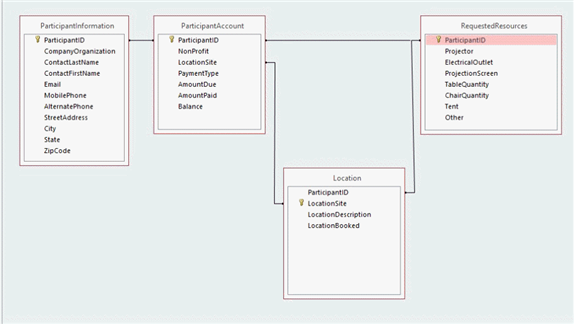 The first report Carmen would like to create will include all participants and the balance due to participate in the Spring Fling. Which two tables should Carmen use to create the report?
 (Multiple Choice)
4.8/5 (78)
(78) Which of the following may be used as a wildcard character when searching for a value in Access?
(Multiple Choice)
4.9/5 (95)
(95) Layout view shows both the form and its data while allowing the form to be modified.
(True/False)
4.8/5 (80)
(80) Case-Based Critical Thinking Questions Case 4-2
Carmen and Sergio have created a database for the Spring Fling event at their college. Sergio created forms for Carmen to use when entering data into the database. Carmen needs to create some reports to update the faculty sponsor on the progress that has been made planning the event. The tables and fields for the database along with established relationships are illustrated in the figure below.
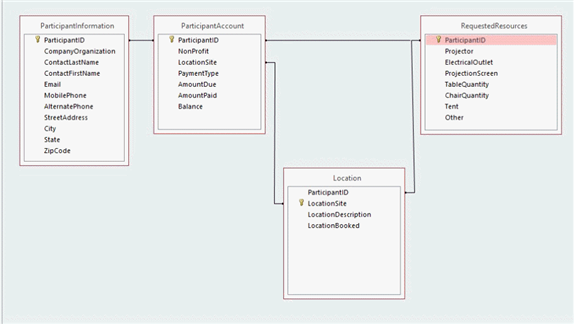 The faculty sponsor has asked Carmen to create a report that includes the participant email address and the location site assigned to the participant. He would also like to know how many tables and chairs each participant needs. Which tables and fields does Carmen need to use to create the report?
 (Multiple Choice)
5.0/5 (79)
(79) It is often easier to maintain data in a datasheet using a form because all changes for a ____ are the focus at one time.
(Multiple Choice)
4.9/5 (76)
(76) Insert the letter of the choice that best matches the phrase or definition.
Premises:
The wildcard character that will match any single numeric character.
Responses:
Find
(?)
#
Correct Answer: Verified
Premises:
Responses:
(Matching)
4.8/5 (87)
(87) When using a wildcard character in the Find and Replace dialog box, it is necessary to select the Any Part of Field Match option. ____________________
(True/False)
5.0/5 (68)
(68) Clicking the
 button moves all fields from the Available Fields box to the Selected Fields box using the Report Wizard.
 (True/False)
4.7/5 (79)
(79) An item on a form or report object that can be manipulated to modify an object's appearance is a(n) ____.
(Multiple Choice)
4.8/5 (73)
(73) Discuss three considerations that are important to form design for the form to convey written information clearly and effectively.
(Essay)
4.9/5 (64)
(64) A ____ is a set of field values for a record that is found in a table related to the primary table on which a report is based.
(Multiple Choice)
4.8/5 (71)
(71) Insert the letter of the choice that best matches the phrase or definition.
Premises:
The button used to display the Find and Replace dialog box.
Responses:
#
Themes
Layout view
Correct Answer:Verified
VerifiedPremises:
Responses:
(Matching)
4.9/5 (80)
(80) The default arrangement for data in a report created from two or more tables or queries is that data is grouped by field.
(True/False)
4.8/5 (79)
(79) A placeholder used in a value search when only part of a value is known is called a ____________________ character.
(Short Answer)
4.8/5 (89)
(89) Field values edited in Form view are also changed in the form's underlying table. ____________________
(True/False)
4.9/5 (76)
(76) 
Filters
- Essay(0)
- Multiple Choice(0)
- Short Answer(0)
- True False(0)
- Matching(0)