



 Chat with AI
Exam 7: Advanced Report Techniques

Exam 1: Office 2010 and Windows 7 Essential Concepts and Skills112 Questions
Exam 2: Databases and Database Objects: an Introduction112 Questions
Exam 3: Querying a Database112 Questions
Exam 4: Maintaining a Database112 Questions
Exam 5: Creating Reports and Forms112 Questions
Exam 6: Multitable Forms112 Questions
Exam 7: Advanced Report Techniques112 Questions
Exam 8: Using SQL112 Questions
Exam 9: Advanced Form Techniques112 Questions
Exam 10: Macros, Navigation Forms, Pivot112 Questions
Exam 11: Administering a Database Syste112 Questions
Exam 12: Database Design112 Questions
Select questions type


To ensure that a calculated control displays as currency, change the _____ property.
(Multiple Choice)
4.9/5  (86)
(86) 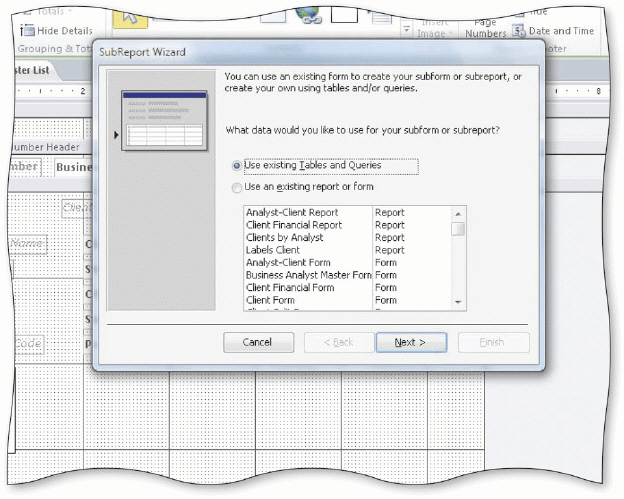 The SubReport Wizard displays in the accompanying figure. To add a subreport to a report, you use the _____ tool on the Design tab.
 (Multiple Choice)
4.9/5 (81)
(81) You can create new Access tables in either Datasheet view or Design view.
(True/False)
4.9/5 (80)
(80) Identify the letter of the choice that best matches the phrase or definition.
Premises:
Used to select multiple controls.
Responses:
Arrange
SHIFT
Database Tools
Correct Answer: Verified
Premises:
Responses:
(Matching)
4.8/5 (77)
(77) To change the report margins, click the Margins button on the _____ tab.
(Multiple Choice)
4.8/5 (79)
(79) If a name is too long to fit in the available space, change the Can Grow property to Yes so that the name will extend to additional lines.
(True/False)
4.8/5 (68)
(68) To display a Report Footer section, right-click any open area of the report and click _____ on the shortcut menu.
(Multiple Choice)
4.8/5 (76)
(76) To cause the contents of the Group Header section to appear at the top of each page, change the Repeat Section property to Yes.
(True/False)
4.9/5 (83)
(83) Identify the letter of the choice that best matches the phrase or definition.
Premises:
Specifies the source of data for the control.
Responses:
Arrange
SHIFT
text box
Correct Answer:Verified
VerifiedPremises:
Responses:
(Matching)
4.9/5 (72)
(72) To select more than one control, click one of the controls and then hold the SHIFT key down while selecting the others.
(True/False)
4.9/5 (70)
(70) To reverse the most recent change to a report design, click the ____________________ button on the Quick Access Toolbar.
(Short Answer)
4.8/5 (80)
(80) To include a name for a calculated field in a query, type the name in the ____________________ property box in the property sheet.
(Short Answer)
4.8/5 (87)
(87) If you move, rename, or modify linked tables, you can use the Linked Table Manager within the ____________________ tab to update the links.
(Short Answer)
4.8/5 (77)
(77) You can align controls in the Report Design window using the Align button on the _____ tab.
(Multiple Choice)
4.8/5 (83)
(83) Identify the letter of the choice that best matches the phrase or definition.
Premises:
Tab on Ribbon that allows you to update links.
Responses:
Database Tools
error indicator
record source
Correct Answer:Verified
VerifiedPremises:
Responses:
(Matching)
4.9/5 (85)
(85) To create a table in Design view, click the _____ button on the Create tab.
(Multiple Choice)
4.9/5 (82)
(82) To create a report from scratch, click the Create tab, and then click the _____ button.
(Multiple Choice)
4.8/5 (79)
(79) To select a smaller font size for a control, use the ____________________ property.
(Short Answer)
4.8/5 (64)
(64) To display the Group, Sort, and Total pane, click the _____ button on the Design tab.
(Multiple Choice)
4.8/5 (78)
(78) To add a date to a report, click the _____ button on the Design tab.
(Multiple Choice)
4.7/5 (74)
(74) 
Filters
- Essay(0)
- Multiple Choice(0)
- Short Answer(0)
- True False(0)
- Matching(0)