



 Chat with AI
Exam 5: Creating Reports and Forms

Exam 1: Office 2010 and Windows 7 Essential Concepts and Skills112 Questions
Exam 2: Databases and Database Objects: an Introduction112 Questions
Exam 3: Querying a Database112 Questions
Exam 4: Maintaining a Database112 Questions
Exam 5: Creating Reports and Forms112 Questions
Exam 6: Multitable Forms112 Questions
Exam 7: Advanced Report Techniques112 Questions
Exam 8: Using SQL112 Questions
Exam 9: Advanced Form Techniques112 Questions
Exam 10: Macros, Navigation Forms, Pivot112 Questions
Exam 11: Administering a Database Syste112 Questions
Exam 12: Database Design112 Questions
Select questions type


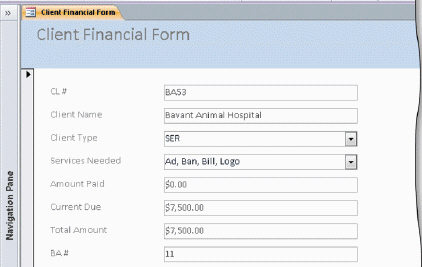 When working with a form, such as that shown in the accompanying figure, there are three different ways to view the form. They are Layout view, Form view, and ____________________ view.
 (Short Answer)
4.8/5  (73)
(73) The contents of the Report Header section print once at the beginning of the report.
(True/False)
4.8/5 (90)
(90) To add a title to a report, click Create on the Ribbon and then click the _____ button on the Design tab.
(Multiple Choice)
4.7/5 (81)
(81) 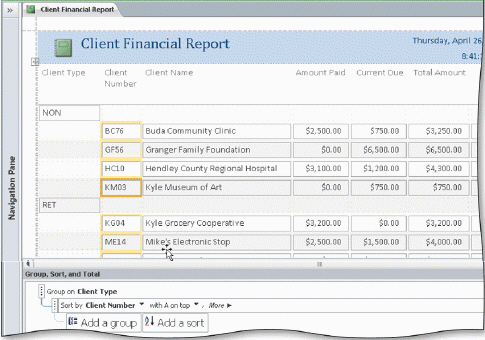 In the accompanying figure, you can click the More button in the Group, Sort, and Total pane to specify additional options. The _____ option allows you to choose values to be totaled and where they are to appear.
 (Multiple Choice)
4.7/5 (67)
(67) Identify the letter of the choice that best matches the phrase or definition.
Premises:
Tab on Ribbon that contains buttons to allow you to add gridlines and change layouts in Layout view.
Responses:
Page Setup
Stacked
Print Preview
Correct Answer: Verified
Premises:
Responses:
(Matching)
4.9/5 (68)
(68) 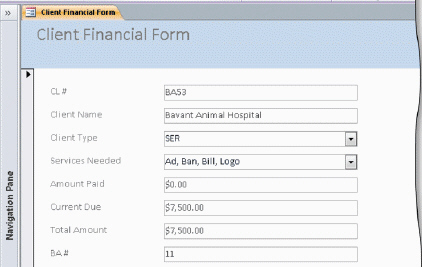 On a custom form, such as that shown in the accompanying figure, the controls for the fields are arranged vertically with labels to the left of the control. This is a(n) ____________________ layout.
 (Short Answer)
4.8/5 (98)
(98) The contents of the Report Footer section print once at the bottom of each page and often contain a date and a page number.
(True/False)
4.9/5 (74)
(74) 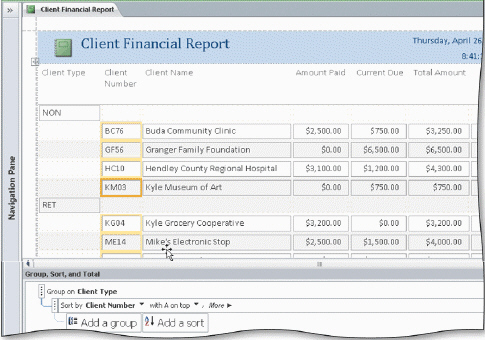 In the accompanying figure, _____ are used to display data that comes for the database, such as the client number and name.
 (Multiple Choice)
4.9/5 (94)
(94) When working with a form in Access, there are three ways you can view a form. What are these three ways and what does each view allow you to do?
(Essay)
4.9/5 (82)
(82) Modified Multiple Choice For both grouping and sorting, there is a More button that you can click if you need to specify additional options. The options you then could select include _____.
(Multiple Choice)
4.8/5 (78)
(78) You can use the filter buttons in the Sort & Filter group on the Home tab to filter records in a report.
(True/False)
4.8/5 (81)
(81) _____ shows the form on the screen and allows you to use the form to update data.
(Multiple Choice)
4.8/5 (71)
(71) To adjust the margins or change the page orientation of a report, open the report in Layout view and then click the _____ tab.
(Multiple Choice)
4.9/5 (86)
(86) To add a date to a form, click the _____ button on the Design tab.
(Multiple Choice)
4.8/5 (78)
(78) When the data in a report is grouped, the contents of the ___________________ section are printed after the group.
(Short Answer)
4.8/5 (82)
(82) A(n) _____ layout arranges controls vertically with the labels to the left of the control.
(Multiple Choice)
4.7/5 (84)
(84) The contents of the ___________________ section print once at the end of the report.
(Short Answer)
4.9/5 (87)
(87) If you open a field list and the tables do not appear in the field list, click _____.
(Multiple Choice)
4.9/5 (75)
(75) 
Filters
- Essay(0)
- Multiple Choice(0)
- Short Answer(0)
- True False(0)
- Matching(0)