



 Chat with AI
Exam 2: Creating a Research Paper With References and Sources

Exam 1: Creating, Formatting, and Editing a Word Document With a Picture103 Questions
Exam 2: Creating a Research Paper With References and Sources103 Questions
Exam 3: Creating a Business Letter With a Letterhead and Table103 Questions
Exam 4: Creating a Document With a Title Page, Lists, Tables, and a Watermark103 Questions
Exam 5: Using a Template to Create a Resume and Sharing a Finished Document103 Questions
Exam 6: Generating Form Letters, Mailing Labels, and a Directory103 Questions
Exam 7: Creating a Newsletter With a Pull-Quote and Graphics103 Questions
Exam 8: Using Document Collaboration, Integration, and Charting Tools103 Questions
Exam 9: Creating a Reference Document With a Table of Contents and an Index103 Questions
Exam 10: Creating a Template for an Online Form103 Questions
Exam 12: Office 365 Essentials53 Questions
Exam 11: Enhancing an Online Form and Using Macros206 Questions
Select questions type


The rule when using MLA style is to press the SPACEBAR ____ time(s) after periods, colons, and other punctuation marks.
(Multiple Choice)
4.9/5  (82)
(82) The MLA documentation style requires that you ____________________ the entire research paper; that is, one blank line should display between each line of text.
(Short Answer)
4.8/5 (83)
(83) According to the MLA style, the _____ is a list of sources that are referenced directly in a research paper.
(Multiple Choice)
4.8/5 (76)
(76) To use Click and Type, you right-click a blank area of the document window.
(True/False)
4.8/5 (81)
(81) To delete a note, select the note reference mark in the footnote text by dragging through the note reference mark, and then click the Cut button on the HOME tab.
(True/False)
4.9/5 (60)
(60) As you move the Click and Type pointer around the document, the icon changes to represent ____________________ that will be applied if you double-click at that location.
(Short Answer)
5.0/5 (77)
(77) The Word Count dialog box displays the number of words as well as the number of _____ in the current document.
(Multiple Choice)
4.9/5 (74)
(74) To search for a special character, use the ____ button in the expanded Find dialog box.
(Multiple Choice)
4.9/5 (89)
(89) A(n) ____________________ is a type of paragraph formatting in which the first line extends to the left of the rest of the paragraph.
(Short Answer)
4.7/5 (77)
(77) According to MLA style, on each page of the research paper, precede the page number by the title of the paper.
(True/False)
4.8/5 (79)
(79) The MLA style requires that the works cited be listed in alphabetical order by the author's last name or, if the work has no author, by the work's title.
(True/False)
4.9/5 (91)
(91) ____________________ is the amount of vertical space between lines of text in a document.
(Short Answer)
4.8/5 (75)
(75) When the ____________________ is clicked, Word displays a menu that allows a correction to be undone or changes how Word handles future automatic corrections of this type.
(Short Answer)
4.9/5 (65)
(65) 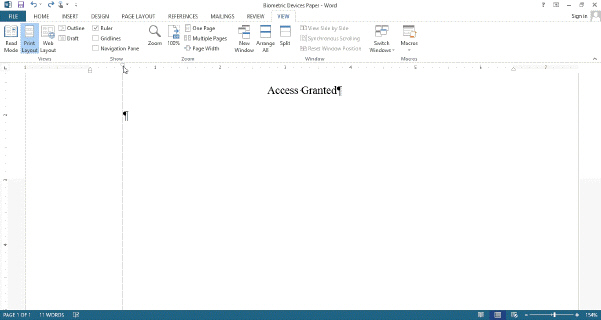 The small square at the 0" mark on the horizontal ruler shown in the accompanying figure is the ____________________, which can be used to change the entire left margin.
 (Short Answer)
4.7/5 (73)
(73) The _____ feature automatically corrects typing, spelling, capitalization, or grammar errors as you type them.
(Multiple Choice)
4.7/5 (72)
(72) If you add text, delete text, or modify text on a page, Word recalculates the location of automatic page breaks and adjusts them accordingly.
(True/False)
5.0/5 (91)
(91) If your hand is on the keyboard , use the ribbon for formatting.
(True/False)
4.9/5 (92)
(92) 
Filters
- Essay(0)
- Multiple Choice(0)
- Short Answer(0)
- True False(0)
- Matching(0)