



 Chat with AI
Exam 4: Finishing a Presentation

Exam 1: Creating a Presentation in Powerpoint 2010137 Questions
Exam 2: Modifying a Presentation71 Questions
Exam 3: Inserting Objects Into a Presentation70 Questions
Exam 4: Finishing a Presentation70 Questions
Exam 5: Working With Advanced Tools and Masters71 Questions
Exam 6: Enhancing Charts68 Questions
Exam 7: Inserting Illustrations, Objects and Media Clips71 Questions
Exam 8: Using Advanced Features71 Questions
Exam 9: Web Apps: Working With Windows Live and Office Web Apps65 Questions
Select questions type


Combining visual messages with verbal messages can increase memory retention by as much as ____.
(Multiple Choice)
4.9/5  (72)
(72) Case-Based Critical Thinking Questions Case 1 Tony is in charge of all presentations for a Fortune 500 pharmaceutical company. In addition to creating powerful and persuasive presentations, Tony must make sure each presentation is in perfect shape before uploading them to the company Web site. Tony uses the Document Inspector dialog box to ____.
(Multiple Choice)
4.9/5 (87)
(87) Pressing [Ctrl] + ____ changes the current pointer during a slide show back to the arrow key.
(Multiple Choice)
4.8/5 (73)
(73) Accent colors are colors used for other objects on slides, such as bullets.
(True/False)
4.9/5 (74)
(74) What is the purpose of the Mark as Final command? Where is it located and when or why would you use it?
(Essay)
4.8/5 (77)
(77) Document properties, also known as metadata , includes specific data about the presentation.
(True/False)
4.9/5 (82)
(82) Case 2 Doug is giving a presentation about volunteer work to a local youth group. To grab his audience's attention, he wants to use lots of animation effects. Doug should apply which of the following standard animation effects to all of the bulleted text items?
(Multiple Choice)
4.8/5 (89)
(89) Every slide in a PowerPoint presentation has a background, the area behind the text and graphics.
(True/False)
4.9/5 (79)
(79) Case 2 Doug is giving a presentation about volunteer work to a local youth group. To grab his audience's attention, he wants to use lots of animation effects. To temporarily hide your slide during a slide show, right-click the screen, point to Screen, then click ____.
(Multiple Choice)
4.8/5 (79)
(79) The Entrance and Exit animations cause an object to enter or exit the slide with an effect .
(True/False)
4.8/5 (77)
(77) An Entrance animation causes an object visible on the slide to have an effect, and a Motion Path animation causes an object to move on a specified path on the slide.
(True/False)
4.9/5 (69)
(69) The chapter stated that ____ of what an audience learns comes directly from visual messages.
(Multiple Choice)
4.9/5 (79)
(79) 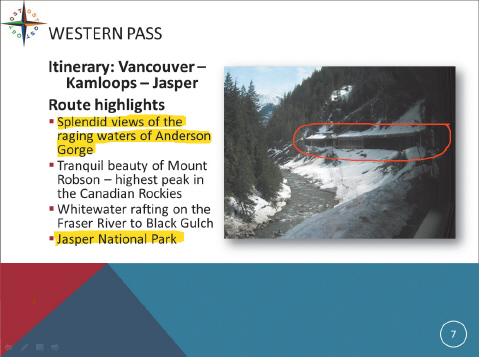 There is a set of four semitransparent icons in the lower left corner. The rectangular icon is the Slide Show ____ button.
 (Multiple Choice)
4.8/5 (81)
(81) The Slide Show toolbar buttons are ____________________ and will blend in with the background color on the slide.
(Short Answer)
4.7/5 (81)
(81) 
Filters
- Essay(0)
- Multiple Choice(0)
- Short Answer(0)
- True False(0)
- Matching(0)