



 Chat with AI
Exam 18: Word: Creating a Business Letter With a Letterhead and Table

Exam 1: Microsoft Windows Internet Explorer 8 : Introduction to Internet Explorer112 Questions
Exam 2: Office 2010 and Windows 7 : essential concepts and skills112 Questions
Exam 3: Access : Databases and Database Objects : an Introduction112 Questions
Exam 4: Access: Querying a Database224 Questions
Exam 5: Discovering Computers: Introduction to Computers112 Questions
Exam 6: Discovering Computers: the Internet and World Wide Web112 Questions
Exam 7: Discovering Computers: Application Software112 Questions
Exam 8: Discovering Computers: Operating Systems and Utility Programs112 Questions
Exam 9: Discovering Computers: Computer Security and Safety, Ethics, and Privacy112 Questions
Exam 10: Excel : Creating a Worksheet and an Embedded Chart112 Questions
Exam 11: Excel : Formulas, Functions, and Formatting112 Questions
Exam 12: Excel : What-If Analysis, Charting and Working With Large Worksheets112 Questions
Exam 13: Powerpoint : Creating and Editing a Presentation With Clip Art112 Questions
Exam 14: Powerpoint : Enhancing a Presentation With Pictures, Shapes and Wordart112 Questions
Exam 15: Powerpoint : Reusing a Presentation With Adding Media112 Questions
Exam 16: Word: Creating, Formatting, and Editing a Word Document With Pictures112 Questions
Exam 17: Word: Creating a Research Paper With Citations and References112 Questions
Exam 18: Word: Creating a Business Letter With a Letterhead and Table112 Questions
Select questions type


In the ____ letter style, the date, complimentary close, and signature block are positioned approximately one-half inch to the right of center or at the right margin.
(Multiple Choice)
4.8/5  (76)
(76) Typing an ordinal followed by a space or a hyphen makes part of the ordinal into a subscript .
(True/False)
4.9/5 (79)
(79) 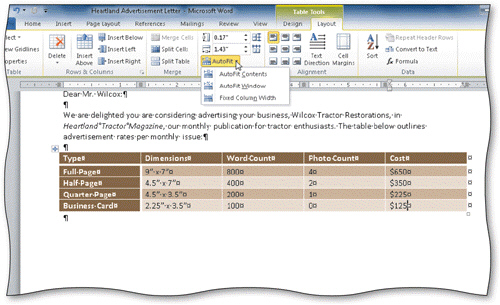 If you want to select the first and third rows in the table in the accompanying figure, you select the first row, and then hold down the ____ key while selecting the third row.
 (Multiple Choice)
4.9/5 (88)
(88) To print a mailing label, click the Create Labels button in the Create group on the Mailings tab, type the delivery address in the Delivery address box, and then click the Print button in the Envelopes and Labels dialog box.
(True/False)
4.8/5 (78)
(78) 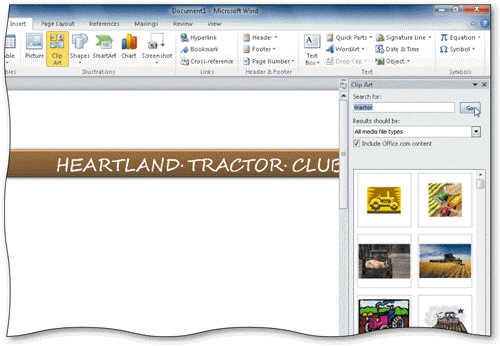 A(n)____, like the one in the accompanying figure, is a separate window that enables you to carry out some Word tasks more efficiently.
 (Multiple Choice)
4.8/5 (87)
(87) You can make one color in a graphic ____, that is, removing its color.
(Multiple Choice)
4.8/5 (80)
(80) Identify the letter of the choice that best matches the phrase or definition.
Premises:
A graphic that you create using Word.
Responses:
salutation
building block
template
Correct Answer: Verified
Premises:
Responses:
(Matching)
4.8/5 (84)
(84) To split cells, position the insertion point in the cell to split, ____, enter the number of columns and rows into which you want the cells split in the Split Cells dialog box, and click the OK button.
(Multiple Choice)
4.9/5 (66)
(66) Identify the letter of the choice that best matches the phrase or definition.
Premises:
The intersection of a row and column.
Responses:
inside address
complimentary close
cell
Correct Answer:Verified
VerifiedPremises:
Responses:
(Matching)
4.8/5 (78)
(78) A letterhead should contain all of the following EXCEPT ____.
(Multiple Choice)
4.8/5 (87)
(87) In a business letter, type the ____ at least four blank lines below the complimentary close, allowing room for the author to sign his or her name.
(Multiple Choice)
4.8/5 (77)
(77) Press the ____________________ key(s)to select the previous cell from the one in which the insertion point appears.
(Short Answer)
4.9/5 (80)
(80) The Bullets button is available on the Home tab of the Ribbon in the ____ group.
(Multiple Choice)
4.7/5 (96)
(96) The difference between an AutoCorrect entry and a building block is that the building block feature makes corrections automatically as soon as the SPACEBAR or a punctuation key is pressed, whereas the F3 key must be pressed or the AutoCorrect command clicked to instruct Word to make an AutoCorrect correction.
(True/False)
4.9/5 (68)
(68) In Word, the term, ____________________, refers to returning the formatting to the Normal style.
(Short Answer)
4.8/5 (77)
(77) When you insert an object in a document, Word always inserts it as a floating object.
(True/False)
4.8/5 (84)
(84) Identify the letter of the choice that best matches the phrase or definition.
Premises:
Appears followed by a colon in a business letter.
Responses:
complimentary close
template
clip art
Correct Answer:Verified
VerifiedPremises:
Responses:
(Matching)
4.9/5 (78)
(78) 
Filters
- Essay(0)
- Multiple Choice(0)
- Short Answer(0)
- True False(0)
- Matching(0)