



 Chat with AI
Exam 14: Powerpoint : Enhancing a Presentation With Pictures, Shapes and Wordart

Exam 1: Microsoft Windows Internet Explorer 8 : Introduction to Internet Explorer112 Questions
Exam 2: Office 2010 and Windows 7 : essential concepts and skills112 Questions
Exam 3: Access : Databases and Database Objects : an Introduction112 Questions
Exam 4: Access: Querying a Database224 Questions
Exam 5: Discovering Computers: Introduction to Computers112 Questions
Exam 6: Discovering Computers: the Internet and World Wide Web112 Questions
Exam 7: Discovering Computers: Application Software112 Questions
Exam 8: Discovering Computers: Operating Systems and Utility Programs112 Questions
Exam 9: Discovering Computers: Computer Security and Safety, Ethics, and Privacy112 Questions
Exam 10: Excel : Creating a Worksheet and an Embedded Chart112 Questions
Exam 11: Excel : Formulas, Functions, and Formatting112 Questions
Exam 12: Excel : What-If Analysis, Charting and Working With Large Worksheets112 Questions
Exam 13: Powerpoint : Creating and Editing a Presentation With Clip Art112 Questions
Exam 14: Powerpoint : Enhancing a Presentation With Pictures, Shapes and Wordart112 Questions
Exam 15: Powerpoint : Reusing a Presentation With Adding Media112 Questions
Exam 16: Word: Creating, Formatting, and Editing a Word Document With Pictures112 Questions
Exam 17: Word: Creating a Research Paper With Citations and References112 Questions
Exam 18: Word: Creating a Business Letter With a Letterhead and Table112 Questions
Select questions type


____________________ is a background feature that allows you to move the background from the slide borders in varying distances by percentages.

Free
(Short Answer)
4.8/5  (77)
(77) Correct Answer: Verified
Offsets
To make a slide background appear on all slides in a presentation, click the Format All button in the Format Background dialog box.
Free
(True/False)
4.7/5 (73)
(73) Correct Answer:Verified
VerifiedFalse
Accent colors in a document theme are designed as colors for primary features on a slide.
Free
(True/False)
4.9/5 (73)
(73) Correct Answer:Verified
VerifiedFalse
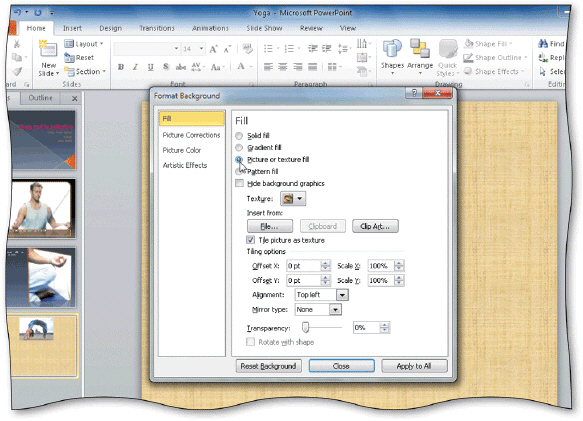 You can _____ anywhere on a slide and then click Format Background to open the Format Background dialog box, shown in the accompanying figure.
 (Multiple Choice)
4.9/5 (81)
(81) _____ allows you to see through a slide background or a color.
(Multiple Choice)
4.8/5 (77)
(77) ____________________ allow you to resize a graphic using the mouse.
(Short Answer)
4.9/5 (92)
(92) You have finally completed the new product announcement presentation for the next sales department meeting.After reviewing the slides by running a slide show, you decide that the new product photograph on slide 3 does not have the right emphasis.You think that rounding the edges of the photograph would enhance its appearance.You round the edges by applying a picture _____.
(Multiple Choice)
4.8/5 (86)
(86) Identify the letter of the choice that best matches the example.
Premises:
A color scheme.
Responses:
Format Painter
view formatting changes before you apply them
picture effects
Correct Answer:Verified
VerifiedPremises:
Responses:
(Matching)
4.8/5 (70)
(70) You have finally completed the new product announcement presentation for the next sales department meeting.After reviewing the slides by running a slide show, you decide that the new product photograph on slide 3 does not have the right emphasis.The new product picture on slide 3 has a narrow black border.You change the border's color and weight by clicking the Picture Border button on the _____.
(Multiple Choice)
5.0/5 (85)
(85) _____ effects add pattern and texture to a slide's background, which add depth to a slide.
(Multiple Choice)
4.8/5 (77)
(77) Which of the following formatting options are available for text inside a shape?
(Multiple Choice)
4.8/5 (81)
(81) When working with a Title and Content slide, you can open the Insert Picture dialog box by clicking the Insert Picture from File icon in the content placeholder.
(True/False)
4.8/5 (92)
(92) Which of the following style elements are included in picture styles?
(Multiple Choice)
4.8/5 (86)
(86) To remove the Shadow text effect, click the ____________________ button on the Quick Access Toolbar.
(Short Answer)
5.0/5 (91)
(91) Clips and photographs you see on Web pages are not covered by copyright law.
(True/False)
4.9/5 (91)
(91) The Format Painter button is located in the Font group on the Home tab.
(True/False)
4.9/5 (96)
(96) Identify the letter of the choice that best matches the example.
Premises:
Graphic design independent of language.
Responses:
Format Painter
six accent colors
CTRL
Correct Answer:Verified
VerifiedPremises:
Responses:
(Matching)
4.9/5 (81)
(81) PowerPoint displays the ____________________ when two shapes are aligned precisely.
(Short Answer)
4.8/5 (73)
(73) A background feature called _____ allows you to move the background from the slide borders in varying distances by a percentage.
(Multiple Choice)
4.8/5 (88)
(88) 
Filters
- Essay(0)
- Multiple Choice(0)
- Short Answer(0)
- True False(0)
- Matching(0)