



 Chat with AI
Exam 14: Powerpoint : Enhancing a Presentation With Pictures, Shapes and Wordart

Exam 1: Microsoft Windows Internet Explorer 8 : Introduction to Internet Explorer112 Questions
Exam 2: Office 2010 and Windows 7 : essential concepts and skills112 Questions
Exam 3: Access : Databases and Database Objects : an Introduction112 Questions
Exam 4: Access: Querying a Database224 Questions
Exam 5: Discovering Computers: Introduction to Computers112 Questions
Exam 6: Discovering Computers: the Internet and World Wide Web112 Questions
Exam 7: Discovering Computers: Application Software112 Questions
Exam 8: Discovering Computers: Operating Systems and Utility Programs112 Questions
Exam 9: Discovering Computers: Computer Security and Safety, Ethics, and Privacy112 Questions
Exam 10: Excel : Creating a Worksheet and an Embedded Chart112 Questions
Exam 11: Excel : Formulas, Functions, and Formatting112 Questions
Exam 12: Excel : What-If Analysis, Charting and Working With Large Worksheets112 Questions
Exam 13: Powerpoint : Creating and Editing a Presentation With Clip Art112 Questions
Exam 14: Powerpoint : Enhancing a Presentation With Pictures, Shapes and Wordart112 Questions
Exam 15: Powerpoint : Reusing a Presentation With Adding Media112 Questions
Exam 16: Word: Creating, Formatting, and Editing a Word Document With Pictures112 Questions
Exam 17: Word: Creating a Research Paper With Citations and References112 Questions
Exam 18: Word: Creating a Business Letter With a Letterhead and Table112 Questions
Select questions type


Many companies without graphic arts departments create their logos using ____________________.
(Short Answer)
4.7/5  (71)
(71) Pictures in the _____ gallery give the appearance of a physical object, such as water drops or sand, that can give your presentation a unique look.
(Multiple Choice)
5.0/5 (83)
(83) 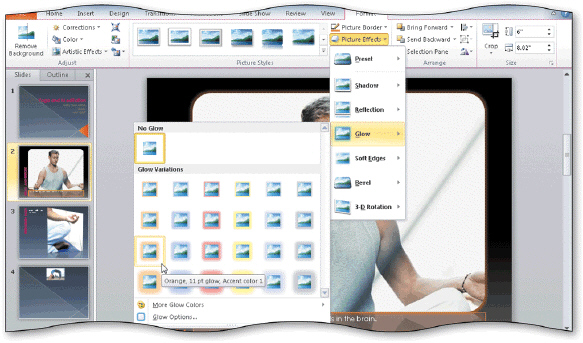 The Picture Effects button is located on the _____, as shown in the accompanying figure.
 (Multiple Choice)
4.8/5 (70)
(70) You can display the WordArt Transform gallery by clicking the Text Effects button on the _____.
(Multiple Choice)
4.8/5 (80)
(80) 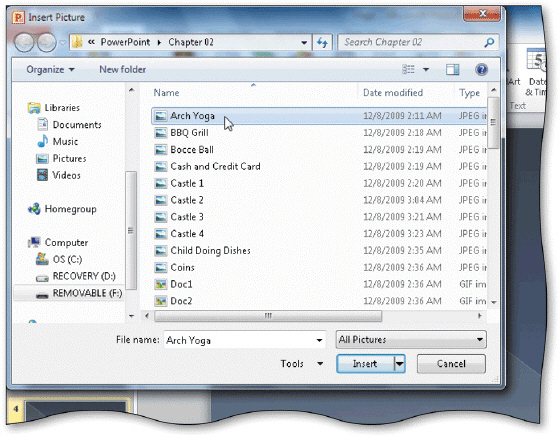 Clicking which of the following buttons opens the Insert Picture dialog box shown in the accompanying figure?
 (Multiple Choice)
4.8/5 (77)
(77) You can change the shape of selected WordArt by clicking the _____ button in the WordArt Styles group on the Drawing Tools Format tab.
(Multiple Choice)
4.9/5 (81)
(81) Which of the following PowerPoint features allows you to see what a picture border color change will look like before you apply it?
(Multiple Choice)
5.0/5 (78)
(78) Studies show people remember at least _____ more information when the document they are seeing or reading contains visual elements.
(Multiple Choice)
4.9/5 (79)
(79) _____ involves one color shade gradually progressing to another shade of the same color or to another color.
(Multiple Choice)
4.9/5 (75)
(75) A good ____________________ offers rules on formatting possessives, capitalizing titles, and using commas.
(Short Answer)
4.7/5 (77)
(77) To change a selected shape's height or width to a specific value, type the value in the Height or Width text boxes on the _____.
(Multiple Choice)
4.8/5 (72)
(72) You can change the transparency of a picture used as a slide's background in the _____ dialog box.
(Multiple Choice)
4.8/5 (88)
(88) People remember at least _________________________ more information when the document they are seeing or reading contains visual elements.
(Short Answer)
4.9/5 (75)
(75) You can display the Background Styles gallery by clicking the Background Styles button on the _____.
(Multiple Choice)
4.8/5 (67)
(67) You can press the _____ keyboard shortcut keys to move the insertion point into the next text placeholder.
(Multiple Choice)
4.9/5 (64)
(64) Which of the following shapes can be converted to a Circle or Square shape by pressing a key as you draw or insert the shape?
(Multiple Choice)
4.8/5 (72)
(72) ____________________ laws apply to both printed and electronic materials.
(Short Answer)
4.9/5 (80)
(80) Contrast determines the overall lightness or darkness of an entire image.
(True/False)
4.9/5 (68)
(68) 
Filters
- Essay(0)
- Multiple Choice(0)
- Short Answer(0)
- True False(0)
- Matching(0)