



 Chat with AI
Exam 17: Word: Creating a Research Paper With Citations and References

Exam 1: Microsoft Windows Internet Explorer 8 : Introduction to Internet Explorer112 Questions
Exam 2: Office 2010 and Windows 7 : essential concepts and skills112 Questions
Exam 3: Access : Databases and Database Objects : an Introduction112 Questions
Exam 4: Access: Querying a Database224 Questions
Exam 5: Discovering Computers: Introduction to Computers112 Questions
Exam 6: Discovering Computers: the Internet and World Wide Web112 Questions
Exam 7: Discovering Computers: Application Software112 Questions
Exam 8: Discovering Computers: Operating Systems and Utility Programs112 Questions
Exam 9: Discovering Computers: Computer Security and Safety, Ethics, and Privacy112 Questions
Exam 10: Excel : Creating a Worksheet and an Embedded Chart112 Questions
Exam 11: Excel : Formulas, Functions, and Formatting112 Questions
Exam 12: Excel : What-If Analysis, Charting and Working With Large Worksheets112 Questions
Exam 13: Powerpoint : Creating and Editing a Presentation With Clip Art112 Questions
Exam 14: Powerpoint : Enhancing a Presentation With Pictures, Shapes and Wordart112 Questions
Exam 15: Powerpoint : Reusing a Presentation With Adding Media112 Questions
Exam 16: Word: Creating, Formatting, and Editing a Word Document With Pictures112 Questions
Exam 17: Word: Creating a Research Paper With Citations and References112 Questions
Exam 18: Word: Creating a Business Letter With a Letterhead and Table112 Questions
Select questions type


Your friend Riley knows that you have a lot of experience with proofreading works cited pages, as you have a background from your time as a graduate student and now as a professional researcher.Her most recent research paper is the first example of a paper on which Riley has worked that will use Web sites as sources.Can you help her indicate which of the following is a correct and complete citation for a Web site?
(Multiple Choice)
4.8/5  (74)
(74) To apply a style to a paragraph, first position the insertion point in the paragraph and then apply the style.
(True/False)
4.9/5 (78)
(78) Although many different styles of documentation exist for report preparation, each style requires the same basic information.
(True/False)
4.9/5 (77)
(77) To search for a special character, use the ____ button in the expanded Find dialog box.
(Multiple Choice)
4.8/5 (83)
(83) The shortcut keys for the _____ character formatting are CTRL+SHIFT+PLUS SIGN.
(Multiple Choice)
4.8/5 (71)
(71) If you add text, delete text, or modify text on a page, Word recomputes the location of automatic page breaks and adjusts them accordingly.
(True/False)
4.9/5 (78)
(78) Identify the letter of the choice that best matches the phrase or definition.
Premises:
Displays along the left edge of the Word window.
Responses:
shortcut keys
field
tag name
Correct Answer: Verified
Premises:
Responses:
(Matching)
4.9/5 (89)
(89) Line spacing is the amount of space above and below a paragraph.
(True/False)
4.9/5 (76)
(76) The _____ feature automatically corrects typing, spelling, capitalization, or grammar errors as you type them.
(Multiple Choice)
4.9/5 (71)
(71) The ____________________ displays when you drag-and-drop text and allows you to change the format of the text that was moved.
(Short Answer)
4.8/5 (91)
(91) By default, the Normal style places ____ points of blank space after each paragraph.
(Multiple Choice)
4.9/5 (90)
(90) 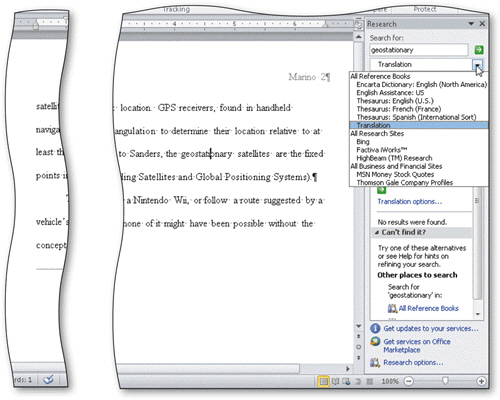 You can use the Copy and Paste commands to copy information from the Research task pane into your document, as shown in the accompanying figure.
 (True/False)
4.9/5 (80)
(80) 
Filters
- Essay(0)
- Multiple Choice(0)
- Short Answer(0)
- True False(0)
- Matching(0)