



 Chat with AI
Exam 4: Access: Querying a Database

Exam 1: Microsoft Windows Internet Explorer 8 : Introduction to Internet Explorer112 Questions
Exam 2: Office 2010 and Windows 7 : essential concepts and skills112 Questions
Exam 3: Access : Databases and Database Objects : an Introduction112 Questions
Exam 4: Access: Querying a Database224 Questions
Exam 5: Discovering Computers: Introduction to Computers112 Questions
Exam 6: Discovering Computers: the Internet and World Wide Web112 Questions
Exam 7: Discovering Computers: Application Software112 Questions
Exam 8: Discovering Computers: Operating Systems and Utility Programs112 Questions
Exam 9: Discovering Computers: Computer Security and Safety, Ethics, and Privacy112 Questions
Exam 10: Excel : Creating a Worksheet and an Embedded Chart112 Questions
Exam 11: Excel : Formulas, Functions, and Formatting112 Questions
Exam 12: Excel : What-If Analysis, Charting and Working With Large Worksheets112 Questions
Exam 13: Powerpoint : Creating and Editing a Presentation With Clip Art112 Questions
Exam 14: Powerpoint : Enhancing a Presentation With Pictures, Shapes and Wordart112 Questions
Exam 15: Powerpoint : Reusing a Presentation With Adding Media112 Questions
Exam 16: Word: Creating, Formatting, and Editing a Word Document With Pictures112 Questions
Exam 17: Word: Creating a Research Paper With Citations and References112 Questions
Exam 18: Word: Creating a Business Letter With a Letterhead and Table112 Questions
Select questions type


A(n)____ query adds a group of records from one table to the end of another table.
(Multiple Choice)
4.9/5  (79)
(79) 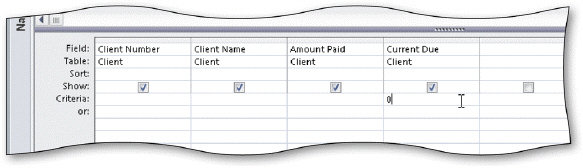 In the accompanying figure, the criterion for Current Due is 0.To find all clients whose current due amount is $2,000.00, erase the 0 in the Current Due column and enter _____ in the Criteria row of the Amount Paid column.
 (Multiple Choice)
4.9/5 (78)
(78) The expression for a calculated field can be typed directly into the Field row.
(True/False)
4.9/5 (90)
(90) Identify the letter of the choice that best matches the phrase or definition.
Premises:
Allows you to add the results of a query to an existing table.
Responses:
validation text
calculated field
required field
Correct Answer: Verified
Premises:
Responses:
(Matching)
4.8/5 (80)
(80) To change the caption for a field in a query, click the field in the design grid, click the _____ button on the Design tab, click the Caption box, and enter the new caption.
(Multiple Choice)
4.8/5 (72)
(72) To change the design of a query, right-click the query and then click ____ on the shortcut menu.
(Multiple Choice)
4.7/5 (66)
(66) To organize entries in the Navigation Pane by table, click ____ on the Navigation Pane menu.
(Multiple Choice)
4.9/5 (82)
(82) 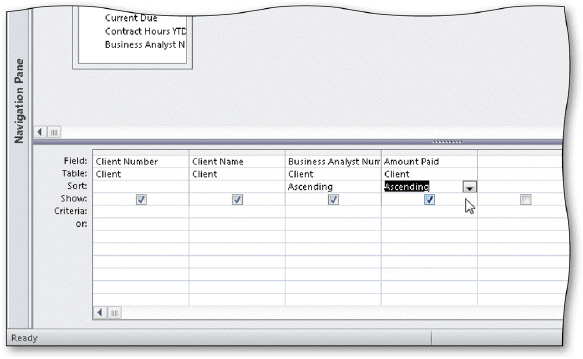 In the accompanying figure, Amount Paid is the ____ key.
You can filter individual fields by clicking the arrow to the right of the field name and using one of the common filters that are available for the field.
(True/False)
4.9/5 (85)
(85) For group calculations, Microsoft Access supports ____ built-in statistics.
(Multiple Choice)
4.8/5 (72)
(72) To update records using an update query, enter the field to be updated in the design grid, enter any necessary criterion, and then click the ____ button to update the records.
(Multiple Choice)
4.9/5 (75)
(75) To quit Access, click the ____ button on the right side of the Access title bar.
(Multiple Choice)
4.8/5 (78)
(78) If you plan to move your data to SQL Server at a later date, do not use ____________________ fields.
(Short Answer)
4.9/5 (69)
(69) To use a parameter query, right-click the query in the Navigation Pane and then click ____ on the shortcut menu.
(Multiple Choice)
4.7/5 (75)
(75) Identify the letter of the choice that best matches the phrase or definition.
Premises:
Allows you to add the records to a new table.
Responses:
default value
<
required field
Correct Answer:Verified
VerifiedPremises:
Responses:
(Matching)
4.9/5 (74)
(74) To print the results of a query that is open, click File on the Ribbon, click the _____ tab in the Backstage view, and then click Quick Print.
(Multiple Choice)
4.9/5 (65)
(65) Identify the letter of the choice that best matches the phrase or definition.
Premises:
Use to select values in a list.
Responses:
(?)
VAR
*
Correct Answer:Verified
VerifiedPremises:
Responses:
(Matching)
4.7/5 (67)
(67) A(n)____________________ is a window containing the various properties of the object.
(Short Answer)
4.8/5 (76)
(76) 
Filters
- Essay(0)
- Multiple Choice(0)
- Short Answer(0)
- True False(0)
- Matching(0)