



 Chat with AI
Exam 1: Creating, Formatting, and Editing

Exam 1: Creating, Formatting, and Editing103 Questions
Exam 2: Creating a Research Paper With References and Sources103 Questions
Exam 3: Creating a Business Letter With a Letterhead and Table206 Questions
Exam 4: Appendix: Office 365 Essentials53 Questions
Select questions type


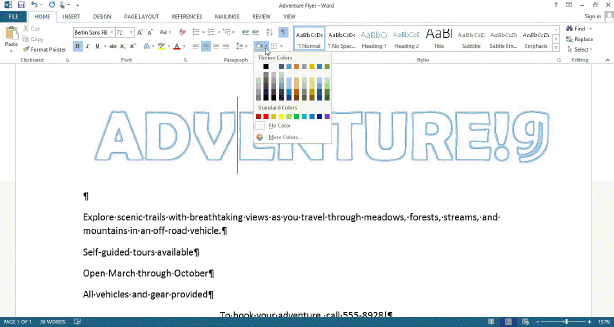 When you ____________________ text, using the tools shown in the accompanying figure, Word colors the rectangular area behind any text or graphics.
 (Short Answer)
4.8/5  (71)
(71) The mouse pointer becomes different shapes depending on the pointer's location and locations you click on the screen.
(True/False)
4.8/5 (73)
(73) If a flagged word is spelled correctly, right-click it and then click ____ on the shortcut menu to instruct Word not to flag future occurrences of the same word in this document.
(Multiple Choice)
5.0/5 (78)
(78) A(n) _________________________ is a character that Word displays on the screen but is not visible on a printed document.
(Short Answer)
4.8/5 (78)
(78) A selected graphic can be resized using the Shape Height and Shape Width text boxes in the Size group on the Format tab on the Picture Tools tab.
(True/False)
4.9/5 (74)
(74) To minimize wrist injury, switch frequently among touch gestures, the keyboard, and the mouse.
(True/False)
4.8/5 (64)
(64) A(n) _________________________ is information that exists on a physical medium such as paper.
(Short Answer)
4.9/5 (75)
(75) By formatting the characters and paragraphs in a document, you can improve its overall appearance. List the formatting suggestions to consider when designing a flyer.
(Essay)
4.8/5 (85)
(85) To move to the beginning of a line with the keyboard, press the ____ key(s).
(Multiple Choice)
4.9/5 (67)
(67) The ____________________ copy in a flyer consists of all text between the headline and the signature line.
(Short Answer)
4.8/5 (73)
(73) In _________________________, as a character is typed Word inserts the character and moves all the characters to the right of the typed character one position to the right.
(Short Answer)
4.8/5 (87)
(87) To move to the bottom of a document window, press the ____ key(s).
(Multiple Choice)
4.7/5 (72)
(72) Each time the ENTER key is pressed, Word creates a new paragraph.
(True/False)
4.9/5 (101)
(101) If Word finds a potential error in a document, a red, green, or blue wavy underline flags the problem.
(True/False)
4.9/5 (87)
(87) Press the ____ key(s) to erase one character to the left of the insertion point.
(Multiple Choice)
4.8/5 (67)
(67) The ____, or typeface, defines the appearance and shape of letters, numbers, and special characters.
(Multiple Choice)
4.8/5 (63)
(63) _________________________ includes both enlarging and reducing the size of a graphic.
(Short Answer)
4.9/5 (68)
(68) ____ formatting is the process of changing the way letters, numbers, punctuation marks, and symbols appear on the screen and in print.
(Multiple Choice)
4.9/5 (68)
(68) 
Filters
- Essay(0)
- Multiple Choice(0)
- Short Answer(0)
- True False(0)
- Matching(0)