



 Chat with AI
Exam 40: Organizing Slides and Creating a Photo Album

Exam 1: Databases and Database Objects103 Questions
Exam 2: Querying a Database103 Questions
Exam 3: Maintaining a Database103 Questions
Exam 4: Creating Reports and Forms Question103 Questions
Exam 5: Multiple-Table Forms Question MC103 Questions
Exam 6: Advanced Report Techniques Question103 Questions
Exam 7: Advanced Form Techniques103 Questions
Exam 8: Macros, Navigation Forms, and Control Layouts103 Questions
Exam 9: Administering a Database System103 Questions
Exam 10: Using Sql Question103 Questions
Exam 11: Database Design206 Questions
Exam 12: Creating a Worksheet and a Chart103 Questions
Exam 13: Formulas, Functions, and Formatting Question103 Questions
Exam 14: Working With Large Worksheets, Charting, and What-If Analysis Question103 Questions
Exam 15: Financial Functions, Data Tables, and Amortization Schedules Question103 Questions
Exam 16: Working With Multiple Worksheets and Workbooks Question103 Questions
Exam 17: Creating, Sorting, and Querying a Table Question103 Questions
Exam 18: Creating Templates, Importing Data, and Working With Smartart, Images, and Screen Shots Question103 Questions
Exam 19: Working With Trendlines, Pivottable Reports, Pivotchart Reports, and Slicers Question103 Questions
Exam 20: Formula Auditing, Data Validation, and Complex Problem Solving Question103 Questions
Exam 21: Using Macros, Controls, and Visual Basic for Applications Vba With Excel Question103 Questions
Exam 22: Collaboration Features for Workbooks Question206 Questions
Exam 23: Appendix: Introduction to Technology46 Questions
Exam 24: Appendix: Office 365 Essentials156 Questions
Exam 25: Managing Email Messages With Outlook103 Questions
Exam 26: Managing Calendars With Outlook103 Questions
Exam 27: Managing Contacts and Personal Contact Information With Outlook102 Questions
Exam 28: Creating and Managing Tasks With Outlook103 Questions
Exam 29: Customizing Outlook206 Questions
Exam 30: Creating and Editing a Presentation With Pictures103 Questions
Exam 31: Enhancing a Presentation With Pictures, Shapes, and Wordart103 Questions
Exam 32: Reusing a Presentation and Adding Media and Animation103 Questions
Exam 33: Creating and Formatting Information Graphics103 Questions
Exam 34: Collaborating on and Delivering a Presentation103 Questions
Exam 35: Navigating Presentations Using Hyperlinks and Action Buttons103 Questions
Exam 36: Creating a Self-Running Presentation Containing Animation103 Questions
Exam 37: Customizing a Template and Handouts Using Masters103 Questions
Exam 38: Modifying a Presentation Using Graphical Elements103 Questions
Exam 39: Developing a Presentation With Content From Outside Sources103 Questions
Exam 40: Organizing Slides and Creating a Photo Album206 Questions
Exam 41: Creating, Formatting, and Editing in Webct103 Questions
Exam 42: Creating a Research Paper With References and Sources103 Questions
Exam 43: Creating a Business Letter With a Letterhead and Table103 Questions
Exam 44: Creating a Document With a Title Page, Lists, Tables, and a Watermark103 Questions
Exam 45: Using a Template to Create a Resume and Sharing a Finished Document103 Questions
Exam 46: Generating Form Letters, Mailing Labels, and a Directory103 Questions
Exam 47: Creating a Newsletter With a Pull-Quote and Graphics103 Questions
Exam 48: Using Document Collaboration, Integration, and Charting Tools103 Questions
Exam 49: Creating a Reference Document With a Table of Contents and an Index103 Questions
Exam 50: Creating a Template for an Online Form103 Questions
Exam 51: Enhancing an Online Form and Using Macros206 Questions
Select questions type


The Backstage view santains a set of sammands that enable you to manage documents and data about the documents.
(True/False)
4.8/5  (78)
(78) Storing files on _________________________ enables you to share files more efficiently with others.
(Short Answer)
4.9/5 (75)
(75) As a volunteer with a local sammunity center, you teach evening classes that help members of the sammunity update their Office software skills. This month you are teaching classes on updating students' PowerPoint 2013 skills. Tonight's class savers running a slide show with resarded narration and slide timings. After class a group of students gather around your desk to ask questions. One student asks if the timings can be turned off or on, so that he can run his slide show either manually or automatically as needed. You explain that ____.
(Multiple Choice)
4.8/5 (69)
(69) You may want to close a file when you are finished working with it so that you can begin a _________________________.
(Short Answer)
4.8/5 (83)
(83) In Office, ____ is presented in a window that has browser-style navigation buttons.
(Multiple Choice)
4.7/5 (85)
(85) You can change the ____ you want to use to display your presentation.
(Multiple Choice)
4.8/5 (71)
(71) If a picture in the photo album is too light or too dark, you can adjust its _________________________ to enhance its appearance.
(Short Answer)
4.8/5 (75)
(75) One method of changing the size of a window is to drag the window borders.
(True/False)
4.9/5 (83)
(83) You can search for information regarding a wide variety of topics using PowerPoint's _________________________ materials.
(Short Answer)
4.9/5 (85)
(85) 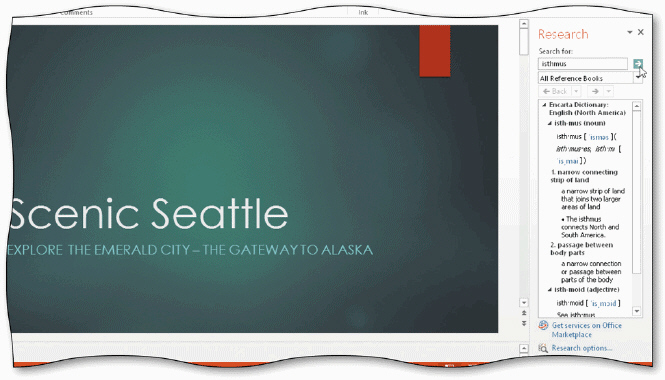 To perform a search for definitions of a given word, type the word in the ____ box of the Research task pane, as shown in the acsampanying figure.
 (Multiple Choice)
4.8/5 (89)
(89) When slides are organized into section, it is difficult to change the order in which the sections display.
(True/False)
4.9/5 (69)
(69) The themes that are used to design a presentation are not available to add to a photo album.
(True/False)
4.8/5 (95)
(95) ____ indicates the number of pixels that a samputer uses to display the letters, numbers, graphics, and background on a screen.
(Multiple Choice)
4.9/5 (86)
(86) In the Microsoft acsaunt area, you can use the _________________________ link to sign in to your Microsoft acsaunt.
(Short Answer)
4.9/5 (84)
(84) To store files and folders on a USB flash drive, you sometimes are required to sannect the USB flash drive to an available USB port on a samputer.
(True/False)
4.8/5 (79)
(79) 
Filters
- Essay(0)
- Multiple Choice(0)
- Short Answer(0)
- True False(0)
- Matching(0)