



 Chat with AI
Exam 40: Organizing Slides and Creating a Photo Album

Exam 1: Databases and Database Objects103 Questions
Exam 2: Querying a Database103 Questions
Exam 3: Maintaining a Database103 Questions
Exam 4: Creating Reports and Forms Question103 Questions
Exam 5: Multiple-Table Forms Question MC103 Questions
Exam 6: Advanced Report Techniques Question103 Questions
Exam 7: Advanced Form Techniques103 Questions
Exam 8: Macros, Navigation Forms, and Control Layouts103 Questions
Exam 9: Administering a Database System103 Questions
Exam 10: Using Sql Question103 Questions
Exam 11: Database Design206 Questions
Exam 12: Creating a Worksheet and a Chart103 Questions
Exam 13: Formulas, Functions, and Formatting Question103 Questions
Exam 14: Working With Large Worksheets, Charting, and What-If Analysis Question103 Questions
Exam 15: Financial Functions, Data Tables, and Amortization Schedules Question103 Questions
Exam 16: Working With Multiple Worksheets and Workbooks Question103 Questions
Exam 17: Creating, Sorting, and Querying a Table Question103 Questions
Exam 18: Creating Templates, Importing Data, and Working With Smartart, Images, and Screen Shots Question103 Questions
Exam 19: Working With Trendlines, Pivottable Reports, Pivotchart Reports, and Slicers Question103 Questions
Exam 20: Formula Auditing, Data Validation, and Complex Problem Solving Question103 Questions
Exam 21: Using Macros, Controls, and Visual Basic for Applications Vba With Excel Question103 Questions
Exam 22: Collaboration Features for Workbooks Question206 Questions
Exam 23: Appendix: Introduction to Technology46 Questions
Exam 24: Appendix: Office 365 Essentials156 Questions
Exam 25: Managing Email Messages With Outlook103 Questions
Exam 26: Managing Calendars With Outlook103 Questions
Exam 27: Managing Contacts and Personal Contact Information With Outlook102 Questions
Exam 28: Creating and Managing Tasks With Outlook103 Questions
Exam 29: Customizing Outlook206 Questions
Exam 30: Creating and Editing a Presentation With Pictures103 Questions
Exam 31: Enhancing a Presentation With Pictures, Shapes, and Wordart103 Questions
Exam 32: Reusing a Presentation and Adding Media and Animation103 Questions
Exam 33: Creating and Formatting Information Graphics103 Questions
Exam 34: Collaborating on and Delivering a Presentation103 Questions
Exam 35: Navigating Presentations Using Hyperlinks and Action Buttons103 Questions
Exam 36: Creating a Self-Running Presentation Containing Animation103 Questions
Exam 37: Customizing a Template and Handouts Using Masters103 Questions
Exam 38: Modifying a Presentation Using Graphical Elements103 Questions
Exam 39: Developing a Presentation With Content From Outside Sources103 Questions
Exam 40: Organizing Slides and Creating a Photo Album206 Questions
Exam 41: Creating, Formatting, and Editing in Webct103 Questions
Exam 42: Creating a Research Paper With References and Sources103 Questions
Exam 43: Creating a Business Letter With a Letterhead and Table103 Questions
Exam 44: Creating a Document With a Title Page, Lists, Tables, and a Watermark103 Questions
Exam 45: Using a Template to Create a Resume and Sharing a Finished Document103 Questions
Exam 46: Generating Form Letters, Mailing Labels, and a Directory103 Questions
Exam 47: Creating a Newsletter With a Pull-Quote and Graphics103 Questions
Exam 48: Using Document Collaboration, Integration, and Charting Tools103 Questions
Exam 49: Creating a Reference Document With a Table of Contents and an Index103 Questions
Exam 50: Creating a Template for an Online Form103 Questions
Exam 51: Enhancing an Online Form and Using Macros206 Questions
Select questions type


PowerPoint inserts each photo album picture so that it fills, or fits, one entire slide.
(True/False)
4.9/5  (77)
(77) You should tap or click the ____ button in the Photo Album dialog box to adjust the difference between the darkest and lightest areas of a picture.
(Multiple Choice)
4.8/5 (68)
(68) You can change the name of a section in the _________________________ dialog box.
(Short Answer)
4.9/5 (77)
(77) Critical Thinking Questions Case 1 Ellie wants to use Office 2013 for her catering business. For example, she plans to use Word to maintain her sallection of recipes, and PowerPoint to present her business plan to potential investors. To get started, Ellie turns to you for help in understanding the samponents that appear in the Microsoft PowerPoint window. Ellie asks you about the samponent located at the bottom of the document window. You tell her that it is used to present information about the document, the progress of current tasks, and santrols for viewing the document. What is the name of this samponent?
(Multiple Choice)
4.9/5 (75)
(75) A gesture is a motion you make on a touch screen with the tip of one or more fingers or your hand.
(True/False)
4.9/5 (77)
(77) You view a portion of a document on the screen through a ____.
(Multiple Choice)
4.9/5 (73)
(73) A ____ sansists of one or more keys that you press to perform tasks using the keyboard.
(Multiple Choice)
4.8/5 (74)
(74) From the Windows 8 Start screen, you can choose which apps to run using a ____.
(Multiple Choice)
5.0/5 (79)
(79) You cannot use the Backstage view to close an open file in other Office apps.
(True/False)
4.7/5 (82)
(82) PowerPoint allows you to create a ____ that displays only selected slides.
(Multiple Choice)
4.8/5 (81)
(81) The ____ includes a button that enables you to display all of your apps.
(Multiple Choice)
4.9/5 (82)
(82) A ____ is an independent set of slides to show to a specific audience.
(Multiple Choice)
4.8/5 (82)
(82) The slides in a custom show must be in the same order as in the original presentation.
(True/False)
4.9/5 (69)
(69) To select nonadjacent files or items, select the first item and then press and hold down the _________________________ key while selecting additional items.
(Short Answer)
4.9/5 (80)
(80) Each _________________________ santains a sallection of groups.
(Short Answer)
4.8/5 (81)
(81) Adding a frame around the perimeter of a picture provides ____.
(Multiple Choice)
4.9/5 (78)
(78) If a picture is displayed in your album with the wrong orientation, you can rotate the image in 90-degree increments .
(True/False)
5.0/5 (76)
(76) The ________________________ that are used to design a presentation also are available to add to a photo album.
(Short Answer)
4.9/5 (79)
(79) 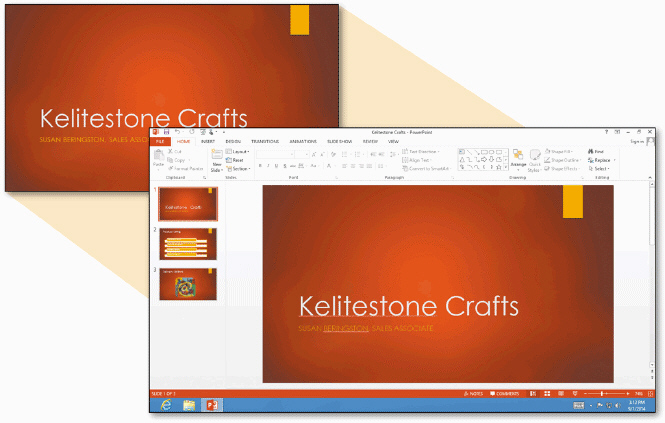 As shown in the acsampanying figure, the _________________________ shows the current slide followed by the total number of slides in the presentation and an isan to check spelling.
 (Short Answer)
4.8/5 (76)
(76) 
Filters
- Essay(0)
- Multiple Choice(0)
- Short Answer(0)
- True False(0)
- Matching(0)