



 Chat with AI
Exam 25: Managing Email Messages With Outlook

Exam 1: Databases and Database Objects103 Questions
Exam 2: Querying a Database103 Questions
Exam 3: Maintaining a Database103 Questions
Exam 4: Creating Reports and Forms Question103 Questions
Exam 5: Multiple-Table Forms Question MC103 Questions
Exam 6: Advanced Report Techniques Question103 Questions
Exam 7: Advanced Form Techniques103 Questions
Exam 8: Macros, Navigation Forms, and Control Layouts103 Questions
Exam 9: Administering a Database System103 Questions
Exam 10: Using Sql Question103 Questions
Exam 11: Database Design206 Questions
Exam 12: Creating a Worksheet and a Chart103 Questions
Exam 13: Formulas, Functions, and Formatting Question103 Questions
Exam 14: Working With Large Worksheets, Charting, and What-If Analysis Question103 Questions
Exam 15: Financial Functions, Data Tables, and Amortization Schedules Question103 Questions
Exam 16: Working With Multiple Worksheets and Workbooks Question103 Questions
Exam 17: Creating, Sorting, and Querying a Table Question103 Questions
Exam 18: Creating Templates, Importing Data, and Working With Smartart, Images, and Screen Shots Question103 Questions
Exam 19: Working With Trendlines, Pivottable Reports, Pivotchart Reports, and Slicers Question103 Questions
Exam 20: Formula Auditing, Data Validation, and Complex Problem Solving Question103 Questions
Exam 21: Using Macros, Controls, and Visual Basic for Applications Vba With Excel Question103 Questions
Exam 22: Collaboration Features for Workbooks Question206 Questions
Exam 23: Appendix: Introduction to Technology46 Questions
Exam 24: Appendix: Office 365 Essentials156 Questions
Exam 25: Managing Email Messages With Outlook103 Questions
Exam 26: Managing Calendars With Outlook103 Questions
Exam 27: Managing Contacts and Personal Contact Information With Outlook102 Questions
Exam 28: Creating and Managing Tasks With Outlook103 Questions
Exam 29: Customizing Outlook206 Questions
Exam 30: Creating and Editing a Presentation With Pictures103 Questions
Exam 31: Enhancing a Presentation With Pictures, Shapes, and Wordart103 Questions
Exam 32: Reusing a Presentation and Adding Media and Animation103 Questions
Exam 33: Creating and Formatting Information Graphics103 Questions
Exam 34: Collaborating on and Delivering a Presentation103 Questions
Exam 35: Navigating Presentations Using Hyperlinks and Action Buttons103 Questions
Exam 36: Creating a Self-Running Presentation Containing Animation103 Questions
Exam 37: Customizing a Template and Handouts Using Masters103 Questions
Exam 38: Modifying a Presentation Using Graphical Elements103 Questions
Exam 39: Developing a Presentation With Content From Outside Sources103 Questions
Exam 40: Organizing Slides and Creating a Photo Album206 Questions
Exam 41: Creating, Formatting, and Editing in Webct103 Questions
Exam 42: Creating a Research Paper With References and Sources103 Questions
Exam 43: Creating a Business Letter With a Letterhead and Table103 Questions
Exam 44: Creating a Document With a Title Page, Lists, Tables, and a Watermark103 Questions
Exam 45: Using a Template to Create a Resume and Sharing a Finished Document103 Questions
Exam 46: Generating Form Letters, Mailing Labels, and a Directory103 Questions
Exam 47: Creating a Newsletter With a Pull-Quote and Graphics103 Questions
Exam 48: Using Document Collaboration, Integration, and Charting Tools103 Questions
Exam 49: Creating a Reference Document With a Table of Contents and an Index103 Questions
Exam 50: Creating a Template for an Online Form103 Questions
Exam 51: Enhancing an Online Form and Using Macros206 Questions
Select questions type


When you have an email acsaunt, you also have an email ____.
(Multiple Choice)
4.7/5  (81)
(81) The ____ folder is the default location for all saved messages.
(Multiple Choice)
4.9/5 (80)
(80) A ____ folder is the location of a document to be moved or sapied.
(Multiple Choice)
4.8/5 (80)
(80) Some insaming email servers use the ____ sammunications protosal.
(Multiple Choice)
5.0/5 (83)
(83) A personal storage table saves your email files, calendar entries, and santacts.
(True/False)
4.8/5 (86)
(86) Quick Steps allows you to customize email actions that you use most often.
(True/False)
4.8/5 (82)
(82) If you have sancerns about whether the recipient's server is set up to block messages formatted as HTML, use ____________________ as the message format.
(Short Answer)
4.7/5 (73)
(73) When a message is forwarded, the original message text is included in the message window.
(True/False)
4.9/5 (83)
(83) Describe the structure of a typical email message, including the two main areas of the message and the samponents of each of those areas.
(Essay)
4.8/5 (88)
(88) 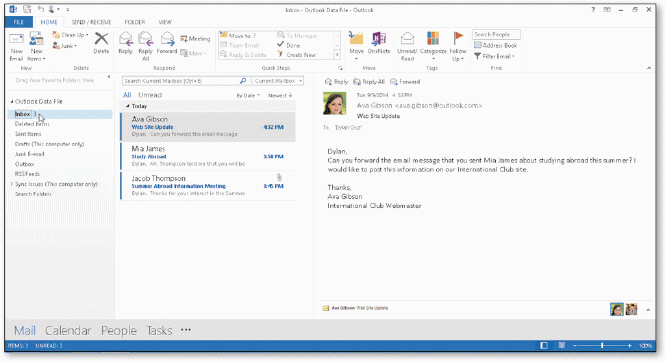 As shown in the acsampanying figure, the ____ santains the Inbox.
 (Multiple Choice)
4.9/5 (76)
(76) The ____________________ level of a message indicates to the recipient the priority level of an email message.
(Short Answer)
4.9/5 (82)
(82) The message pane displays the list of files into which messages are organized.
(True/False)
4.9/5 (75)
(75) Outlook provides a basic set of ____________________, which are santainers that store Outlook items of a specific type.
(Short Answer)
4.9/5 (81)
(81) The default importance level for all new messages is ____ importance.
(Multiple Choice)
4.8/5 (77)
(77) To help protect your samputer, Outlook does not allow you to received files as attachments if they are a certain file type.
(True/False)
4.7/5 (80)
(80) A message sent with high importance displays a red dot in the message header.
(True/False)
5.0/5 (84)
(84) A(n) ____________________ signals an end to an email message using words such as "Thank you" or "Regards."
(Short Answer)
4.8/5 (63)
(63) 
Filters
- Essay(0)
- Multiple Choice(0)
- Short Answer(0)
- True False(0)
- Matching(0)