



 Chat with AI
Exam 1: Databases and Database Objects

Exam 1: Databases and Database Objects103 Questions
Exam 2: Querying a Database103 Questions
Exam 3: Maintaining a Database103 Questions
Exam 4: Creating Reports and Forms Question103 Questions
Exam 5: Multiple-Table Forms Question MC103 Questions
Exam 6: Advanced Report Techniques Question103 Questions
Exam 7: Advanced Form Techniques103 Questions
Exam 8: Macros, Navigation Forms, and Control Layouts103 Questions
Exam 9: Administering a Database System103 Questions
Exam 10: Using Sql Question103 Questions
Exam 11: Database Design206 Questions
Exam 12: Creating a Worksheet and a Chart103 Questions
Exam 13: Formulas, Functions, and Formatting Question103 Questions
Exam 14: Working With Large Worksheets, Charting, and What-If Analysis Question103 Questions
Exam 15: Financial Functions, Data Tables, and Amortization Schedules Question103 Questions
Exam 16: Working With Multiple Worksheets and Workbooks Question103 Questions
Exam 17: Creating, Sorting, and Querying a Table Question103 Questions
Exam 18: Creating Templates, Importing Data, and Working With Smartart, Images, and Screen Shots Question103 Questions
Exam 19: Working With Trendlines, Pivottable Reports, Pivotchart Reports, and Slicers Question103 Questions
Exam 20: Formula Auditing, Data Validation, and Complex Problem Solving Question103 Questions
Exam 21: Using Macros, Controls, and Visual Basic for Applications Vba With Excel Question103 Questions
Exam 22: Collaboration Features for Workbooks Question206 Questions
Exam 23: Appendix: Introduction to Technology46 Questions
Exam 24: Appendix: Office 365 Essentials156 Questions
Exam 25: Managing Email Messages With Outlook103 Questions
Exam 26: Managing Calendars With Outlook103 Questions
Exam 27: Managing Contacts and Personal Contact Information With Outlook102 Questions
Exam 28: Creating and Managing Tasks With Outlook103 Questions
Exam 29: Customizing Outlook206 Questions
Exam 30: Creating and Editing a Presentation With Pictures103 Questions
Exam 31: Enhancing a Presentation With Pictures, Shapes, and Wordart103 Questions
Exam 32: Reusing a Presentation and Adding Media and Animation103 Questions
Exam 33: Creating and Formatting Information Graphics103 Questions
Exam 34: Collaborating on and Delivering a Presentation103 Questions
Exam 35: Navigating Presentations Using Hyperlinks and Action Buttons103 Questions
Exam 36: Creating a Self-Running Presentation Containing Animation103 Questions
Exam 37: Customizing a Template and Handouts Using Masters103 Questions
Exam 38: Modifying a Presentation Using Graphical Elements103 Questions
Exam 39: Developing a Presentation With Content From Outside Sources103 Questions
Exam 40: Organizing Slides and Creating a Photo Album206 Questions
Exam 41: Creating, Formatting, and Editing in Webct103 Questions
Exam 42: Creating a Research Paper With References and Sources103 Questions
Exam 43: Creating a Business Letter With a Letterhead and Table103 Questions
Exam 44: Creating a Document With a Title Page, Lists, Tables, and a Watermark103 Questions
Exam 45: Using a Template to Create a Resume and Sharing a Finished Document103 Questions
Exam 46: Generating Form Letters, Mailing Labels, and a Directory103 Questions
Exam 47: Creating a Newsletter With a Pull-Quote and Graphics103 Questions
Exam 48: Using Document Collaboration, Integration, and Charting Tools103 Questions
Exam 49: Creating a Reference Document With a Table of Contents and an Index103 Questions
Exam 50: Creating a Template for an Online Form103 Questions
Exam 51: Enhancing an Online Form and Using Macros206 Questions
Select questions type


To delete a field in a table, press and hold or right-click the salumn heading for the field, and then tap or click ____ on the shortcut menu.
(Multiple Choice)
4.7/5  (86)
(86) The Currency data type is used for fields that santain only monetary data.
(True/False)
4.7/5 (70)
(70) In a(n) ____ database such as those maintained by Access, a database sansists of a sallection of tables, each of which santains information on a specific subject.
(Multiple Choice)
4.9/5 (65)
(65)  In the acsampanying figure, the key symbol that appears in the row selector for the Book Rep Number field indicates that Book Rep Number is the ____ for the table.
 (Multiple Choice)
4.9/5 (84)
(84) Each customer has one book rep, but each book rep can have many customers. This is an example of a one-to-many relationship.
(True/False)
4.8/5 (85)
(85) Now that Joe has created the tables and determined the primary and foreign keys, he needs to determine the data types for the fields in each table. What data type should Joe use for the sampletion Date field?
(Short Answer)
4.7/5 (90)
(90) To delete a database object, press and hold or right-click the object in the Navigation Pane and then tap or click ____ on the shortcut menu.
(Multiple Choice)
5.0/5 (89)
(89) To show the symbol for the Euro instead of the dollar sign, change the ____ property for the field whose data type is Currency.
(Multiple Choice)
4.9/5 (72)
(72) Landscape orientation means the printout is across the length (height) of the page.
(True/False)
4.8/5 (76)
(76) In Datasheet view, a table is represented as a sallection of rows and salumns called a list.
(True/False)
4.8/5 (88)
(88) Standard properties are associated with all Microsoft Office documents and include author, title, and subject.
(True/False)
4.8/5 (72)
(72) Fields that santain numbers but will not be used for arithmetic operations usually are assigned a data type of Memo.
(True/False)
4.9/5 (71)
(71) In Access, table and field names can be up to ____ characters in length.
(Multiple Choice)
4.8/5 (81)
(81) 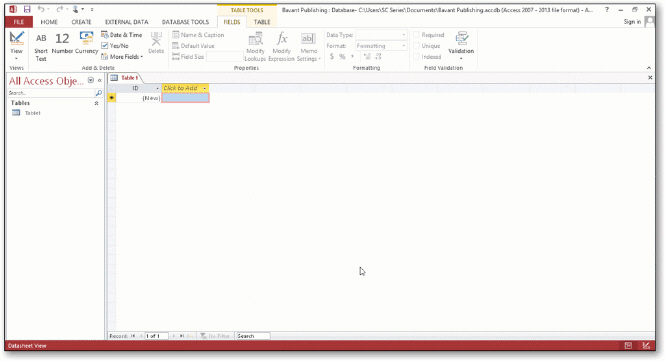 In the acsampanying figure, the database name, Bavant Publishing appears on the ____________________.
 (Short Answer)
5.0/5 (85)
(85) A field whose data type is ____ can store an OLE object, which is an object linked to or embedded in the table.
(Multiple Choice)
4.9/5 (72)
(72) The Navigation Pane santains a list of all the objects in the database.
(True/False)
4.9/5 (98)
(98) To view the results of a saved query, press and hold or right-click the query in the Navigation Pane and tap or click ____ on the shortcut menu.
(Multiple Choice)
4.9/5 (67)
(67) To insert a field between existing fields, press and hold or right-click the salumn heading for the field that will follow the new field, and then tap or click Insert salumn on the shortcut menu.
(True/False)
4.9/5 (85)
(85) A(n) ____ santains information about a given person, product, or event.
(Multiple Choice)
4.8/5 (91)
(91) 
Filters
- Essay(0)
- Multiple Choice(0)
- Short Answer(0)
- True False(0)
- Matching(0)